







Question: Fix the error on this Python code and make sure that getting expected output (see the picture of expected output): Error: Value Error: too many
Fix the error on this Python code and make sure that getting expected output (see the picture of expected output):
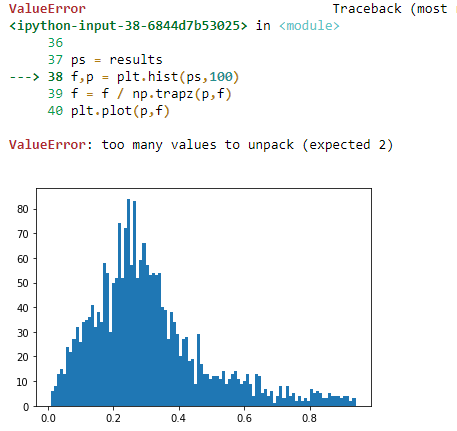
Error: "Value Error: too many values tounpack" (expected 2)
Code:
import numpy as npfrom statistics import meanimport matplotlib as pltimport matplotlib.pyplot as pltfrom random import randrangedef takeHalfTest(a,b,oper,order): asOrig=np.random.randint(1,7,a) if(order==1): as1=np.sort(asOrig) else: as1=-np.sort(-asOrig) as1=as1[0:b] out=0 if(oper==1): out=min(as1) elif(oper==2): out=max(as1) elif(oper==3): out=mean(as1) else: diffs=np.diff(as1) dMin=np.min(diffs) j=np.argmin(diffs) if(dMin# results += [a1,b1,oper1,order1, a2,b2,oper2,order2,1, counter1/m] # results += [a1,b1,oper1,order1, a2,b2,oper2,order2,2, counter2/m] results += [counter1/m] results += [counter2/m]print(results)ps = resultsf,p = plt.hist(ps,100)f = f / np.trapz(p,f)plt.plot(p,f)grid('on')plt.xlabel('P(procedure)')plt.ylabel('freq.')plt.title('Probabilities of diff. procedures')The Output of this code is: This is error message whilevisualizing the data
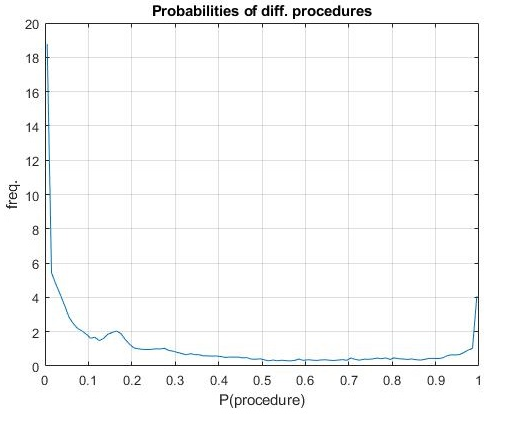
This is the expected result: Modify the code so that getthe result like this
ValueError in 36 37 ps results ---> -> 38 fp = plt.hist(ps, 100) 39 f f/np.trapz (p, f) 40 plt.plot(p, f) ValueError: too many values to unpack (expected 2) 80 70 60 50 40 30 20 10 0 0.0 = 0.2 0.4 b ALD 0.6 Traceback (most 0.8
Step by Step Solution
★★★★★
3.47 Rating (163 Votes )
There are 3 Steps involved in it
1 Expert Approved Answer
Step: 1 Unlock

Question Has Been Solved by an Expert!
Get step-by-step solutions from verified subject matter experts
Step: 2 Unlock
Step: 3 Unlock
 Study Help