







Question: Flowchart Assignment Summer 2019 Cashier Process NOTE: This is a simplified version of a process for the purpose of illustrating flowcharting techniques. Create flow Chart
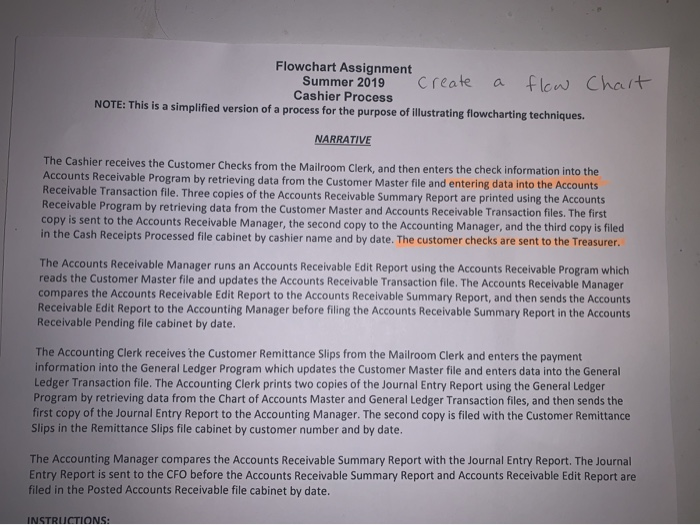
Flowchart Assignment Summer 2019 Cashier Process NOTE: This is a simplified version of a process for the purpose of illustrating flowcharting techniques. Create flow Chart a NARRATIVE The Cashier receives the Customer Checks from the Mailroom Clerk, and then enters the check information into the Accounts Receivable Program by retrieving data from the Customer Master file and entering data into the Accounts Receivable Transaction file. Three copies of the Accounts Receivable Summary Report are printed using the Accounts Receivable Program by retrieving data from the Customer Master and Accounts Receivable Transaction files. The first copy is sent to the Accounts Receivable Manager, the second copy to the Accounting Manager, and the third copy is filed in the Cash Receipts Processed file cabinet by cashier name and by date. The customer checks are sent to the Treasurer. The Accounts Receivable Manager runs an Accounts Receivable Edit Report using the Accounts Receivable Program which reads the Customer Master file and updates the Accounts Receivable Transaction file. The Accounts Receivable Manager compares the Accounts Receivable Edit Report to the Accounts Receivable Summary Report, and then sends the Accounts Receivable Edit Report to the Accounting Manager before filing the Accounts Receivable Summary Report in the Accounts Receivable Pending file cabinet by date. The Accounting Clerk receives the Customer Remittance Slips from the Mailroom Clerk and enters the payment information into the General Ledger Program which updates the Customer Master file and enters data into the General Ledger Transaction file. The Accounting Clerk prints two copies of the Journal Entry Report using the General Ledger Program by retrieving data from the Chart of Accounts Master and General Ledger Transaction files, and then sends the first copy of the Journal Entry Report to the Accounting Manager. The second copy is filed with the Customer Remittance Slips in the Remittance Slips file cabinet by customer number and by date. The Accounting Manager compares the Accounts Receivable Summary Report with the Journal Entry Report. The Journal Entry Report is sent to the CFO before the Accounts Receivable Summary Report and Accounts Receivable Edit Report are filed in the Posted Accounts Receivable file cabinet by date. INSTRUCTIONS: Flowchart Assignment Summer 2019 Cashier Process NOTE: This is a simplified version of a process for the purpose of illustrating flowcharting techniques. Create flow Chart a NARRATIVE The Cashier receives the Customer Checks from the Mailroom Clerk, and then enters the check information into the Accounts Receivable Program by retrieving data from the Customer Master file and entering data into the Accounts Receivable Transaction file. Three copies of the Accounts Receivable Summary Report are printed using the Accounts Receivable Program by retrieving data from the Customer Master and Accounts Receivable Transaction files. The first copy is sent to the Accounts Receivable Manager, the second copy to the Accounting Manager, and the third copy is filed in the Cash Receipts Processed file cabinet by cashier name and by date. The customer checks are sent to the Treasurer. The Accounts Receivable Manager runs an Accounts Receivable Edit Report using the Accounts Receivable Program which reads the Customer Master file and updates the Accounts Receivable Transaction file. The Accounts Receivable Manager compares the Accounts Receivable Edit Report to the Accounts Receivable Summary Report, and then sends the Accounts Receivable Edit Report to the Accounting Manager before filing the Accounts Receivable Summary Report in the Accounts Receivable Pending file cabinet by date. The Accounting Clerk receives the Customer Remittance Slips from the Mailroom Clerk and enters the payment information into the General Ledger Program which updates the Customer Master file and enters data into the General Ledger Transaction file. The Accounting Clerk prints two copies of the Journal Entry Report using the General Ledger Program by retrieving data from the Chart of Accounts Master and General Ledger Transaction files, and then sends the first copy of the Journal Entry Report to the Accounting Manager. The second copy is filed with the Customer Remittance Slips in the Remittance Slips file cabinet by customer number and by date. The Accounting Manager compares the Accounts Receivable Summary Report with the Journal Entry Report. The Journal Entry Report is sent to the CFO before the Accounts Receivable Summary Report and Accounts Receivable Edit Report are filed in the Posted Accounts Receivable file cabinet by date. INSTRUCTIONS
Step by Step Solution
There are 3 Steps involved in it

Get step-by-step solutions from verified subject matter experts
 Study Help