







Question: The figure shown below presents the result of applying a filter to an image. Figure Image before filtering (left) and after filtering(right) Activate Windo
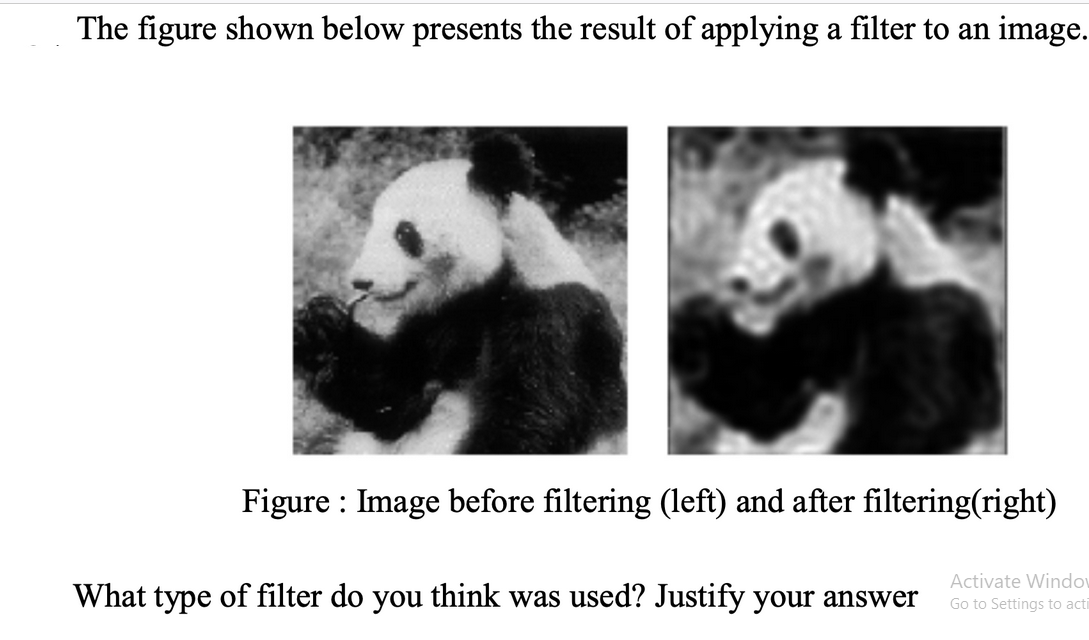
The figure shown below presents the result of applying a filter to an image. Figure Image before filtering (left) and after filtering(right) Activate Windo Go to Settings to acti What type of filter do you think was used? Justify your answer
Step by Step Solution
There are 3 Steps involved in it
1 Expert Approved Answer
Step: 1 Unlock

We can blur an image using different lowpass blurri... View full answer
Question Has Been Solved by an Expert!
Get step-by-step solutions from verified subject matter experts
Step: 2 Unlock
Step: 3 Unlock
 Study Help