







Question: Following the MVC architectural pattern, develop a Java - based web application using Java Servlets and JSPs to build a Job Application System. The system
Following the MVC architectural pattern, develop a Javabased web application using Java Servlets and JSPs to build a Job Application System.
The system has the following users the user has the first name, last name, and email user id phone, address, city, country:
Job Applicant there are many applicants
Hiring Manager there are many hiring managers
The system has the following forms:
Job applicant form to create the applicants account
Job description created by the manager and should have the apply button
Job Application form completed and submitted by the applicant
Interview form created and filled out by the manager and approveddisapproved by the applicant
Job offer form created and filled out by the manager and approveddisapproved by the applicant
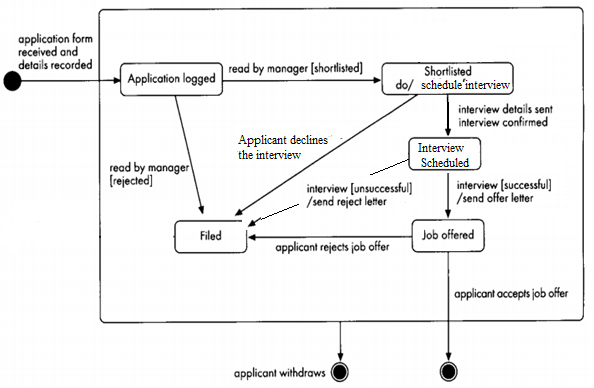
Use the figure below to understand the workflow of the system.
Requirements:
The system can be used by different companies to announce jobs and manage the hiring process
The job vacancy is posted by a hiring manager the applicant shall not see the hiring managers name
First, the company shall announce a job vacancy. The job vacancy contains the following:
The title: contains the position ex Software Engineer
The position closing date: the deadline for applying
The position details
Apply button clicking this button opens up the Job Application Form
The job applicant shall first create an account. The account has the following:
o First name
o Last name
o City
o Country
o Email Address
o Phone Number
o Highest level of education College Diploma, Bachelor, Master, PhD
The job applicant shall apply for the job by filling out the job application form
The job application form contains the following information about the applicant:
Why are you applying for this position; the applicant shall answer this question
Resume as Attachment
The Submit Application button
In addition to the users information from the user account filled automatically
Once the application is received, it will have the status Application Logged The applicant cant submit duplicate job applications, but may apply for different positions. The applicant can still update the application if it is still in the Application Logged status.
The applicant shall be able to withdraw the application at any time during the hiring process.
Once the application is received, the corresponding hiring manager will review it then the manager shall either reject it and its status shall be Filed or the manager shall select it for the interview and the status will be Shortlisted
Then, the manager will schedule the interview. The Interview form shall have the interview date and time. If the applicant accepts the interview, the status of the application will be changed to Interview Scheduled If disapproved, he will not have the chance to interview for the position. In case the applicant disapproves, the status will be changed to Filed
If the interview is successful, the applicant will have a job offer, and the status will be Job Offered
The manager shall add the comments about the interview in the form and select Create an Offer.
If the Interview is not successful, the hiring manager will add the comments and select No Offer. In case of no offer, the status of Job Application will be changed to Filed
The applicant shall accept the offer or decline the offer. If accept, the status will be changed to Accepted If decline, the status will be changed to Declined
The Interview form has the following fields:
Interview date and time make sure to check for valid daytime not past date are allowed
Rate the applicants interpersonal skills to where is excellent make sure to check for valid numbers, or you can choose a dropdown list or a radio button
Rate the applications technical skills to
The Job Offer form contains the following:
Position
Salary
Job start date
You should use a relational database system to store all the data in the system.
Step by Step Solution
There are 3 Steps involved in it
1 Expert Approved Answer
Step: 1 Unlock

Question Has Been Solved by an Expert!
Get step-by-step solutions from verified subject matter experts
Step: 2 Unlock
Step: 3 Unlock
 Study Help