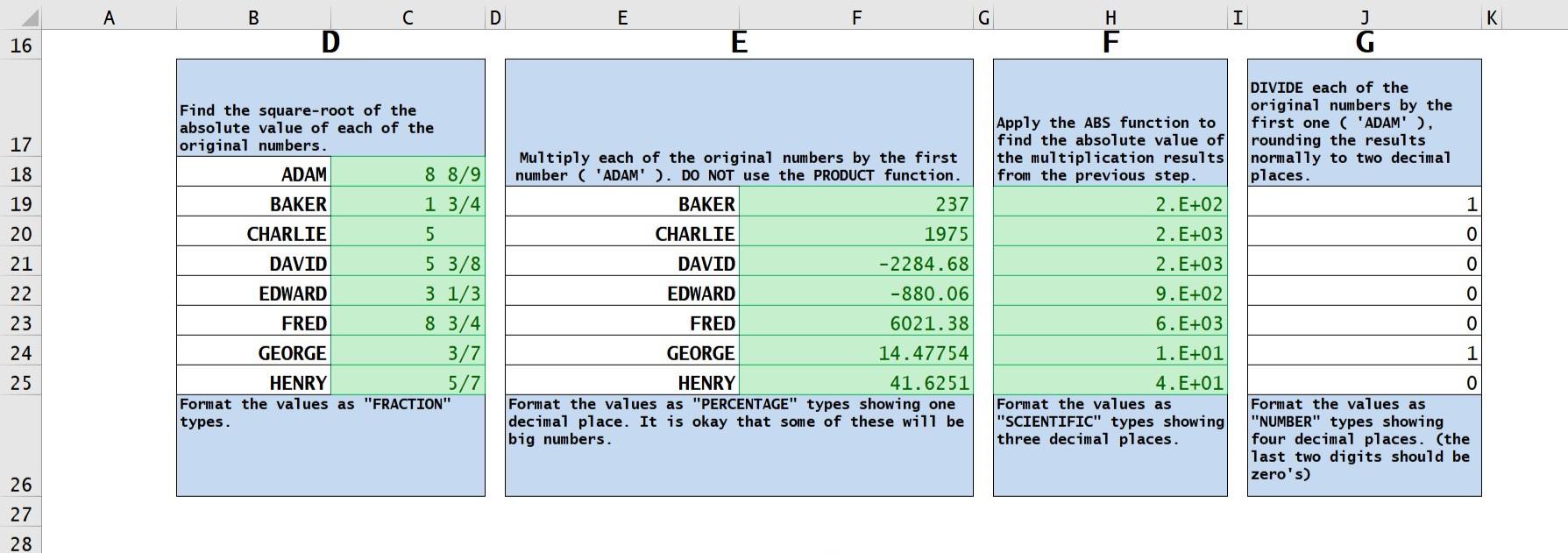
Question: - For A, how do you copy the datas without using copy and paste? How do you use simple, reference only formulas? what are the

- For A, how do you copy the datas without using copy and paste?

How do you use simple, reference only formulas?

what are the formaulas for B,C and G?
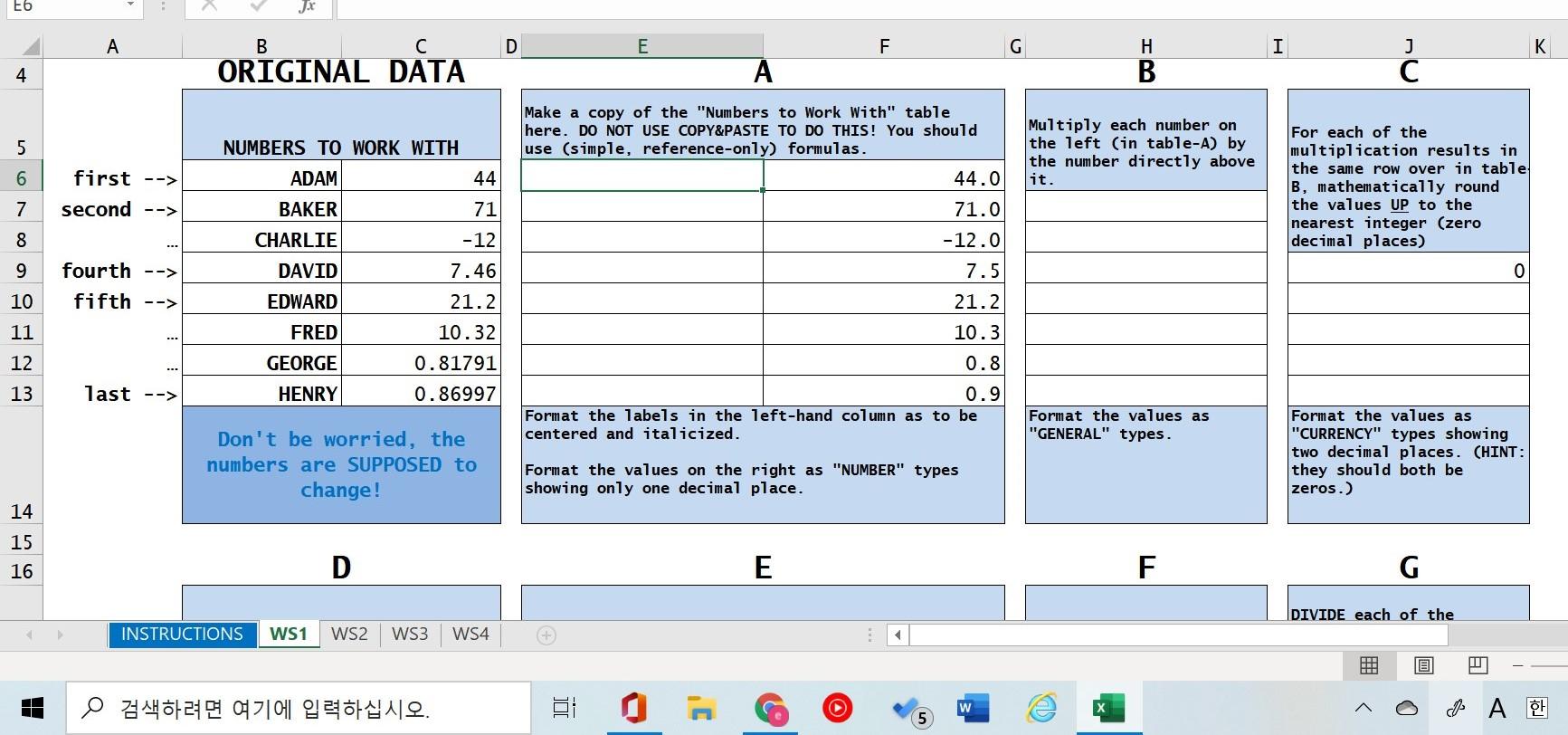
- For A, how do you copy the datas without using- For A, how do you copy the datas without using

E6 Jx A D E F G I K B ORIGINAL DATA H B A J C 4 5 Make a copy of the "Numbers to Work With" table here. DO NOT USE COPY&PASTE TO DO THIS! You should use (simple, reference-only) formulas. 44.0 Multiply each number on the left (in table-A) by the number directly above it. 6 first --> second --> For each of the multiplication results in the same row over in table B, mathematically round the values UP to the nearest integer (zero decimal places) 0 7 8 9 3 NUMBERS TO WORK WITH ADAM 44 BAKER 71 CHARLIE -12 DAVID 7.46 EDWARD 21.2 FRED 10.32 GEORGE 0.81791 HENRY 0.86997 71.0 -12.0 7.5 21.2 fourth --> fifth --> 10 11 10.3 12 0.8 13 last --> 0.9 Format the labels in the left-hand column as to be centered and italicized. Format the values as "GENERAL" types. Don't be worried, the numbers are SUPPOSED to change! Format the values as "CURRENCY" types showing two decimal places. (HINT: they should both be zeros.) Format the values on the right as "NUMBER" types showing only one decimal place. 14 15 16 D E F G DIVIDE each of the INSTRUCTIONS WS1 WS2 WS3 WS4 . BA A B C D E F G I K D 16 E j G DIVIDE each of the original numbers by the first one ( 'ADAM' ), rounding the results normally to two decimal places. 17 18 1 19 20 0 21 Find the square-root of the absolute value of each of the original numbers. ADAM 8 8/9 BAKER 1 3/4 CHARLIE 5 DAVID 5 3/8 EDWARD 3 1/3 FRED 8 3/4 GEORGE 3/7 HENRY 5/7 Format the values as "FRACTION" types. 0 Apply the ABS function to find the absolute value of the multiplication results from the previous step. 2.E+02 2. E+03 2. E+03 9.E+02 6.E+03 1. E+01 4.E+01 Format the values as "SCIENTIFIC" types showing three decimal places. 22 23 24 25 Multiply each of the original numbers by the first number ( 'ADAM' ). DO NOT use the PRODUCT function. BAKER 237 CHARLIE 1975 DAVID -2284.68 EDWARD -880.06 FRED 6021.38 GEORGE 14.47754 HENRY 41.6251 Format the values as "PERCENTAGE" types showing on decimal place. It is okay that some of these will be big numbers. ololo Format the values as "NUMBER" types showing four decimal places. (the last two digits should be zero's) 26 27 28

Step by Step Solution

There are 3 Steps involved in it

1 Expert Approved Answer
Step: 1 Unlock blur-text-image

Question Has Been Solved by an Expert!

Get step-by-step solutions from verified subject matter experts

Step: 2 Unlock
Step: 3 Unlock

Students Have Also Explored These Related General Management Questions!