



Question: For an answer to be graded as correct, you must use an Excel formula: 1. Begin each formula with an = sign. 2. Reference cells,
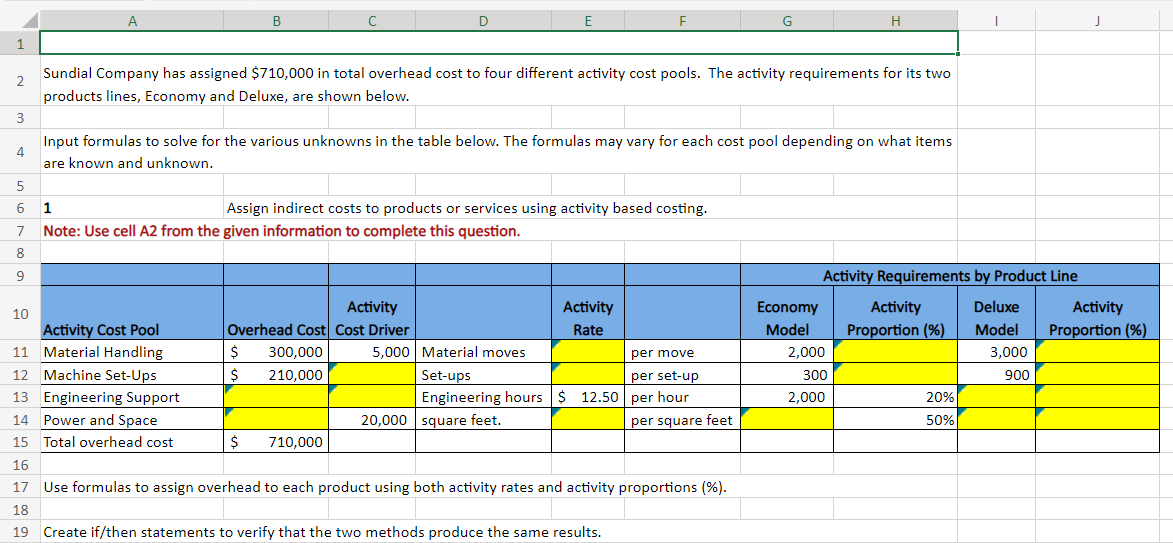
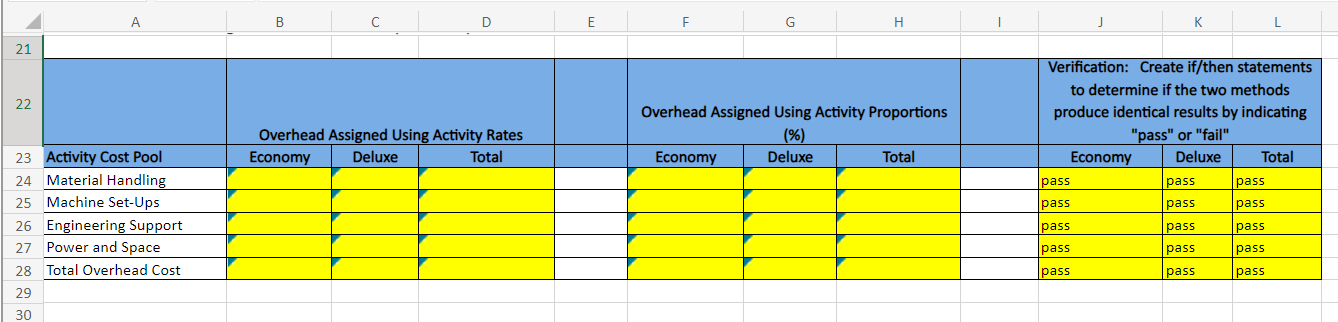
For an answer to be graded as correct, you must use an Excel formula: 1. Begin each formula with an = sign. 2. Reference cells, instead of entering values. Example: =B3+C3 \begin{tabular}{|c|c|c|c|c|c|c|c|c|c|c|c|c|} \hline \multirow{2}{*}{4} & \multirow[t]{2}{*}{ A } & \multirow[t]{2}{*}{ B } & \multirow[t]{2}{*}{ c } & \multirow[t]{2}{*}{ D } & \multirow[t]{2}{*}{ E } & \multirow[t]{2}{*}{F} & \multirow[t]{2}{*}{ G } & \multirow[t]{2}{*}{ H } & \multirow[t]{2}{*}{ } & \multirow[t]{2}{*}{ j } & \multirow[t]{2}{*}{ K } & \multirow[t]{2}{*}{ L } \\ \hline & & & & & & & & & & & & \\ \hline 22 & & \multicolumn{3}{|c|}{ Overhead Assigned Using Activity Rates } & & \multicolumn{3}{|c|}{\begin{tabular}{l} Overhead Assigned Using Activity Proportions \\ (\%) \end{tabular}} & & \multicolumn{3}{|c|}{\begin{tabular}{l} Verification: Create if/then statements \\ to determine if the two methods \\ produce identical results by indicating \\ "pass" or "fail" \end{tabular}} \\ \hline 23 & Activity Cost Pool & Economy & Deluxe & Total & & Economy & Deluxe & Total & & Economy & Deluxe & Total \\ \hline 24 & Material Handling & & & & & & & & & pass & pass & pass \\ \hline 25 & Machine Set-Ups & & & & & & & & & pass & pass & pass \\ \hline 26 & Engineering Support & & & & & & & & & pass & pass & pass \\ \hline 27 & Power and Space & & & & & & & & & pass & pass & pass \\ \hline 28 & Total Overhead Cost & & & & & & & & & pass & pass & pass \\ \hline 29 & & & & & & & & & & & & \\ \hline 30 & & & & & & & & & & & & \\ \hline \end{tabular} \begin{tabular}{|c|c|c|c|c|c|c|c|c|c|c|} \hline & A & B & C & D & E & F & G & H & I & J \\ \hline \multicolumn{11}{|l|}{1} \\ \hline 2 & \multicolumn{8}{|c|}{\begin{tabular}{l} Sundial Company has assigned $710,000 in total overhead cost to four different activity cost pools. The activity requirements for its two \\ products lines, Economy and Deluxe, are shown below. \end{tabular}} & & \\ \hline \multicolumn{11}{|l|}{3} \\ \hline 4 & \multicolumn{8}{|c|}{\begin{tabular}{l} Input formulas to solve for the various unknowns in the table below. The formulas may vary for each cost pool depending on what items \\ are known and unknown. \end{tabular}} & & \\ \hline \multicolumn{11}{|l|}{5} \\ \hline 6 & 1 & \multicolumn{7}{|c|}{ Assign indirect costs to products or services using activity based costing. } & & \\ \hline 7 & \multirow{2}{*}{\multicolumn{10}{|c|}{ Note: Use cell A2 from the given information to complete this question. }} \\ \hline 8 & & & & & & & & & & \\ \hline 9 & & & & & & & \multicolumn{4}{|c|}{ Activity Requirements by Product Line } \\ \hline 10 & Activity Cost Pool & Overhead Cost & \begin{tabular}{c} Activity \\ Cost Driver \end{tabular} & & \begin{tabular}{l} Activity \\ Rate \end{tabular} & & \begin{tabular}{l} Economy \\ Model \end{tabular} & \begin{tabular}{l} Activity \\ Proportion (\%) \end{tabular} & \begin{tabular}{l} Deluxe \\ Model \end{tabular} & \begin{tabular}{c} Activity \\ Proportion (\%) \end{tabular} \\ \hline 11 & Material Handling & 300,000 & 5,000 & Material moves & & per move & 2,000 & & 3,000 & \\ \hline 12 & Machine Set-Ups & 210,000 & & Set-ups & & per set-up & 300 & & 900 & \\ \hline 13 & Engineering Support & & & \begin{tabular}{|l|} Engineering hours \\ \end{tabular} & $12.50 & per hour & 2,000 & 20% & & \\ \hline 14 & Power and Space & & 20,000 & square feet. & & per square feet & & 50% & & \\ \hline 15 & Total overhead cost & 710,000 & & & & & & & & \\ \hline \multicolumn{11}{|l|}{16} \\ \hline 17 & \multicolumn{8}{|c|}{ Use formulas to assign overhead to each product using both activity rates and activity proportions (\%). } & & \\ \hline 18 & & & & & & & & & & \\ \hline \end{tabular}
Step by Step Solution
There are 3 Steps involved in it

Get step-by-step solutions from verified subject matter experts