







Question: For C# using visual studio Create a project named EmployeeApp with a class named Employee that has three properties: an employee name ( string )
For C# using visual studio
Create a project named EmployeeApp with a class named Employee that has three properties: an employee name string a monthly salary double and an annual salary double The annual salary is always times the monthly salary. A constructor has sufficient parameters to initialize the employee object. The monthly salary only accepts only positive numbers. Assigning a negative number to the monthly salary results in a salary of zero. A RaisePay method gives the
employee a raise.
Create an array or collection of Employee objects using the Employee class and the following data.
First Name Last Name Monthly Salary
Tom Thompson
Pete Peterson
Georgia Kennedy
Meredith Jones
Jean Cummings
Michael Robbins
Polly Marks
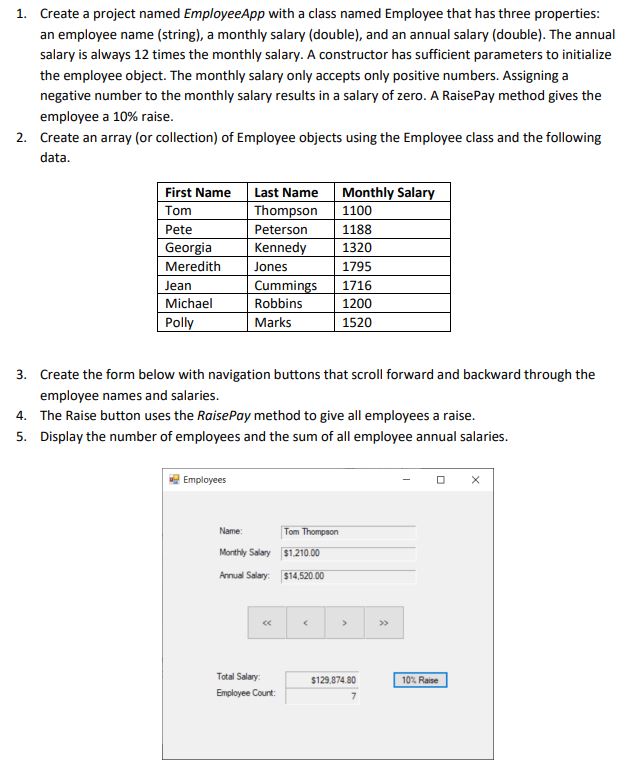
Create the form below with navigation buttons that scroll forward and backward through the Create a project named EmployeeApp with a class named Employee that has three properties:
an employee name string a monthly salary double and an annual salary double The annual
salary is always times the monthly salary. A constructor has sufficient parameters to initialize
the employee object. The monthly salary only accepts only positive numbers. Assigning a
negative number to the monthly salary results in a salary of zero. A RaisePay method gives the
employee a raise.
Create an array or collection of Employee objects using the Employee class and the following
data.
Create the form below with navigation buttons that scroll forward and backward through the
employee names and salaries.
The Raise button uses the RaisePay method to give all employees a raise.
Display the number of employees and the sum of all employee annual salaries.employee names and salaries.
The Raise button uses the RaisePay method to give all employees a raise.
Display the number of employees and the sum of all employee annual salaries
Step by Step Solution
There are 3 Steps involved in it
1 Expert Approved Answer
Step: 1 Unlock

Question Has Been Solved by an Expert!
Get step-by-step solutions from verified subject matter experts
Step: 2 Unlock
Step: 3 Unlock
 Study Help