







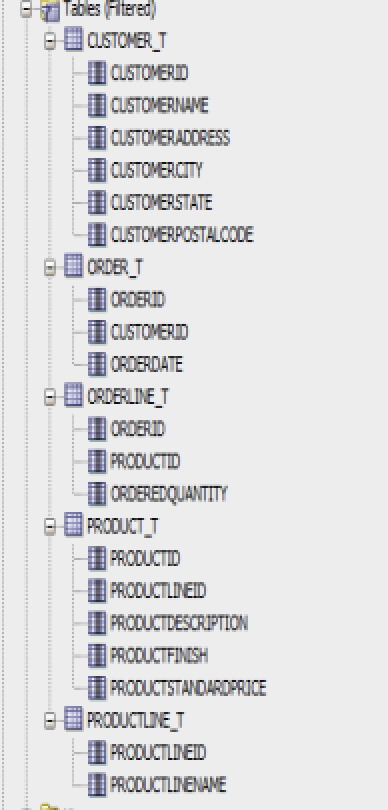
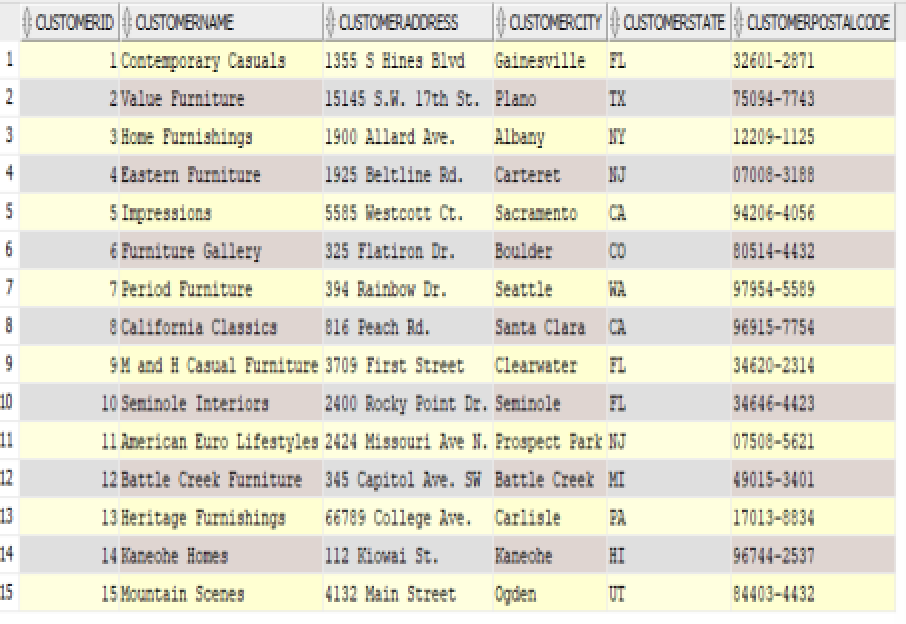
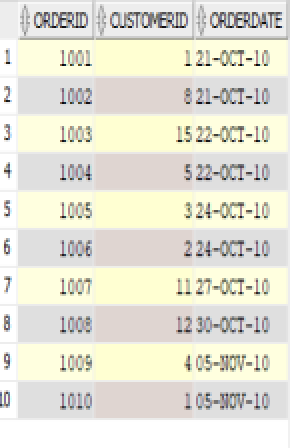
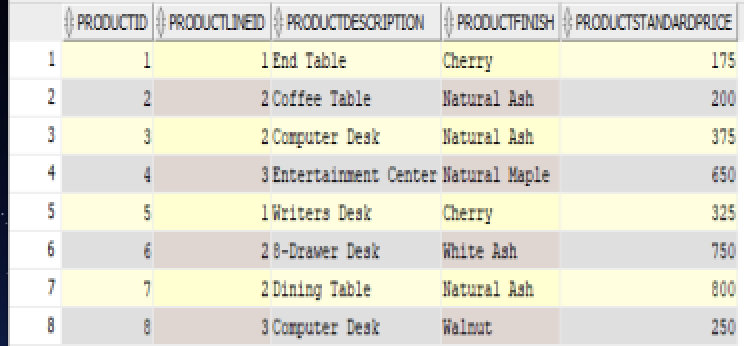
Question: . . For each query upload a screenshot showing the query and the results. The tables to solve are shown above. Write a query that
 .
. 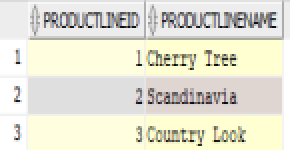 .
. 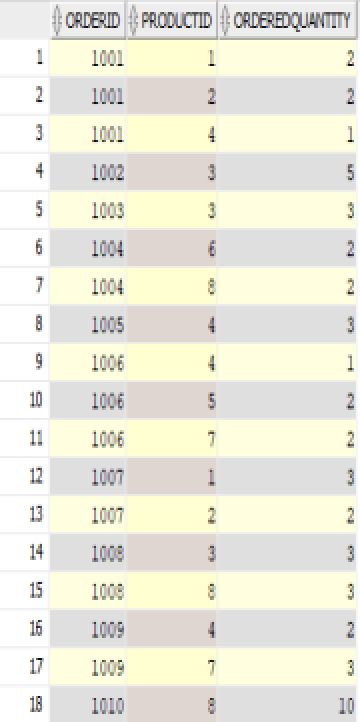
For each query upload a screenshot showing the query and the results. The tables to solve are shown above.
Write a query that returns the title and unit_price of each item. In addition your query should also return the new price of the item which is 80% of the current unit price. This new field should be named New_Price while the original unit_price field should be names old_price.
What is the price of the most expensive item? (Hint: what is the maximum unit_price?)
A. Write a query that returns the number of records of table ORDER_DETAILS. B. Now modify the above query to count only the records that correspond to the item with id 1.
Find the title of the item and name of the artist for those items whose artist contains the character: &
Find the first and last name of the customers whose fax is empty (NULL). Hint: the query should return the customers whose fax is actually empty and not field with the character NULL
Find the names of all the customers, ordered by customer's last name ascending and first name descending
Write a query that returns the Last name and address of each customer but for only those customers who are from California and whose city is alphabetically before New York.
Write a query that returns the Last name, First name, state and city of each customer but for only those customers who: are from California and whose city is alphabetically before New York OR whose first name starts with A
Write a query that returns the Last name, First name, state and city of each customer but for only those customers who: are from California and whose city is alphabetically before New York AND whose first name starts with A
Compare the results of queries 8 and 9.
Find the Incoice_Id and Invoice_total for those invoices whose Invoice_total is larger than 600 and smaller than 700.
Repeat the previous query but this time use the BETWEEN function. Do you see the same results?
Find the active vendors. Hint: Find the ids of the vendors that have active invoices i.e. who exist in table vendors. Each vendor should be reported once.
Using the table VENDORS find vendor contact first and last name for those records whose Vendor-Contact_First_name starts with C. Report the results:
In ascending alphabetical order of contact first name and then ascending alphabetical order of contact last name
In ascending alphabetical order of contact first name and then descending alphabetical order of contact last name
In ascending alphabetical order of contact last name and then ascending alphabetical order of contact first name
Compare the results of a and b and the results of a and c.
Report the first names of all customers and their fax. If their fax is empty then report 9999999999. Hint: Use NVL function
Report the First name and last name of customers, however you should only report the first letter of the first name and the entire last name. Example: Instead of: Bob Squarepants You should report B Squarepants Hint: Use the SUBSTR function
Report the First name and last name of customers, however you should only report the first letter of the first name accompanied by a dot and the entire last name. Example: Instead of: Bob Squarepants You should report B. Squarepants Hint: Use the CONCAT function
Report the Artist Name and the average Unit_Price per artist.
Report the total number of items sold per order_id Hint: you should use the Order_Details table
Count the number of customers per state. Report the results in order so that the states with the most customers are listed first. Name the column that lists the count of customers as State_Ordering
Repeat the previous query but this time report only the states in which you have more than 1 customers. Can you use the WHERE clause to solve this?
CUSTOMERSTATE CUSTONERPOSTALCOCE ORDERDATE ORDERLINE ORDEREDQUANTITY PRODUCT D PRCCUCTLINED PRODUCTFICH CUSTOMERSTATE CUSTONERPOSTALCOCE ORDERDATE ORDERLINE ORDEREDQUANTITY PRODUCT D PRCCUCTLINED PRODUCTFICH
Step by Step Solution
There are 3 Steps involved in it

Get step-by-step solutions from verified subject matter experts
 Study Help