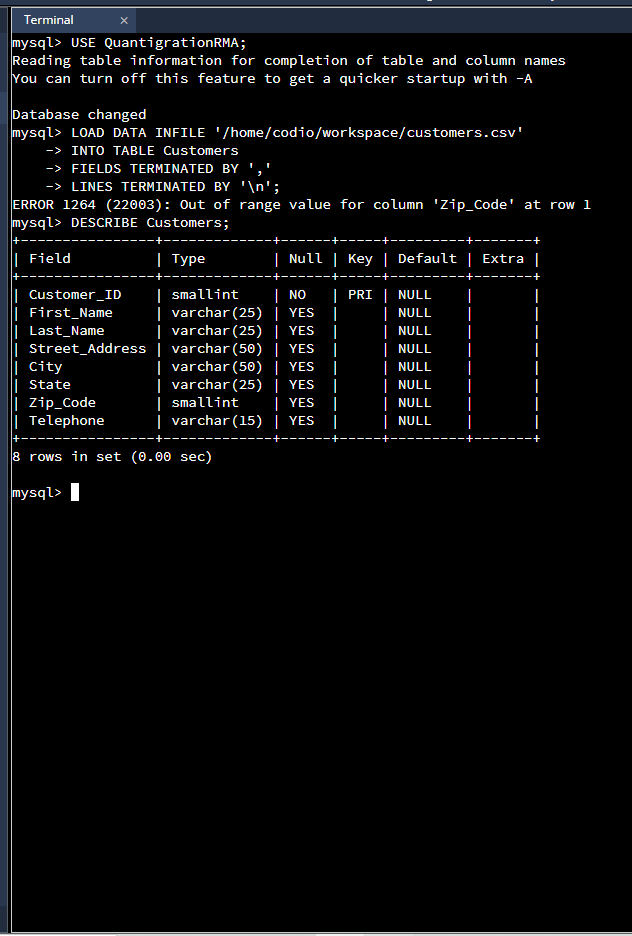
Question: I need help writing the code in Codio with the instructions attached. I also attached a screenshot of the error code that I was given.
I need help writing the code in Codio with the instructions attached. I also attached a screenshot of the error code that I was given.
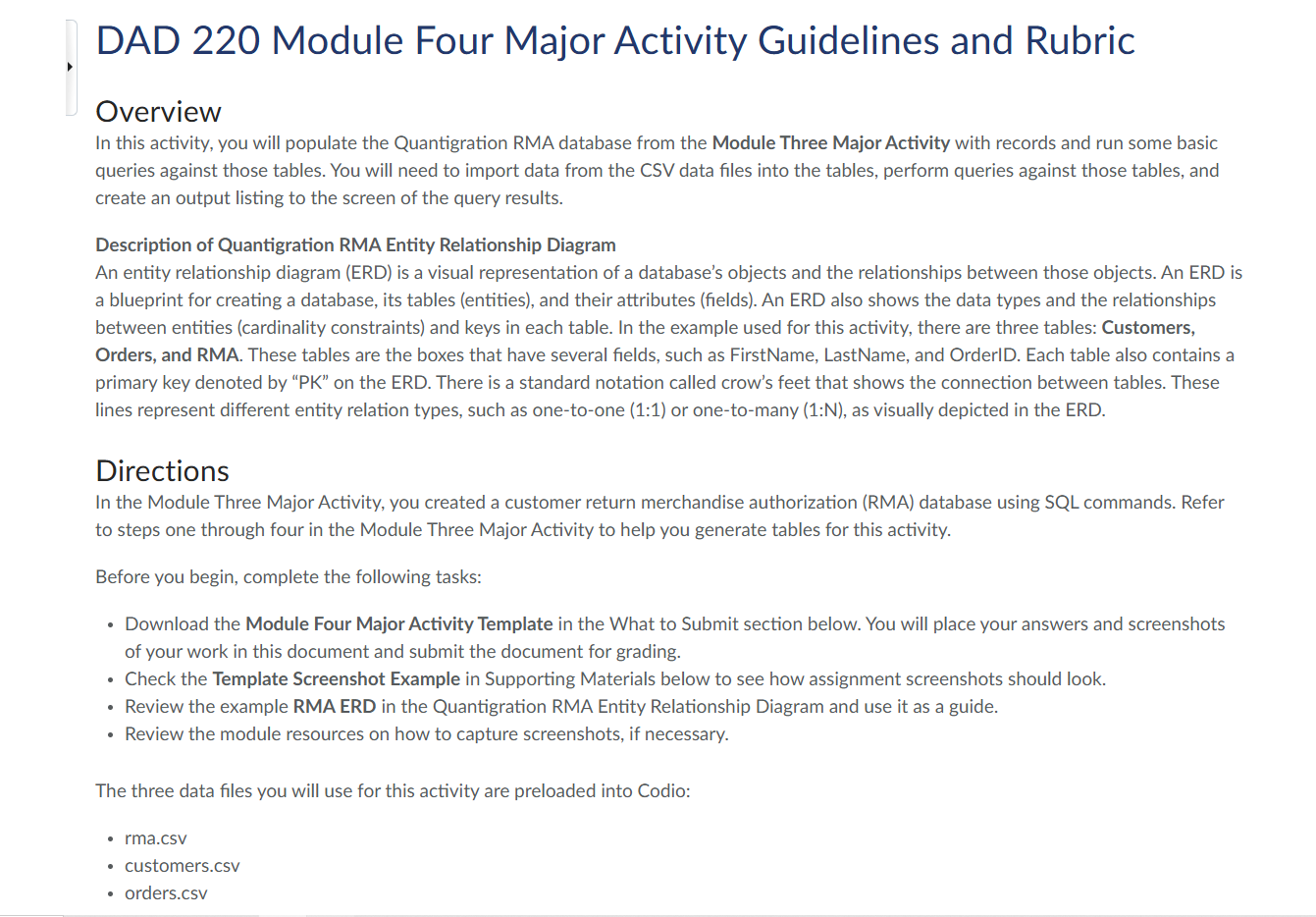
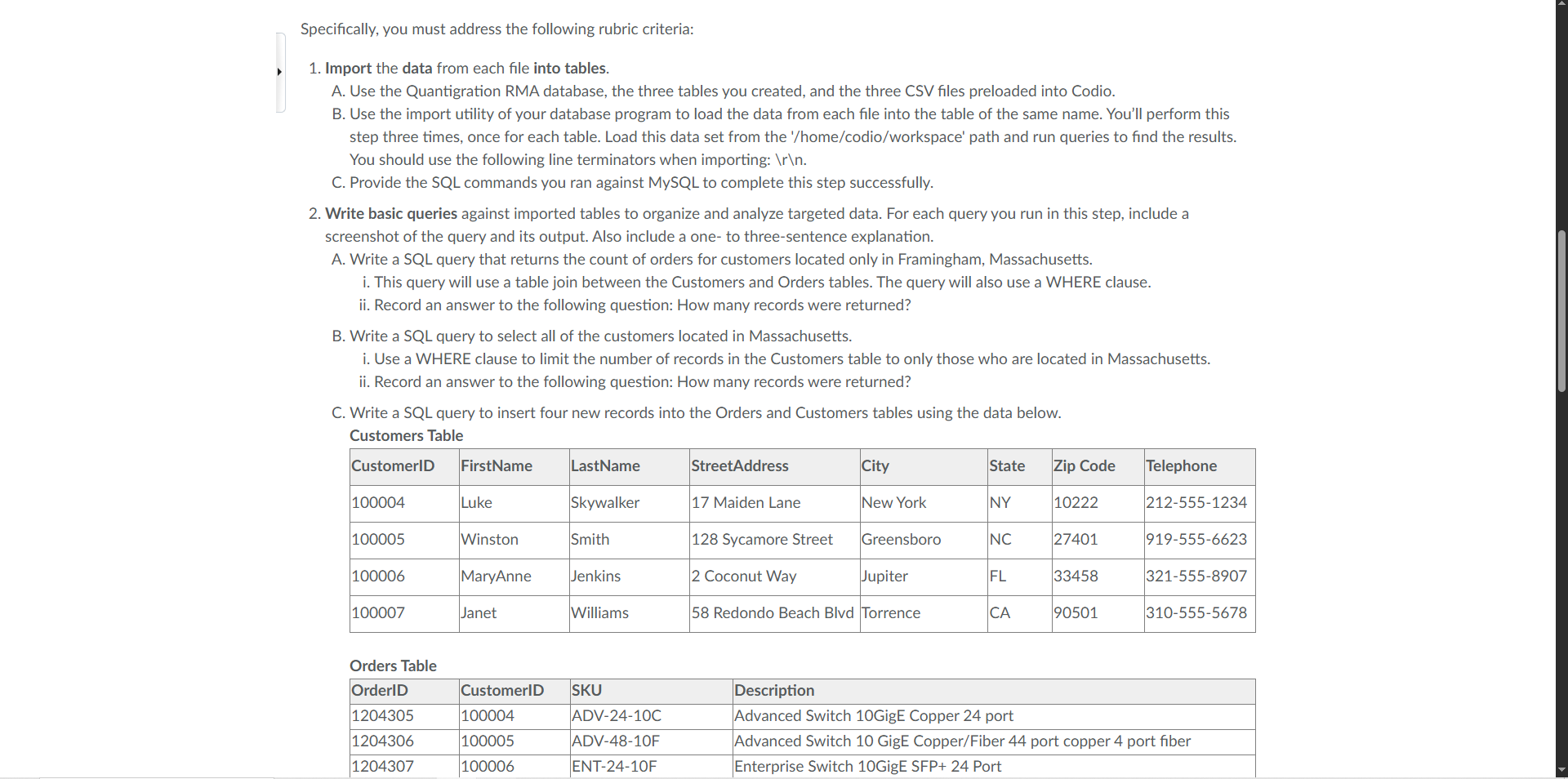
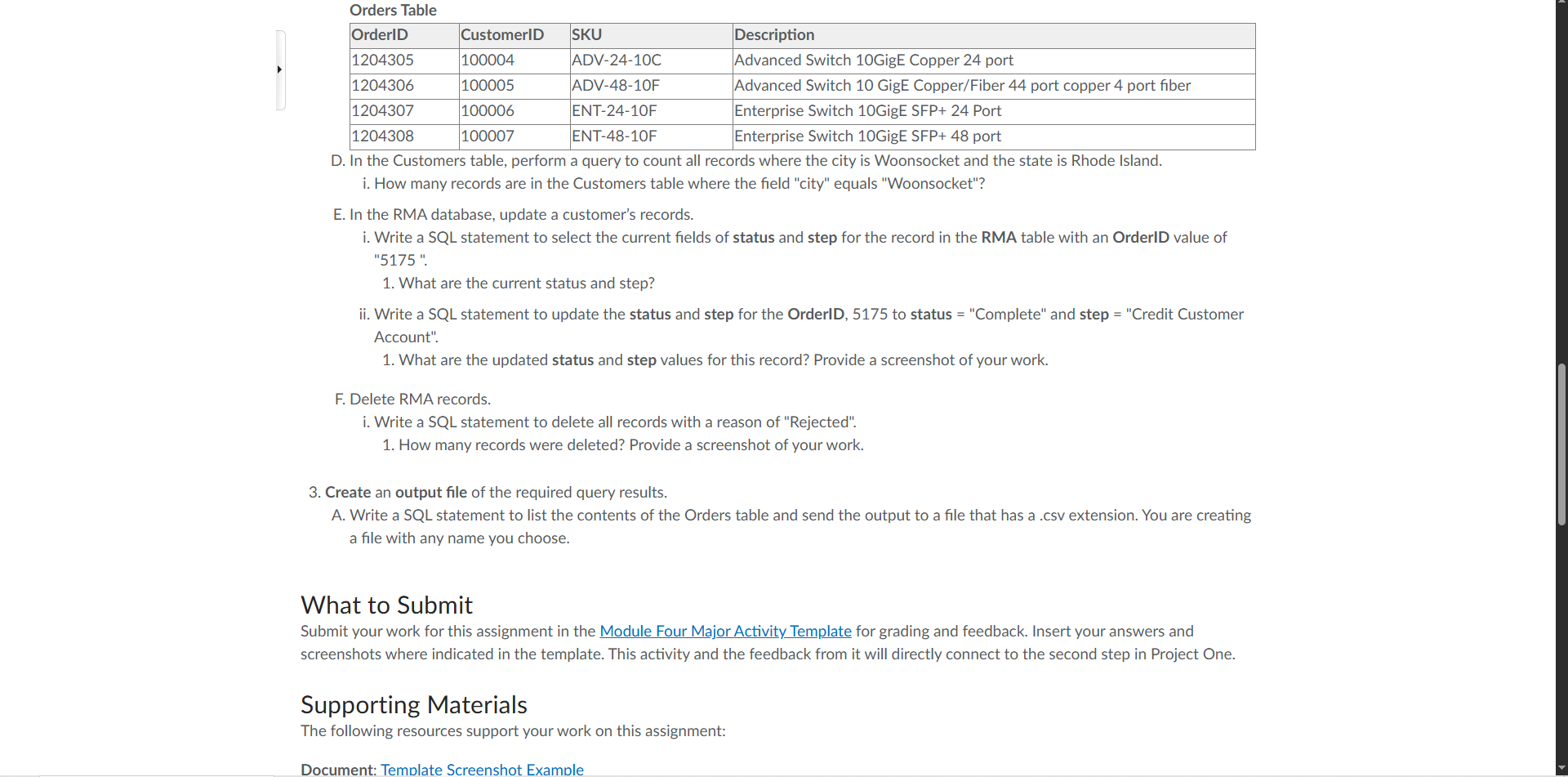
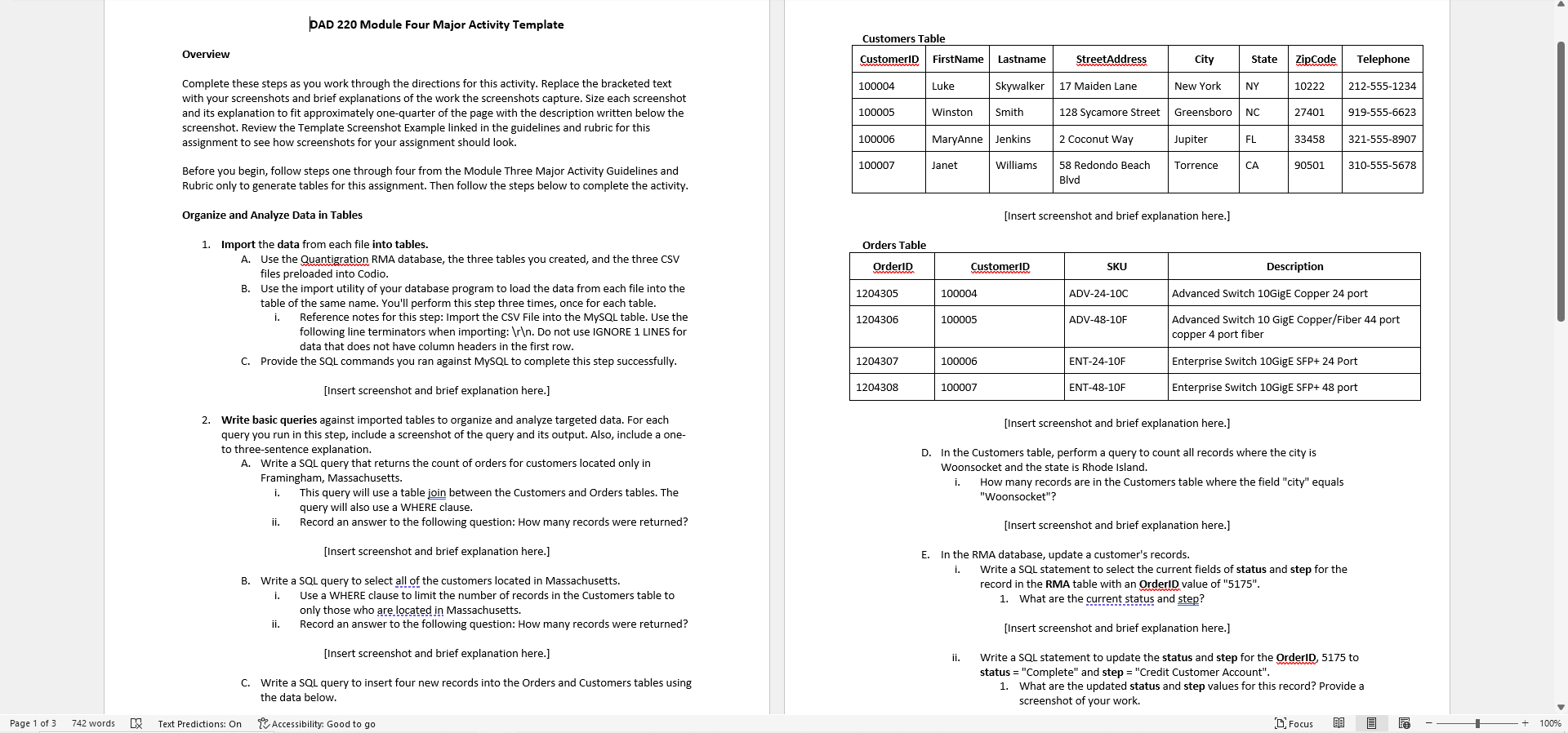
Terminal X mysql> USE QuantigrationRMA; Reading table information for completion of table and column names You can turn off this feature to get a quicker startup with -A Database changed mysql> LOAD DATA INFILE '/home/codio/workspace/customers. csv' -> INTO TABLE Customers FIELDS TERMINATED BY -> LINES TERMINATED BY ' \ ' ; ERROR 1264 (22003): Out of range value for column 'Zip_Code' at row 1 mysql> DESCRIBE Customers; Field Type Null | Key | Default | Extra Customer_ID smallint NO PRI NULL First_Name varchar (25) YES NULL Last_Name varchar (25) YES NULL Street_Address varchar (50) YES NULL City varchar (50) YES NULL State varchar (25) YES NULL Zip_Code smallint YES NULL Telephone varchar (15) YES NULL 8 rows in set (0.00 sec) mysql>DAD 220 Module Four Major Activity Guidelines and Rubric Overview In this activity, you will populate the Quantigration RMA database from the Module Three Major Activity with records and run some basic queries against those tables. You will need to import data from the CSV data files into the tables, perform queries against those tables, and create an output listing to the screen of the query results. Description of Quantigration RMA Entity Relationship Diagram An entity relationship diagram (ERD) is a visual representation of a database's objects and the relationships between those objects. An ERD is a blueprint for creating a database, its tables (entities), and their attributes (fields). An ERD also shows the data types and the relationships between entities (cardinality constraints) and keys in each table. In the example used for this activity, there are three tables: Customers, Orders, and RMA. These tables are the boxes that have several fields, such as FirstName, LastName, and Order|D. Each table also contains a primary key denoted by \"PK\" on the ERD. There is a standard notation called crow's feet that shows the connection between tables. These lines represent different entity relation types, such as one-to-one (1:1) or one-to-many (1:N), as visually depicted in the ERD. Directions In the Module Three Major Activity, you created a customer return merchandise authorization (RMA) database using SQL commands. Refer to steps one through four in the Module Three Major Activity to help you generate tables for this activity. Before you begin, complete the following tasks: Download the Module Four Major Activity Template in the What to Submit section below. You will place your answers and screenshots of your work in this document and submit the document for grading. Check the Template Screenshot Example in Supporting Materials below to see how assignment screenshots should look. Review the example RMA ERD in the Quantigration RMA Entity Relationship Diagram and use it as a guide. Review the module resources on how to capture screenshots, if necessary. The three data files you will use for this activity are preloaded into Codio: * rma.csv * customers.csv * orders.csv Specifically, you must address the following rubric criteria: 1. Import the data from each file into tables. A. Use the Quantigration RMA database, the three tables you created, and the three CSV files preloaded into Codio. B. Use the import utility of your database program to load the data from each file into the table of the same name. You'll perform this step three times, once for each table. Load this data set from the '/home/codio/workspace' path and run queries to find the results. You should use the following line terminators when importing: \\\ . C. Provide the SQL commands you ran against MySQL to complete this step successfully. 2. Write basic queries against imported tables to organize and analyze targeted data. For each query you run in this step, include a screenshot of the query and its output. Also include a one- to three-sentence explanation. A. Write a SQL query that returns the count of orders for customers located only in Framingham, Massachusetts. i. This query will use a table join between the Customers and Orders tables. The query will also use a WHERE clause. ii. Record an answer to the following question: How many records were returned? B. Write a SQL query to select all of the customers located in Massachusetts. i. Use a WHERE clause to limit the number of records in the Customers table to only those who are located in Massachusetts. ii. Record an answer to the following question: How many records were returned? C. Write a SQL query to insert four new records into the Orders and Customers tables using the data below. Customers Table CustomerID FirstName LastName StreetAddress City State Zip Code Telephone 100004 Luke Skywalker 17 Maiden Lane New York NY 10222 212-555-1234 100005 Winston Smith 128 Sycamore Street Greensboro NC 27401 919-555-6623 100006 MaryAnne Jenkins 2 Coconut Way Jupiter FL 33458 321-555-8907 100007 Janet Williams 58 Redondo Beach Blvd Torrence CA 90501 310-555-5678 Orders Table OrderID CustomerID SKU Description 1204305 100004 ADV-24-10C Advanced Switch 10GigE Copper 24 port 1204306 100005 ADV-48-10F Advanced Switch 10 GigE Copper/Fiber 44 port copper 4 port fiber 1204307 100006 ENT-24-10F Enterprise Switch 10GigE SFP+ 24 PortOrders Table 'OrderlID CustomerID (SKU Description 1204305 100004 ADV-24-10C [Advanced Switch 10GigE Copper 24 port 1204306 100005 IADV-48-10F (Advanced Switch 10 GigE Copper/Fiber 44 port copper 4 port fiber 1204307 100006 ENT-24-10F Enterprise Switch 10GigE SFP+ 24 Port 1204308 100007 ENT-48-10F Enterprise Switch LOGigE SFP+ 48 port D. In the Customers table, perform a query to count all records where the city is Woonsocket and the state is Rhode Island. i. How many records are in the Customers table where the field "city" equals "Woonsocket"? E. In the RMA database, update a customer's records. i. Write a SQL statement to select the current fields of status and step for the record in the RMA table with an OrderlD value of "5175". 1. What are the current status and step? ii. Write a SQL statement to update the status and step for the OrderlD, 5175 to status = "Complete" and step = "Credit Customer Account". 1. What are the updated status and step values for this record? Provide a screenshot of your work. F. Delete RMA records. i. Write a SQL statement to delete all records with a reason of "Rejected". 1. How many records were deleted? Provide a screenshot of your work. 3. Create an output file of the required query results. A. Write a SQL statement to list the contents of the Orders table and send the output to a file that has a .csv extension. You are creating a file with any name you choose. What to Submit Submit your work for this assignment in the Module Four Major Activity Template for grading and feedback. Insert your answers and screenshots where indicated in the template. This activity and the feedback from it will directly connect to the second step in Project One. Supporting Materials The following resources support your work on this assignment: Document: Template Screenshot Example PAD 220 Module Four Major Activity Template Customers Table Overview Customerip | FirstName | Lastname 'StreetAddress City State | ZipCode | Telephone Complete these steps as you work through the directions for this activity. Replace the bracketed text 100004 Luke skywalker | 17 Maiden Lane NewYork | NY 10222 | 212-555-1234 with your screenshots and brief explanations of the work the screenshots capture, Size each screenshot and its explanation to fit approximately one-quarter of the page with the description written below the 100005 Winston | Smith 128 Sycamore Street | Greensboro | NC 27401 | 919-555-6623 screenshot. Review the Template Screenshot Example linked in the guidelines and rubric for this ; assignment to see how screenshots for your assignment should look. 100006 MaryAnne | Jenkins | 2 Coconut Way Jupiter FL 33458 | 321-555-8907 Before you begin, follow steps one through four from the Module Three Major Activity Guidelines and 100007 Janet 'Williams a. Redondo Beach | Torrence | CA 90501 | 310-555-5678 Rubric only to generate tables for this assignment. Then follow the steps below to complete the activity. Biv Organize and Analyze Data in Tables [Insert screenshot and brief explanation here.] 1. Import the data from each file into tables. Orders Table A. Use the Quantigration RMA database, the three tables you created, and the three CSV orderio skU Description files preloaded into Codio. Bianca 8. Use the import utility of your database program to load the data from each file into the 1204305 'so0004 ADV-24-100 'Advanced Switch 1OGigE Copper 24 port table of the same name. You'll perform this step three times, once for each table. i. Reference notes for this step: Import the CSV File into the MySQL table. Use the 1204306 100005 ADV-48-10F Advanced Switch 10 GigE Copper/Fiber 44 port following line terminators when importing: \ \ . Do not use IGNORE 2 LINES for copper 4 port fiber data that does not have column headers in the first row. C. Provide the SQL commands you ran against MySQL to complete this step successfully. 1204307 100006 ENT-24-10F Enterprise Switch LOGigE SFP+ 24 Port [Insert screenshot and brief explanation here.] 1204308 100007 ENT-48-10F Enterprise Switch LOGigE SFP+ 48 port 2. Write basic queries against imported tables to organize and analyze targeted data. For each [Insert screenshot and brief explanation here.] query you run in this step, include a screenshot of the query and its output. Also, include a one- to three-sentence explanation. D. Inthe Customers table, perform a query to count all records where the city is A, Write a SQL query that returns the count of orders for customers located only in Woonsocket and the state is Rhode Island. Framingham, Massachusetts. i. How many records are in the Customers table where the field "city" equals i. This query will use a table join between the Customers and Orders tables. The "Woonsocket"? query will also use a WHERE clause. il, Record an answer to the following question: How many records were returned? [Insert screenshot and brief explanation here] [Insert screenshot and brief explanation here.] E. Inthe RMA database, update a customer's records. i. Write a SQL statement to select the current fields of status and step for the 8. Write a SQL query to select all of the customers located in Massachusetts. record in the RMA table with an OrderID value of "5175", i. Use a WHERE clause to limit the number of records in the Customers table to. 1. What are the current stetus and step? only those who are located in Massachusetts. ii, Record an answer to the following question: How many records were returned? [Insert screenshot and brief explanation here] [Insert screenshot and brief explanation here.) ii, Write a SQL statement to update the status and step for the OrderlD, 5175 to status = "Complete" and step = "Credit Customer Account\". C. Write a SQL query to insert four new records into the Orders and Customers tables using 1. What are the updated status and step values for this record? Provide a the data below. screenshot of your work, Pagetof3 742words [JX Text Predictions: On T-Accessibility: Good to go Dirocus f -_t_+1
Step by Step Solution
There are 3 Steps involved in it
1 Expert Approved Answer
Step: 1 Unlock
Question Has Been Solved by an Expert!
Get step-by-step solutions from verified subject matter experts
Step: 2 Unlock
Step: 3 Unlock
Students Have Also Explored These Related Accounting Questions!









 Study Help