







Question: For python 2 --- Question 4. (15 points) Consider the following GUI Tkinter program. -* FinalTest Question.PY GUI Question Code from Tkintek import * class
For python 2
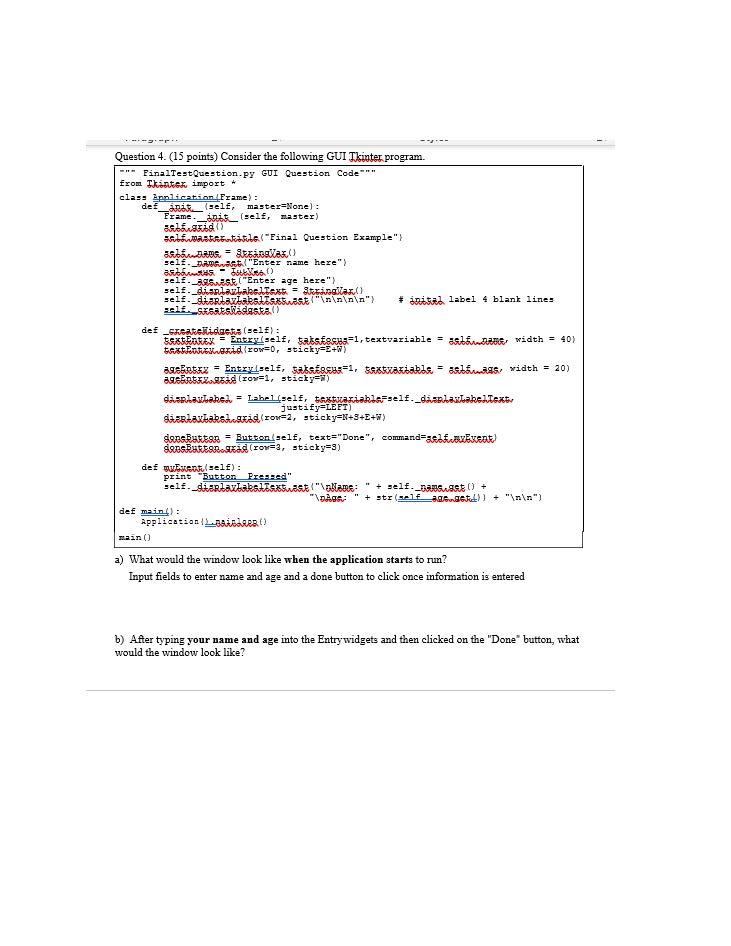
--- Question 4. (15 points) Consider the following GUI Tkinter program. -"* FinalTest Question.PY GUI Question Code from Tkintek import * class Application Frame) : de Ansel, master=None): Frame init__(self, master) Ests id) salaattisile("Final Question Example"> as bawang, Srbsailaz selt. Damswasta "Enter name here" astos - ) self.996st("Enter age here" self._tarlarlabelText = tagitan selp. diartavlakstiskswast" ") # initial label 4 blank lines sel.SesatsWodasta) def _skatslidactus (self): Esat Entex = Entry/sele, aksessu:=1, textvariable = asta, width = 40) text Porrow=0, sticky=2+) 29Entez = Entry_selt, Sats Escua=1, Eextxariable = astags vidth = 20) 396entad(rov=1, sticky) dan aslaked = Lahel self, textuariahis self._dalas Lahe text justify=LEFT) dizriaxtabstand zov=2, sticky=N+3+E+W) Sans Button = Button(self, text="Done", command=asfaExent dass Butanaxad (row=3, sticky=3) def wat self): print "Button Pressed" self. diarlavlakstistastollame: + self._mansas) + Age: + str(self_act)] + " ") def main) : Application Loibarrat main() a) What would the window look like when the application starts to run? Input fields to enter name and age and a done button to click once information is entered b) After typing your name and age into the Entry widgets and then clicked on the "Done" button, what would the window look like
Step by Step Solution
There are 3 Steps involved in it

Get step-by-step solutions from verified subject matter experts
 Study Help