





Lunch selections
| Item total | 0.00 |
| Tax | 0.00 |
| Total with tax | $0.00 |


for the following javascript code follow the directions listed below and in the picture
Lunch selections
Item total 0.00 Tax 0.00 Total with tax $0.00
1. Before the closing
tag, add an empty script element.
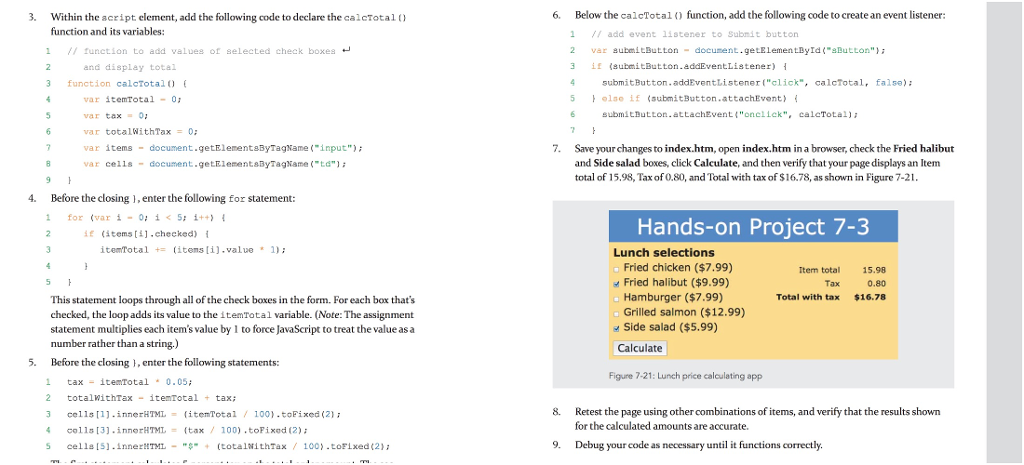
3. 6. Below the calcTotalfunction, add the following code to create an event listener: Within the acript element, add the following code to declare the calcTotal) function and its variables: 1 add event 11stener to Submit button 2 v r8ubmiButton-doeunent.geLElementById("aButton"); 3 if submitButton.addEventListener) { 1 // function to add values of selected check boxes and display total submitButton.addEventListener ("click", calcTotal, false) olse if(submitButton.attachEvent) function calcTotal0 5 var itemTotal-0 var tax = 0; var totalWithTax 0; var items document.getElementaByTagName ("input" var celis document.getElementsByagName (ta) submitButton.attachEvent("onellck", caleTotal) 7. Save your changes to index.htm, open index.htm in a browser, check the Fried halibut and Side salad boxes, click Calculate, and then verify that your page displays an Item total of 15.9, Tax of 0.80, and Total with tx of $16.78, as shown in Figure 7-21 4. Before the closing,enter the following for statement: 1for (var i-015: 1++) if (itens [i].checked) { Hands-on Project 7-3 itemTotal t: items [1].value 1); Lunch selections Fried chicken ($7.99) Fried halibut ($9.99) Hamburger ($7.99) Grilled salmon ($12.99) Side salad ($5.99) Item total 15.98 0.80 $16.78 Total with tax This statement loops through all of the check boxes in the form. For each box thats checked, the loop adds its value to the itemTotal variable. (Note: The assignment statement multiplies each item's value by 1 to force JavaScript to treat the value as a number rather than a string.) Calculate 5. Before the closing , enter the following statements: Figure 7-21: Lunch price calculating app 1 taxitemTotal0.05; 2 totalWithTax itenTotal tax 3 cells [1].innerHTML {itemTota1 / 100).toFixed (2); 4 colls [3].innerHTML = {tax / 100).toFixed (2); 5 cells [S].innerHTML- "$. + (totaltiithTax / 100).toFixed(2); 8. Retest the page using other combinations of items, and verify that the results shown for the calculated amounts are accurate. 9. Debug your code as necessary until it functions correctly
There are 3 Steps involved in it

Get step-by-step solutions from verified subject matter experts
 Study Help