







Question: this is the lab2 html . Lab 2_2 Lab 2_2 with JavaScript What to do Please follow the steps and answer questions 4-5 in a
this is the lab2 html .
Lab 2_2 with JavaScript
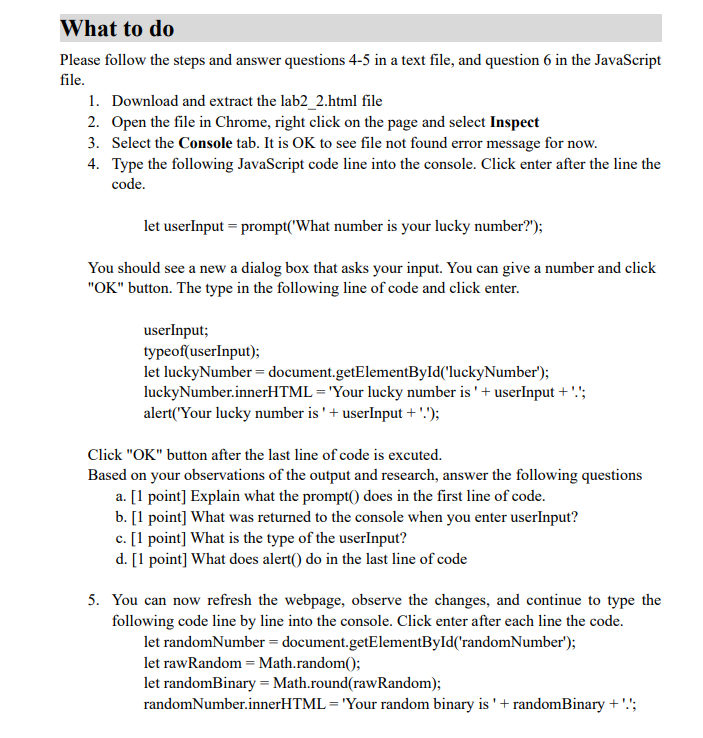
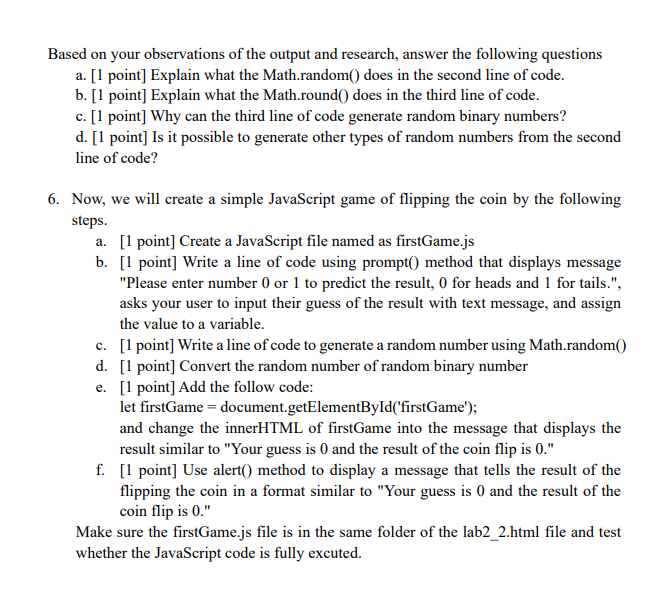
What to do Please follow the steps and answer questions 4-5 in a text file, and question 6 in the JavaScript file. 1. Download and extract the lab2_2.html file 2. Open the file in Chrome, right click on the page and select Inspect 3. Select the Console tab. It is OK to see file not found error message for now. 4. Type the following JavaScript code line into the console. Click enter after the line the code. let userInput = prompt('What number is your lucky number?"); You should see a new a dialog box that asks your input. You can give a number and click "OK" button. The type in the following line of code and click enter. userInput; typeof(userInput); let luckyNumber = document.getElementById("luckyNumber'); luckyNumber.innerHTML = 'Your lucky number is' + userInput + "'; alert("Your lucky number is ' + userInput + '.'); Click "OK" button after the last line of code is excuted. Based on your observations of the output and research, answer the following questions a. [1 point] Explain what the prompt() does in the first line of code. b. [1 point] What was returned to the console when you enter userInput? c. [1 point] What is the type of the userInput? d. [1 point] What does alert() do in the last line of code 5. You can now refresh the webpage, observe the changes, and continue to type the following code line by line into the console. Click enter after each line the code. let randomNumber = document.getElementById('randomNumber"); let raw Random = Math.random(); let randomBinary = Math.round(raw Random); randomNumber.innerHTML = 'Your random binary is ' + randomBinary+''; Based on your observations of the output and research, answer the following questions a. [1 point] Explain what the Math.random() does in the second line of code. b. [1 point] Explain what the Math.round() does in the third line of code. c. [1 point] Why can the third line of code generate random binary numbers? d. [1 point] Is it possible to generate other types of random numbers from the second line of code? 6. Now, we will create a simple JavaScript game of flipping the coin by the following steps. a. [1 point] Create a JavaScript file named as firstGame.js b. [1 point] Write a line of code using prompt() method that displays message "Please enter number 0 or 1 to predict the result, for heads and 1 for tails.", asks your user to input their guess of the result with text message, and assign the value to a variable. c c. [1 point] Write a line of code to generate a random number using Math.random() d. [1 point] Convert the random number of random binary number e. [1 point] Add the follow code: let firstGame = document.getElementById('firstGame'); and change the innerHTML of firstGame into the message that displays the result similar to "Your guess is 0 and the result of the coin flip is 0." f. [1 point] Use alert() method to display a message that tells the result of the flipping the coin in a format similar to "Your guess is 0 and the result of the coin flip is 0." Make sure the firstGame.js file is in the same folder of the lab2_2.html file and test whether the JavaScript code is fully excuted
Step by Step Solution
There are 3 Steps involved in it

Get step-by-step solutions from verified subject matter experts
 Study Help