







Question: - For the following work, set up the excel spreadsheets as required. A suggestion is made to use a single workbook, with individual sheets for
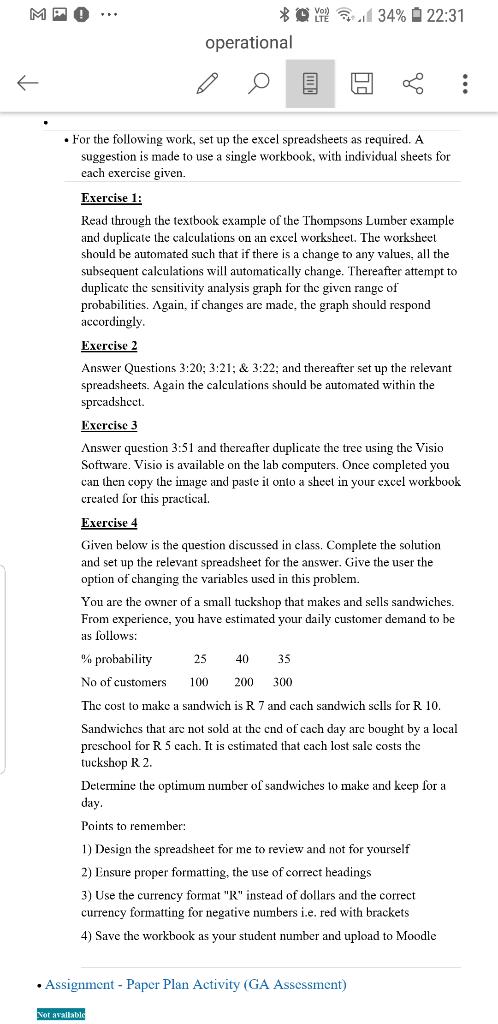 | |
- For the following work, set up the excel spreadsheets as required. A suggestion is made to use a single workbook, with individual sheets for each exercise given. Exercise 1: Read through the textbook example of the Thompsons Lumber example and duplicate the calculations on an exeel worksheel. The worksheet should be automated such that if there is a change to any values, all the subsequent calculations will automatically change. Thereafter attempt to duplicate the sensitivity analysis graph for the given range of probabilities. Again, if changes are made, the graph should respond accordingly. Exercise 2 Answer Questions 3:20;3:21;&3:22; and thereafter set up the relevant spreadsheets. Again the calculations should be automated within the spreadshect. Exercise 3 Answer question 3:51 and thereafter duplicate the tree using the Visio Software. Visio is available on the lab computers. Once completed you can then copy the image and paste it onto a sheet in your excel workbook created for this practical. Exercise 4 Given below is the question discussed in class. Complete the solution and set up the relevant spreadsheet for the answer. Give the user the option of changing the variables used in this problem. You are the owner of a small tuckshop that makes and sells sandwiches. From experience, you have estimated your daily customer demand to be as follows: The cost to make a sandwich is R7 and each sandwich sclls for R 10 . Sandwiches that are not sold at the end of cach day are bought by a local preschool for R5 each. It is estimated that each lost sale costs the tuckshop R 2 . Determine the optimum number of sandwiches to make and keep for a day. Points to remember: 1) Design the spreadsheet for me to review and not for yourself 2) Ensure proper formatting, the use of correct headings 3) Use the currency format "R" instead of dollars and the correct currency formatting for negative numbers i.e. red with brackets 4) Save the workbook as your student number and upload to Moodle - Assignment - Paper Plan Activity (GA Assessment) - For the following work, set up the excel spreadsheets as required. A suggestion is made to use a single workbook, with individual sheets for each exercise given. Exercise 1: Read through the textbook example of the Thompsons Lumber example and duplicate the calculations on an exeel worksheel. The worksheet should be automated such that if there is a change to any values, all the subsequent calculations will automatically change. Thereafter attempt to duplicate the sensitivity analysis graph for the given range of probabilities. Again, if changes are made, the graph should respond accordingly. Exercise 2 Answer Questions 3:20;3:21;&3:22; and thereafter set up the relevant spreadsheets. Again the calculations should be automated within the spreadshect. Exercise 3 Answer question 3:51 and thereafter duplicate the tree using the Visio Software. Visio is available on the lab computers. Once completed you can then copy the image and paste it onto a sheet in your excel workbook created for this practical. Exercise 4 Given below is the question discussed in class. Complete the solution and set up the relevant spreadsheet for the answer. Give the user the option of changing the variables used in this problem. You are the owner of a small tuckshop that makes and sells sandwiches. From experience, you have estimated your daily customer demand to be as follows: The cost to make a sandwich is R7 and each sandwich sclls for R 10 . Sandwiches that are not sold at the end of cach day are bought by a local preschool for R5 each. It is estimated that each lost sale costs the tuckshop R 2 . Determine the optimum number of sandwiches to make and keep for a day. Points to remember: 1) Design the spreadsheet for me to review and not for yourself 2) Ensure proper formatting, the use of correct headings 3) Use the currency format "R" instead of dollars and the correct currency formatting for negative numbers i.e. red with brackets 4) Save the workbook as your student number and upload to Moodle - Assignment - Paper Plan Activity (GA Assessment)
Step by Step Solution
There are 3 Steps involved in it
To set up the Excel spreadsheets for your assignments you can follow these detailed steps for each e... View full answer

Get step-by-step solutions from verified subject matter experts
 Study Help