







Question: For the Network given in figure , create according to the figure in Cisco packet tracer and paste your screenshots from Cisco packet tracer. Design
For the Network given in figure , create according to the figure in Cisco packet tracer and paste your screenshots from Cisco packet tracer.
Design and simulation of the Communications Network, using Cisco Packet Tracer.
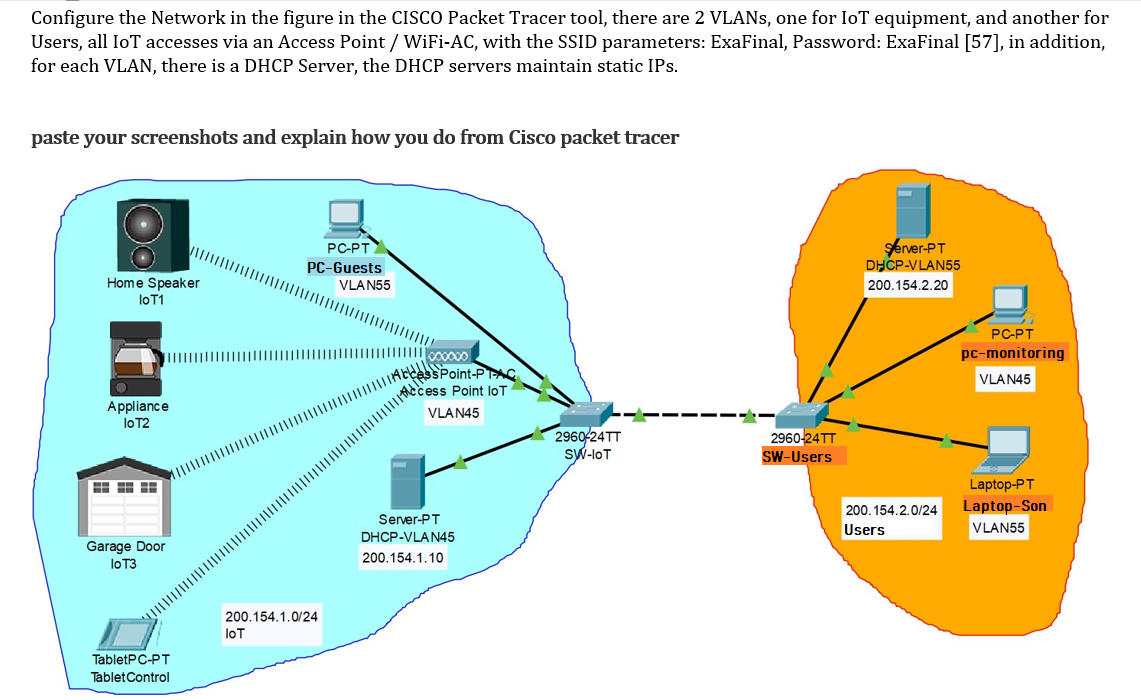
Configure the Network in the figure in the CISCO Packet Tracer tool, there are 2 VLANs, one for IoT equipment, and another for Users, all IoT accesses via an Access Point / WiFi-AC, with the SSID parameters: ExaFinal, Password: ExaFinal [57], in addition, for each VLAN, there is a DHCP Server, the DHCP servers maintain static IPs. paste your screenshots and explain how you do from Cisco packet tracer PC-PT PC-Guests VLAN55 sterver-PT DHCP-VLAN55 200.154.2.20 Home Speaker lo T1 PC-PT pc-monitoring VLAN45 WIACICAss Point-Piac Access Point lot VLA N45 Appliance lo T2 2960-24TT SW-IoT 2960-24TT SW-Users 200.154.2.0/24 Users Laptop-PT Laptop-Son VLAN55 Server-PT DHCP-VLAN45 200.154.1.10 Garage Door lo T3 200.154.1.0/24 IoT TabletPC-PT Tablet Control Configure the Network in the figure in the CISCO Packet Tracer tool, there are 2 VLANs, one for IoT equipment, and another for Users, all IoT accesses via an Access Point / WiFi-AC, with the SSID parameters: ExaFinal, Password: ExaFinal [57], in addition, for each VLAN, there is a DHCP Server, the DHCP servers maintain static IPs. paste your screenshots and explain how you do from Cisco packet tracer PC-PT PC-Guests VLAN55 sterver-PT DHCP-VLAN55 200.154.2.20 Home Speaker lo T1 PC-PT pc-monitoring VLAN45 WIACICAss Point-Piac Access Point lot VLA N45 Appliance lo T2 2960-24TT SW-IoT 2960-24TT SW-Users 200.154.2.0/24 Users Laptop-PT Laptop-Son VLAN55 Server-PT DHCP-VLAN45 200.154.1.10 Garage Door lo T3 200.154.1.0/24 IoT TabletPC-PT Tablet Control
Step by Step Solution
There are 3 Steps involved in it

Get step-by-step solutions from verified subject matter experts
 Study Help