







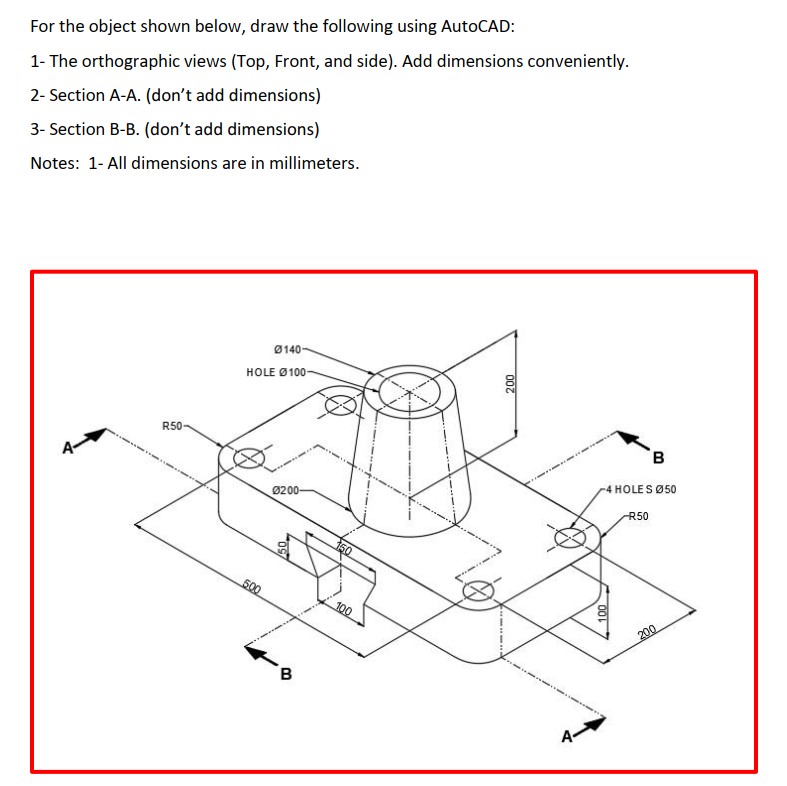
Question: For the object shown below, draw the following using AutoCAD: 1 - The orthographic views ( Top , Front, and side ) . Add dimensions
For the object shown below, draw the following using AutoCAD:
The orthographic views Top Front, and side Add dimensions conveniently.
Section AAdont add dimensions
Section BBdont add dimensions
Notes: All dimensions are in millimeters.
Step by Step Solution
There are 3 Steps involved in it
1 Expert Approved Answer
Step: 1 Unlock

Question Has Been Solved by an Expert!
Get step-by-step solutions from verified subject matter experts
Step: 2 Unlock
Step: 3 Unlock
 Study Help