







Question: For these tasks, you will create 5 forms for the interface of an application for City Gym that interacts with a database. You will use
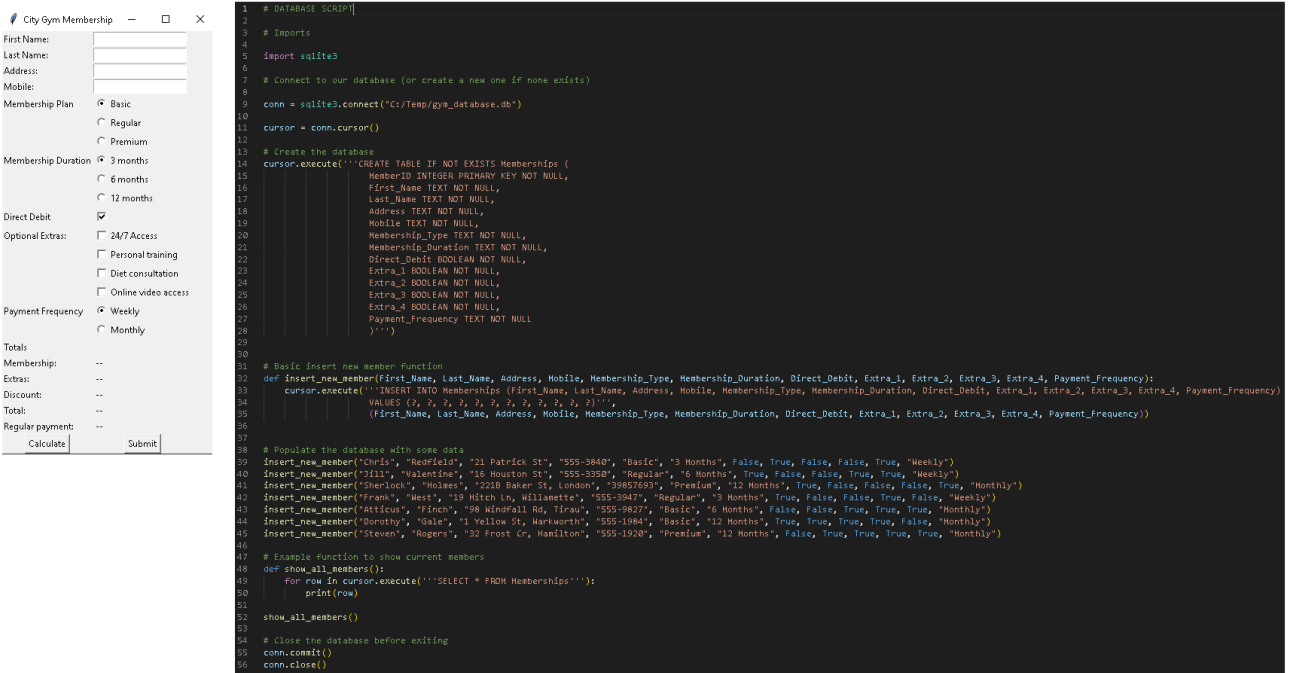
For these tasks, you will create forms for the interface of an application for City Gym that interacts with a database. You will use Python to create a functioning GUI based on those forms. Refer to the image provided which contains an example of the membership form GUI and the database script. Task : Creating forms Part A: Using Python and Tkinter, create five forms or screens for the 'City Gym' gym membership application. Main screen: This is a static window that should contain labels and navigation componentsbuttons to the rest of the forms, including the help window. Membership form: This form has to somewhat replicate the example that is provided in the image. Search form: This form is used to search for members based on either the members ID last name, membership type or a combination of last name and membership type. Use appropriate UI components and layout to accommodate these search criteria. The form should also have a component to display the retrieved information. Statistics form: The purpose of this form is to display various useful information about the members, such as the total number of members. Help screen: This is a static window that should contain information on how to use this application. Task : Developing the application. After you have created the forms for the interface, your task is to design and develop the application functionality. Part A: Creating the main menu screen. The main menu screen allows users to navigate through the application. Using the GUI you created earlier, write the code for navigation to the five formsscreens: Main screen. Membership form. Search form. Statistics form. Help screen. Also, make sure to allow the user to return to the menu from the other forms. Part B: Creating a membership form. Create a membership form that will store the data in the database script provided. When creating the membership form, refer to the image as a guide of how this should look. Additionally, each time the form is filled out, the application will need to insert the data as a new member in the database. The application should validate all user input and show a message when the data is successfully added or display an error message when there is a problem. The form should only be cleared when the user input is successful. Part C: Creating a search form. Create a search form that allows the user to search for members by name, membership type, or a combination of both. The search can return more than one result if multiple members are found. If there were no members found, display an appropriate message to the user. Display the retrieved information in an appropriate format. The most useful would be a table with one client per line. Part D: Creating a statistics form. Create a statistics form to help the staff access statistical information about the members. The form should display information about all members, including the following: Total number of members. Total members for each membership type Basic Regular or Premium Total members that have selected each extra. Total members that have selected direct debit. Also, the format to display the retrieved information is your choice.
Step by Step Solution
There are 3 Steps involved in it
1 Expert Approved Answer
Step: 1 Unlock

Question Has Been Solved by an Expert!
Get step-by-step solutions from verified subject matter experts
Step: 2 Unlock
Step: 3 Unlock
 Study Help