







Question: For this assignment, we are going to find and count the spaces within a string. Your code will go through the string and every time
For this assignment, we are going to find and count the spaces within a string. Your code will go through the string and every time a space character is encountered it will output the index that it saw it. In the end, your code will output the total number of spaces seen and the total number of characters in the string.
NOTE: The total number of characters is NOT the same as the size of the string. This is the number of characters up to, but not including the null character \0.
Steps
- Create a string of 100 characters in size.
- Create counter variables to count the total number of spaces and a total number of characters. Initialize them to 0.
- Prompt the user to enter a string and read it using the gets function.
- Create a loop to go from index 0 to the point that a '\0' character is seen.
- If the character is a space output which index you are at.
- If the character is space add one to the total spaces.
- Add one to the total number of characters so long as the character is not '\0'.
- Output the total number of spaces and a total number of characters.
Tips
To check for the null character use the following symbols in C:
'\0'
To check for a space use the following symbols:
' '
Note that there is a space between the single quotes.
Finally. make sure you follow the string example of the problem solving with arrays portion of the lecture. It will assist with understanding some of the steps in this homework.
Example Screenshots
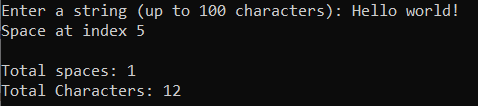
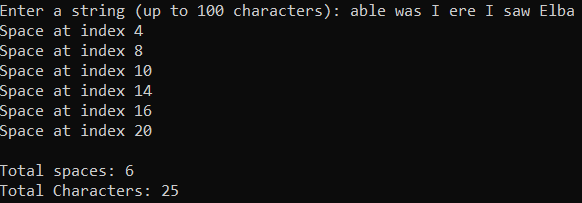
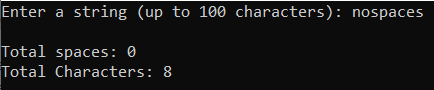
Enter a string (up to 100 characters): Hello world! Space at index 5 Total spaces: 1 Total Characters: 12 Enter a string (up to 100 characters): able was I ere I saw Elba Space at index 4 Space at index 8 Space at index 10 Space at index 14 Space at index 16 Space at index 20 Total spaces: 6 Total Characters: 25 Enter a string (up to 100 characters): nospaces Total spaces: 0 Total Characters: 8
Step by Step Solution
There are 3 Steps involved in it

Get step-by-step solutions from verified subject matter experts
 Study Help