







Question: For this assignment, you ll add a class to an Inventory Maintenance application and then add code to the two forms that use this class.
For this assignment, youll add a class to an Inventory Maintenance application and then add code to the two forms that use this class.
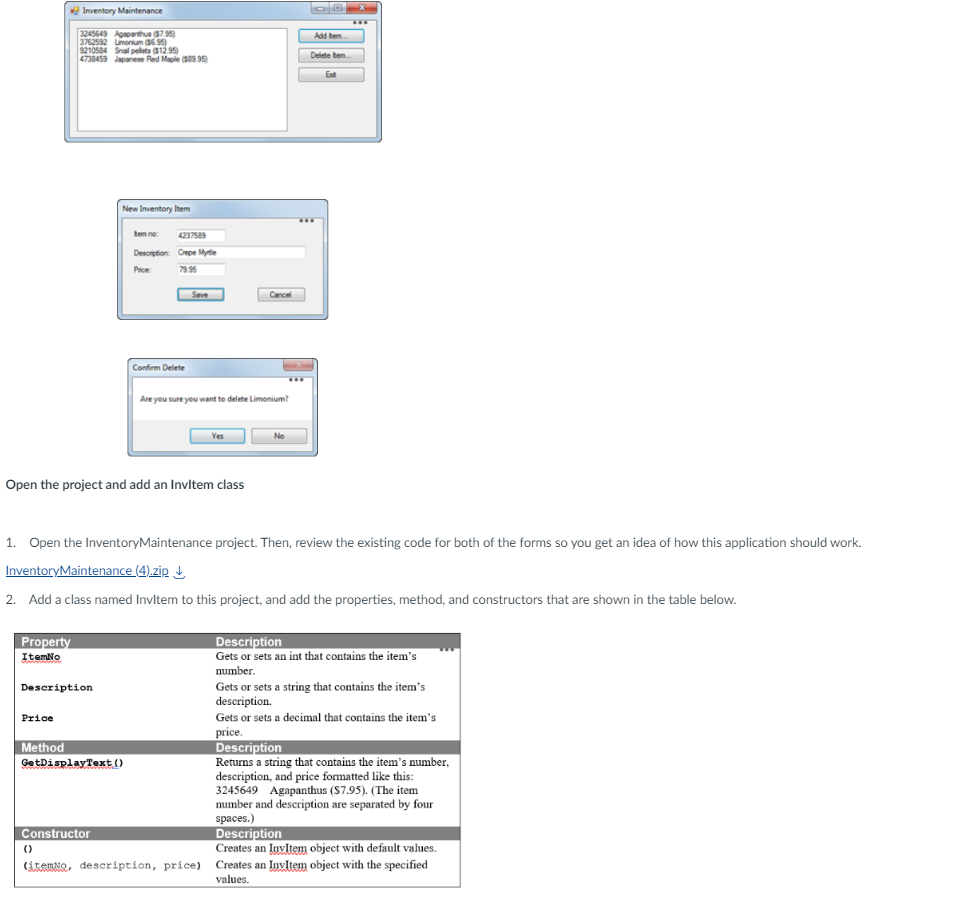
Open the project and add an InvItem class
Open the InventoryMaintenance project. Then, review the existing code for both of the forms so you get an idea of how this application should work.
InventoryMaintenance zipDownload InventoryMaintenance zip
Add a class named InvItem to this project, and add the properties, method, and constructors that are shown in the table below.
Add code to implement the New Item form
Display the code for the New Item form, and declare a class variable named invItem of type InvItem with an initial value of null.
Add a public method named GetNewItem that displays the form as a dialog box and returns an InvItem object.
Add code to the btnSaveClick event handler that creates a new InvItem object and closes the form if the data is valid.
Add code to implement the Inventory Maintenance form
Display the code for the Inventory Maintenance form, and declare a class variable named invItems of type List with an initial value of null.
Add a statement to the frmInvMaintLoad event handler that uses the GetItems method of the InvItemDB class to load the items list.
Add code to the FillItemListBox method that adds the items in the list to the Items list box. Use the GetDisplayText method of the InvItem class to format the item data.
Add code to the btnAddClick event handler that creates a new instance of the New Item form and executes the GetNewItem method of that form. If the InvItem object thats returned by this method is not null, this event handler should add the new item to the list, call the SaveItems method of the InvItemDB class to save the list, and then refresh the Items list box. Test the application to be sure this event handler works.
Add code to the btnDeleteClick event handler that removes the selected item from the list, calls the SaveItems method of the InvItemDB class to save the list, and refreshes the Items list box. Be sure to confirm the delete operation. Then, test the application to be sure this event handler works. Take a screenshot.
Submit your screenshot and code to Blackboard.
Open the project and add an Inviltem class
Open the InventoryMaintenance project. Then, review the existing code for both of the forms so you get an idea of how this application should work.
InventoryMaintenance zip darr
Add a class named Invitem to this project, and add the properties, method, and constructors that are shown in the table below.
Step by Step Solution
There are 3 Steps involved in it
1 Expert Approved Answer
Step: 1 Unlock

Question Has Been Solved by an Expert!
Get step-by-step solutions from verified subject matter experts
Step: 2 Unlock
Step: 3 Unlock
 Study Help