







Question: 23 Extra exercises for Murach 's Visual Basic 2015 Extra 11-1 Create and use an Inventory Item class In this exercise, you'll add a class
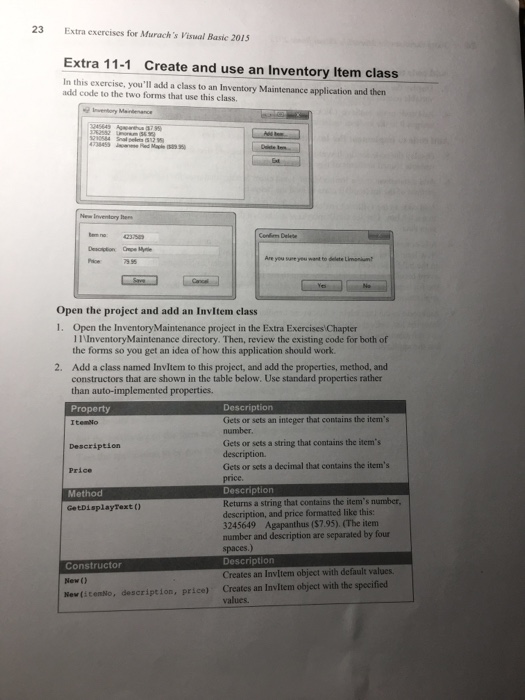
23 Extra exercises for Murach 's Visual Basic 2015 Extra 11-1 Create and use an Inventory Item class In this exercise, you'll add a class to an Inventory Maintenance application and then add code to the two forms that use this class want to delete Li Open the project and add an Invltem class 1. Open the InventoryMaintenance project in the Extra Exercises Chapter IInventoryMaintenance directory. Then, review the existing code for both of the forms so you get an idea of how this application should work. Add a class named Invltem to this project, and add the properties, method, and constructors that are shown in the table below. Use standard properties rather than auto-implemented properties. Property Itemto 2. Description Gets or sets an integer that contains the items number Gets or sets a string that contains the item's Description Gets or sets a decimal that contains the item's price. Price Method GetDisplayText ) Returns a string that contains the item's number description, and price formatted like this: 3245649 Agapanthas ($7.95). (The itenm ione przatedbyfour spaces.) Description Creates an Invltem object with default values. Constructor New ( ? New(icenNo, description, price) Creates an Invltem object with the specified values
Step by Step Solution
There are 3 Steps involved in it

Get step-by-step solutions from verified subject matter experts
 Study Help