







Question: For this assignment, you will use bash to create a simple photo inventory system. Your system will store basic information about photos and allow the
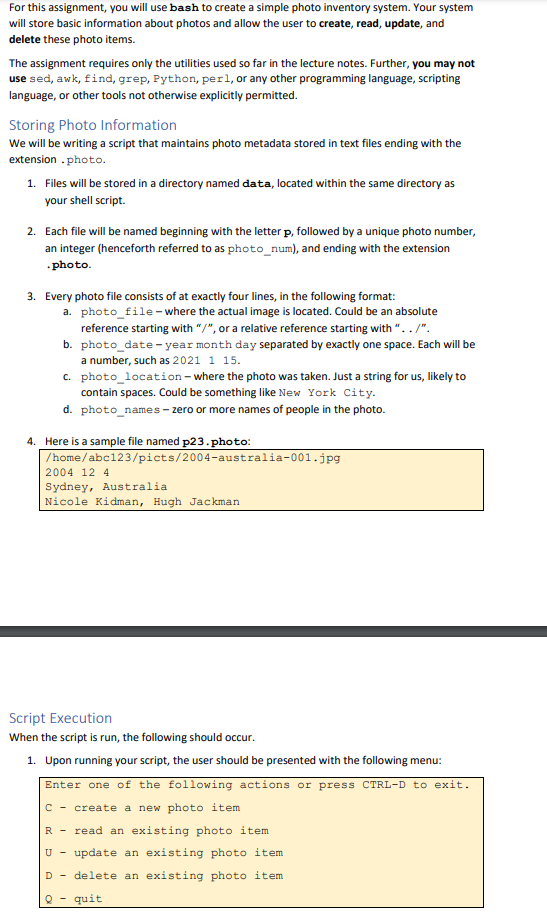
For this assignment, you will use bash to create a simple photo inventory system. Your system will store basic information about photos and allow the user to create, read, update, and delete these photo items. The assignment requires only the utilities used so far in the lecture notes. Further, you may not use sed, awk, find, grep, Python, perl, or any other programming language, scripting language, or other tools not otherwise explicitly permitted. Storing Photo Information We will be writing a script that maintains photo metadata stored in text files ending with the extension .photo. 1. Files will be stored in a directory named data, located within the same directory as your shell script 2. Each file will be named beginning with the letter p, followed by a unique photo number, an integer (henceforth referred to as photo_num), and ending with the extension photo. 3. Every photo file consists of at exactly four lines, in the following format: a. photo_file-where the actual image is located. Could be an absolute reference starting with "/", or a relative reference starting with "../". b. photo_date-year month day separated by exactly one space. Each will be a number, such as 2021 1 15. c. photo_location-where the photo was taken. Just a string for us, likely to contain spaces. Could be something like New York City. d. photo_names - zero or more names of people in the photo. 4. Here is a sample file named p23.photo: /home/abc123/picts/2004-australia-001.jpg 2004 124 Sydney, Australia Nicole Kidman, Hugh Jackman Script Execution When the script is run, the following should occur. 1. Upon running your script, the user should be presented with the following menu: Enter one of the following actions or press CTRL-D to exit. C - create a new photo item R - read an existing photo item U- update an existing photo item D - delete an existing photo item quit Q For this assignment, you will use bash to create a simple photo inventory system. Your system will store basic information about photos and allow the user to create, read, update, and delete these photo items. The assignment requires only the utilities used so far in the lecture notes. Further, you may not use sed, awk, find, grep, Python, perl, or any other programming language, scripting language, or other tools not otherwise explicitly permitted. Storing Photo Information We will be writing a script that maintains photo metadata stored in text files ending with the extension .photo. 1. Files will be stored in a directory named data, located within the same directory as your shell script 2. Each file will be named beginning with the letter p, followed by a unique photo number, an integer (henceforth referred to as photo_num), and ending with the extension photo. 3. Every photo file consists of at exactly four lines, in the following format: a. photo_file-where the actual image is located. Could be an absolute reference starting with "/", or a relative reference starting with "../". b. photo_date-year month day separated by exactly one space. Each will be a number, such as 2021 1 15. c. photo_location-where the photo was taken. Just a string for us, likely to contain spaces. Could be something like New York City. d. photo_names - zero or more names of people in the photo. 4. Here is a sample file named p23.photo: /home/abc123/picts/2004-australia-001.jpg 2004 124 Sydney, Australia Nicole Kidman, Hugh Jackman Script Execution When the script is run, the following should occur. 1. Upon running your script, the user should be presented with the following menu: Enter one of the following actions or press CTRL-D to exit. C - create a new photo item R - read an existing photo item U- update an existing photo item D - delete an existing photo item quit
Step by Step Solution
There are 3 Steps involved in it

Get step-by-step solutions from verified subject matter experts
 Study Help