







Question: For this exercise, you are going to create a new PHP file called exercise-2.php. This file will connect to your autoservice database (what you connected
For this exercise, you are going to create a new PHP file called exercise-2.php. This file will connect to your autoservice database (what you connected to in Practical Class 7) and display the clients name and the cars related to the client name clicked in exercise-1.php (Part of Exercise 1). You will need to use the customercar database table refer figure 2
The output should look like figure 3
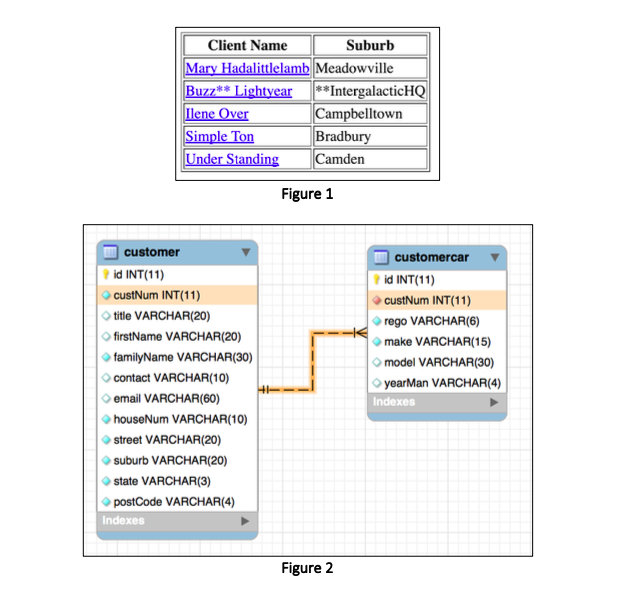
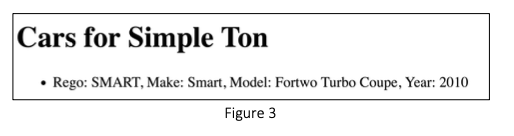
Client Name Suburb Mary Hadalittlelamb Meadowville Buzz** Lightyear **IntergalacticHQ Ilene Over Campbelltown Simple Ton Bradbury Under Standing Camden Figure 1 customer id INT(11) custNum INT(11) title VARCHAR(20) firstName VARCHAR(20) familyName VARCHAR(30) contact VARCHAR(10) email VARCHAR(60) houseNum VARCHAR(10) street VARCHAR(20) suburb VARCHAR(20) state VARCHAR(3) postCode VARCHAR(4) Indexes customercar id INT(11) custNum INT(11) rego VARCHAR(6) make VARCHAR(15) model VARCHAR(30) year Man VARCHAR(4) Indexes Figure 2 Cars for Simple Ton Rego: SMART, Make: Smart, Model: Fortwo Turbo Coupe, Year: 2010 Figure 3
Step by Step Solution
There are 3 Steps involved in it

Get step-by-step solutions from verified subject matter experts
 Study Help