





Question: For this project, you'll develop an application that lets the user register products to customers. The design of the Add Registration form x . Add
 For this project, you'll develop an application that lets the userregister products to customers. The design of the Add Registration form x

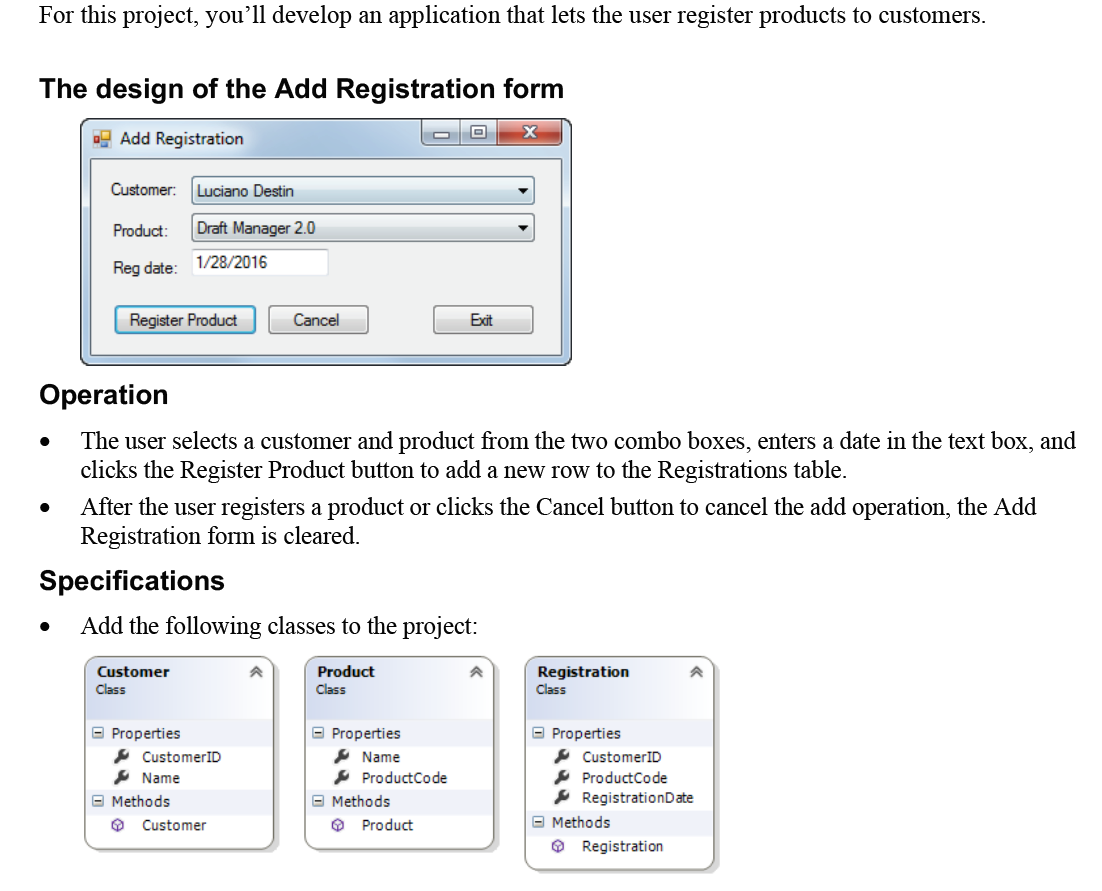
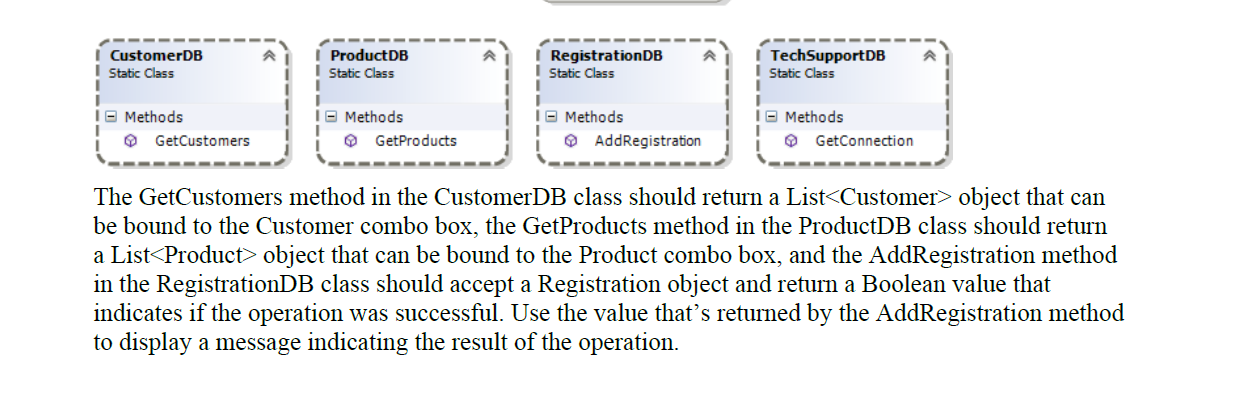
For this project, you'll develop an application that lets the user register products to customers. The design of the Add Registration form x . Add Registration Customer: Luciano Destin Product: Draft Manager 2.0 Reg date: 1/28/2016 Register Product Cancel Exit Operation The user selects a customer and product from the two combo boxes, enters a date in the text box, and clicks the Register Product button to add a new row to the Registrations table. After the user registers a product or clicks the Cancel button to cancel the add operation, the Add Registration form is cleared. Specifications Add the following classes to the project: Customer Class Product Class Registration Class Properties CustomerID Name Methods Customer Properties Name Product Code Methods Product Properties CustomerID Product Code Registration Date Methods Registration | CustomerDB Static Class I ProductDB I Static Class I Registration DB Static Class | TechSupportDB Static Class I I Methods GetCustomers Methods GetProducts 16 Methods i AddRegistration I Methods GetConnection i The GetCustomers method in the CustomerDB class should return a List object that can be bound to the Customer combo box, the GetProducts method in the ProductDB class should return a List Product> object that can be bound to the Product combo box, and the AddRegistration method in the RegistrationDB class should accept a Registration object and return a Boolean value that indicates if the operation was successful. Use the value that's returned by the AddRegistration method to display a message indicating the result of the operation. For this project, you'll develop an application that lets the user register products to customers. The design of the Add Registration form x . Add Registration Customer: Luciano Destin Product: Draft Manager 2.0 Reg date: 1/28/2016 Register Product Cancel Exit Operation The user selects a customer and product from the two combo boxes, enters a date in the text box, and clicks the Register Product button to add a new row to the Registrations table. After the user registers a product or clicks the Cancel button to cancel the add operation, the Add Registration form is cleared. Specifications Add the following classes to the project: Customer Class Product Class Registration Class Properties CustomerID Name Methods Customer Properties Name Product Code Methods Product Properties CustomerID Product Code Registration Date Methods Registration | CustomerDB Static Class I ProductDB I Static Class I Registration DB Static Class | TechSupportDB Static Class I I Methods GetCustomers Methods GetProducts 16 Methods i AddRegistration I Methods GetConnection i The GetCustomers method in the CustomerDB class should return a List object that can be bound to the Customer combo box, the GetProducts method in the ProductDB class should return a List Product> object that can be bound to the Product combo box, and the AddRegistration method in the RegistrationDB class should accept a Registration object and return a Boolean value that indicates if the operation was successful. Use the value that's returned by the AddRegistration method to display a message indicating the result of the operation

Step by Step Solution

There are 3 Steps involved in it

1 Expert Approved Answer
Step: 1 Unlock blur-text-image
Question Has Been Solved by an Expert!

Get step-by-step solutions from verified subject matter experts

Step: 2 Unlock
Step: 3 Unlock

Students Have Also Explored These Related Databases Questions!