





Question: Format the range A13:H42 as a Table with headers, and apply the style Table Style Light 20. Sort the table from Ato Z by Item
Format the range A13:H42 as a Table with headers,
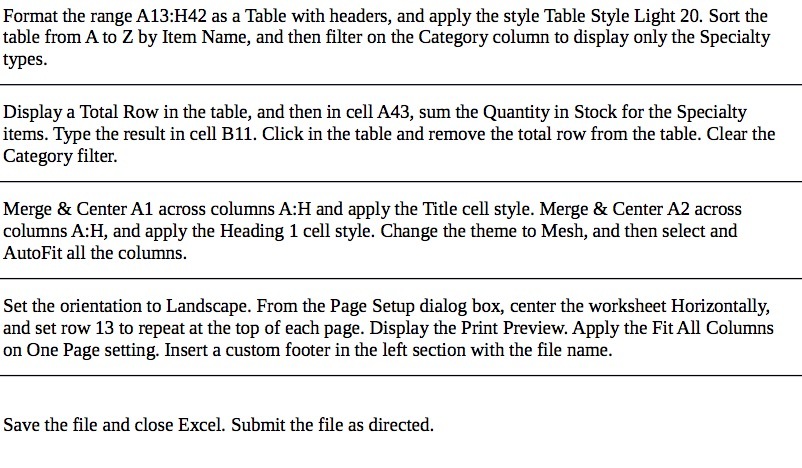
Format the range A13:H42 as a Table with headers, and apply the style Table Style Light 20. Sort the table from Ato Z by Item Name, and then lter on the Category colunm to display only the Specialty types. Display a Total How in the table, and then in cell A43, sum the Quantity in Stock for the Specialty items. Type the result in cell 1311. Click in the table and remove the total row from the table. Clear the Category filter. Merge 8t CenterAl across columns AH and apply the Title cell style. Merge 8: Center A2 across columns AzH, and apply the Heading 1 cell style. Change the theme to Mesh, and then select and AutoFit all the columns. Set the orientation to Landscape. From the Page Setup dialog box, center the worksheet Horizontally, and set row 13 to repeat at the top of each page. Display the Print Preview. Apply the Pit All Columns on One Page setting. Insert a custom footer in the left section with the le name. Save the file and close Excel. Submit the file as directed

Step by Step Solution

There are 3 Steps involved in it

1 Expert Approved Answer
Step: 1 Unlock blur-text-image

Question Has Been Solved by an Expert!

Get step-by-step solutions from verified subject matter experts

Step: 2 Unlock
Step: 3 Unlock

Students Have Also Explored These Related Mathematics Questions!