







Question: Formatted Table Write a program to print a small formatted table showing the radius, diameter, circumference, and area of two circles according to the following
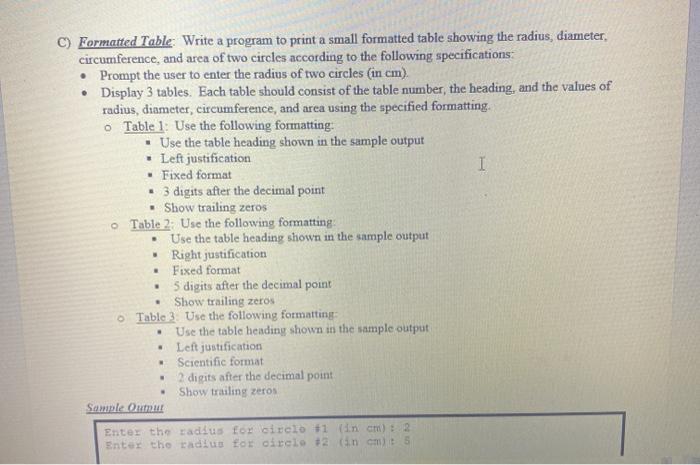
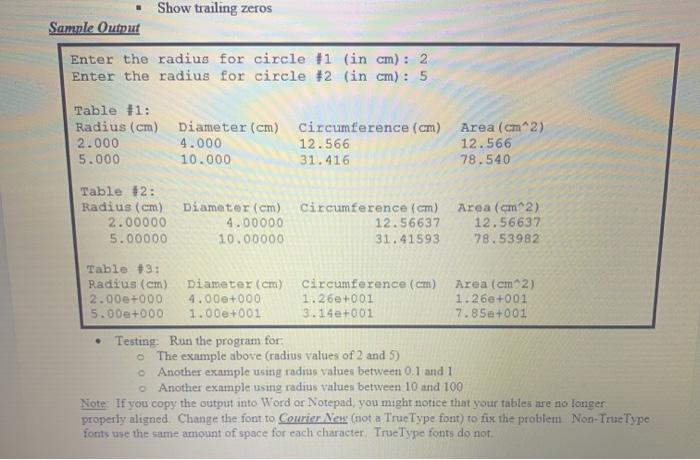
Formatted Table Write a program to print a small formatted table showing the radius, diameter, circumference, and area of two circles according to the following specifications: Prompt the user to enter the radius of two circles (in cm). Display 3 tables. Each table should consist of the table number, the heading, and the values of radius, diameter, circumference, and area using the specified formatting o Table 1: Use the following formatting Use the table heading shown in the sample output Left justification I . Fixed format 3 digits after the decimal point Show trailing zeros Table 2: Use the following formatting Use the table heading shown in the sample output Right justification Fixed format 5 digits after the decimal point Show trailing zeros Table 3. Use the following formatting Use the table heading shown in the sample output Left justification Scientific format 2 digits after the decimal point Show trailing zeros Sample Oumut Enter the radius for circlot1 in cm) : 2 Enter the radius for circle #2 (in cmt 5 . Show trailing zeros Sample Output Enter the radius for circle 11 (in cm) : 2 Enter the radius for circle #2 (in cm) : 5 Table #1: Radius (cm) Diameter (cm) circumference (cm) 2.000 4.000 12.566 5.000 10.000 31.416 Area (cm2) 12.566 78.540 Table #2: Radius (cm) 2.00000 5.00000 Diameter (cm) circumference (cm) 4.00000 12.56637 10.00000 31.41593 Area (cm2) 12.56637 78.53982 Table 3: Radius (cm) Diameter (cm) circumference (cm) Area (cm2) 2.000+000 4.00+000 1.26+001 1.26+001 5.000+000 1.000+001 3.14+001 7.85e+001 Testing: Run the program for The example above (radius values of 2 and 5) Another example using radius values between 0.1 and 1 Another example using radius values between 10 and 100 Note If you copy the output into Word or Notepad, you might notice that your tables are no longer properly aligned Change the font to Courier New (not a True Type font) to fix the problem. Non-TrueType fonts use the same amount of space for each character True Type fonts do not
Step by Step Solution
There are 3 Steps involved in it

Get step-by-step solutions from verified subject matter experts
 Study Help