







Question: Formula: Multiply, Divide, Subtract; Cell Referencing BE11.11 - Using Excel to Calculate a Change in Depreciation Student Work Area Required: Provide input into cells shaded
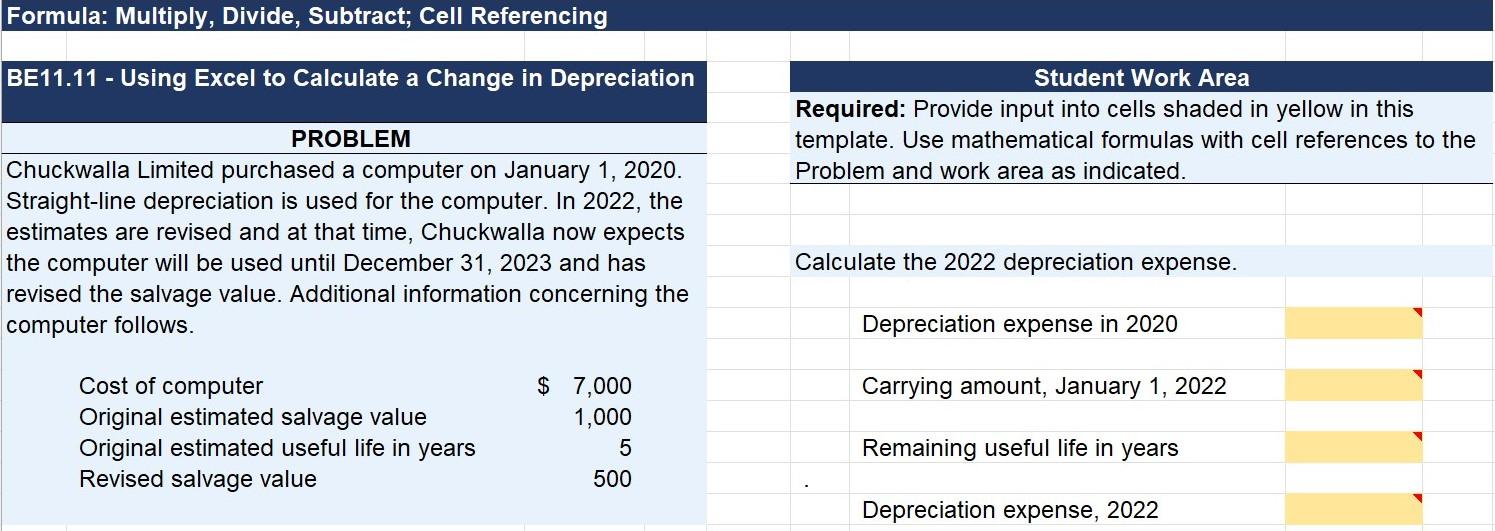
Formula: Multiply, Divide, Subtract; Cell Referencing BE11.11 - Using Excel to Calculate a Change in Depreciation Student Work Area Required: Provide input into cells shaded in yellow in this template. Use mathematical formulas with cell references to the Problem and work area as indicated. PROBLEM Chuckwalla Limited purchased a computer on January 1, 2020. Straight-line depreciation is used for the computer. In 2022, the estimates are revised and at that time, Chuckwalla now expects the computer will be used until December 31, 2023 and has revised the salvage value. Additional information concerning the computer follows. Calculate the 2022 depreciation expense. Depreciation expense in 2020 Carrying amount, January 1, 2022 Cost of computer Original estimated salvage value Original estimated useful life in years Revised salvage value $ 7,000 1,000 5 500 Remaining useful life in years Depreciation expense, 2022
Step by Step Solution
There are 3 Steps involved in it

Get step-by-step solutions from verified subject matter experts
 Study Help