







Question: from graphics import * def isBetween(x, end1, end2): '''Return True if x is between the ends or equal to either. The ends do not need
from graphics import *
def isBetween(x, end1, end2): '''Return True if x is between the ends or equal to either. The ends do not need to be in increasing order.''' return end1
def isInside(point, rect): '''Return True if the point is inside the Rectangle rect.''' pt1 = rect.getP1() pt2 = rect.getP2() return isBetween(point.getX(), pt1.getX(), pt2.getX()) and \ isBetween(point.getY(), pt1.getY(), pt2.getY())
def makeColoredRect(corner, width, height, color, win): ''' Return a Rectangle drawn in win with the upper left corner and color specified.'''
corner2 = corner.clone() corner2.move(width, -height) rect = Rectangle(corner, corner2) rect.setFill(color) rect.draw(win) return rect
def getChoice(choicePairs, default, win): #NEW '''Given a list choicePairs of tuples with each tuple in the form (rectangle, choice), return the choice that goes with the rectangle in win where the mouse gets clicked, or return default if the click is in none of the rectangles.'''
point = win.getMouse() for (rectangle, choice) in choicePairs: if isInside(point, rectangle): return choice return default def main(): win = GraphWin('pick Colors', 400, 400) win.yUp()
#NEW choicePairs = list() buttonSetup = [(310, 350, 'red'), (310, 310, 'yellow'), (310, 270, 'blue'), (310, 220, 'green'), (310, 190, 'pink')] for (x, y, color) in buttonSetup: button = makeColoredRect(Point(x, y), 80, 30, color, win) choicePairs.append((button, color))
house = makeColoredRect(Point(60, 200), 180, 150, 'gray', win) door = makeColoredRect(Point(90, 150), 40, 100, 'white', win) roof = Polygon(Point(50, 200), Point(250, 200), Point(150, 300)) roof.setFill('black') roof.draw(win) #NEW shapePairs = [(house, 'house'), (door, 'door'), (roof, 'roof')] msg = Text(Point(win.getWidth()/2, 375),'') msg.draw(win) for (shape, description) in shapePairs: prompt = 'Click to choose a ' + description + ' color.' msg.setText(prompt) color = getChoice(choicePairs, 'white', win) shape.setFill(color)
win.promptClose(msg)
main()
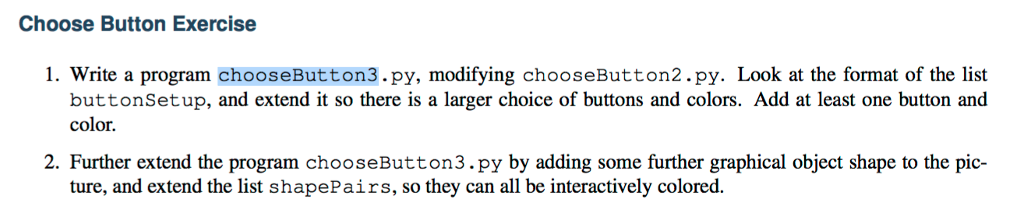
Choose Button Exercise 1. Write a program chooseButton3.py, modifying chooseButton2.py. Look at the format of the list buttonSetup, and extend it so there is a larger choice of buttons and colors. Add at least one button and color. 2. Further extend the program chooseButton3.py by adding some further graphical object shape to the pic- ture, and extend the list shapePairs, so they can all be interactively colored. Choose Button Exercise 1. Write a program chooseButton3.py, modifying chooseButton2.py. Look at the format of the list buttonSetup, and extend it so there is a larger choice of buttons and colors. Add at least one button and color. 2. Further extend the program chooseButton3.py by adding some further graphical object shape to the pic- ture, and extend the list shapePairs, so they can all be interactively colored
Step by Step Solution
There are 3 Steps involved in it

Get step-by-step solutions from verified subject matter experts
 Study Help