







Question: from graphics import * def isBetween(x, end1, end2): '''Return True if x is between the ends or equal to either. The ends do not need
from graphics import *
def isBetween(x, end1, end2): '''Return True if x is between the ends or equal to either. The ends do not need to be in increasing order.''' return end1
def isInside(point, rect): '''Return True if the point is inside the Rectangle rect.''' pt1 = rect.getP1() pt2 = rect.getP2() return isBetween(point.getX(), pt1.getX(), pt2.getX()) and \ isBetween(point.getY(), pt1.getY(), pt2.getY())
def polyHere(rect, win): ''' Draw a polygon interactively in Rectangle rect, in GraphWin win. Collect mouse clicks inside rect into the vertices of a Polygon, and always draw the Polygon created so far. When a click goes outside rect, stop and return the final polygon. The Polygon ends up drawn. The method draws and undraws rect. ''' rect.setOutline("red") rect.draw(win) vertices = list() pt = win.getMouse() while isInside(pt, rect): vertices.append(pt) poly = Polygon(vertices) poly.draw(win) pt = win.getMouse() poly.undraw() poly.draw(win) rect.undraw() return poly
def main(): win = GraphWin('Drawing Polygons', 400, 400) win.yUp() instructions = Text(Point(win.getWidth()/2, 30), "Click vertices inside the red rectangle."+ " Click outside the rectangle to stop.") instructions.draw(win)
rect1 = Rectangle(Point(5, 55), Point(200, 120)) poly1 = polyHere(rect1, win) poly1.setFill('green') rect2 = Rectangle(Point(210, 50), Point(350, 350)) poly2 = polyHere(rect2, win) poly2.setOutline('orange')
win.promptClose(instructions)
main()
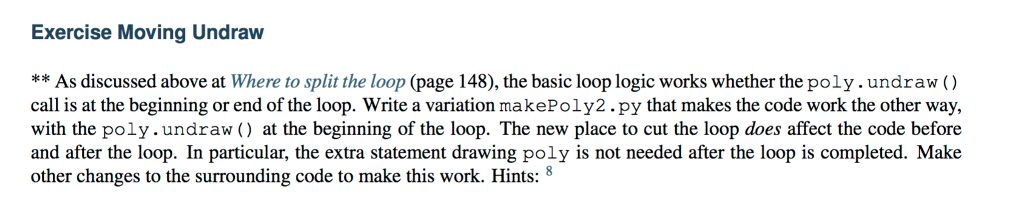
Exercise Moving Undraw ** As discussed above at Where to split the loop (page 148), the basic loop logic works whether the poly.undraw call is at the beginning or end of the loop. Write a variation makePoly2.py that makes the code work the other way, with the poly.undraw () at the beginning of the loop. The new place to cut the loop does affect the code before and after the loop. In particular, the extra statement drawing poly is not needed after the loop is completed. Make other changes to the surrounding code to make this work. Hints:8 Exercise Moving Undraw ** As discussed above at Where to split the loop (page 148), the basic loop logic works whether the poly.undraw call is at the beginning or end of the loop. Write a variation makePoly2.py that makes the code work the other way, with the poly.undraw () at the beginning of the loop. The new place to cut the loop does affect the code before and after the loop. In particular, the extra statement drawing poly is not needed after the loop is completed. Make other changes to the surrounding code to make this work. Hints:8
Step by Step Solution
There are 3 Steps involved in it

Get step-by-step solutions from verified subject matter experts
 Study Help