







Question: from pox.core import core import pox.openflow.libopenflow _ 0 1 as of log = core.getLogger ( ) class Routing ( object ) : def _ _
from pox.core import core
import pox.openflow.libopenflow as of
log core.getLogger
class Routing object:
def initself connection:
# Keep track of the connection to the switch so that we can
# send it messages!
self.connection connection
# This binds our PacketIn event listener
connection.addListenersself
def dorouting self packet, packetin portonswitch, switchid:
# portonswtich the port on which this packet was received
# switchid the switch which received this packet
# Your code here
pass
def handlePacketIn self event:
Handles packet in messages from the switch.
packet event.parsed # This is the parsed packet data.
if not packet.parsed:
logwarningIgnoring incomplete packet"
return
packetin event.ofp # The actual ofppacketin message.
self.doroutingpacket packetin event.port, event.dpid
def launch :
Starts the component
def startswitch event:
logdebugControlling seventconnection,
Routingeventconnection
core.openflow.addListenerByNameConnectionUp startswitch
#usrbinpython
from mininet.topo import Topo
from mininet.net import Mininet
from mininet.cli import CLI
from mininet.node import RemoteController
class MyTopologyTopo:
def initself:
Topo.initself
# laptop self.addHostLaptop ipdefaultRoute"Laptopeth
# switch self.addSwitchs
# self.addLinklaptop switch port port
if namemain:
#This part of the script is run when the script is executed
topo MyTopology #Creates a topology
c RemoteControllernamec controllerRemoteController, ip port #Creates a remote controller
net Mininettopotopo, controllerc #Loads the topology
net.start #Starts mininet
CLInet #Opens a command line to run commands on the simulated topology
net.stop #Stops mininet
Network Topology and Rules to be implemented:
Rule : ICMP traffic is forwarded only between the Student Housing LAN, Faculty LAN
and IT Department subnets or between devices that are on the same subnet.
Rule : TCP traffic is forwarded only between the University Data Center, IT
Department, Faculty LAN, Student Housing LAN, trustedPC, or between devices that
are on the same subnet; however, only the Faculty LAN may access the exam
server.
Rule : UDP traffic is forwarded only between the University Data Center, IT
Department, Faculty LAN, Student Housing LAN, or between devices that are on the
same subnet
Rule : All other traffic should be dropped.
Your goal will be to allow or block traffic between the different devices based on the Network
Topology Rules given below. In this assignment, you cannot use flooding ie you cannot use
flooding: ofOFPPFLOOD Instead, you will need to specify specific ports for all traffic and the
forwarding must be done by subnet, not by enumerating all of the IP addresses. You might
consider a method to determine if an IP Address is valid on a particular subnet. Notice that the
rules are written according to the subnet.
You may implement your router however you choosealthough as a suggestion, you may find it
easiest to determine the correct destination port by using
the source and destination IP addresses
or the source port on the switch from which the packet originated.
These provided files will get you startedyou will need to modify both:
labtoposkel.py labcontrollerskel.py
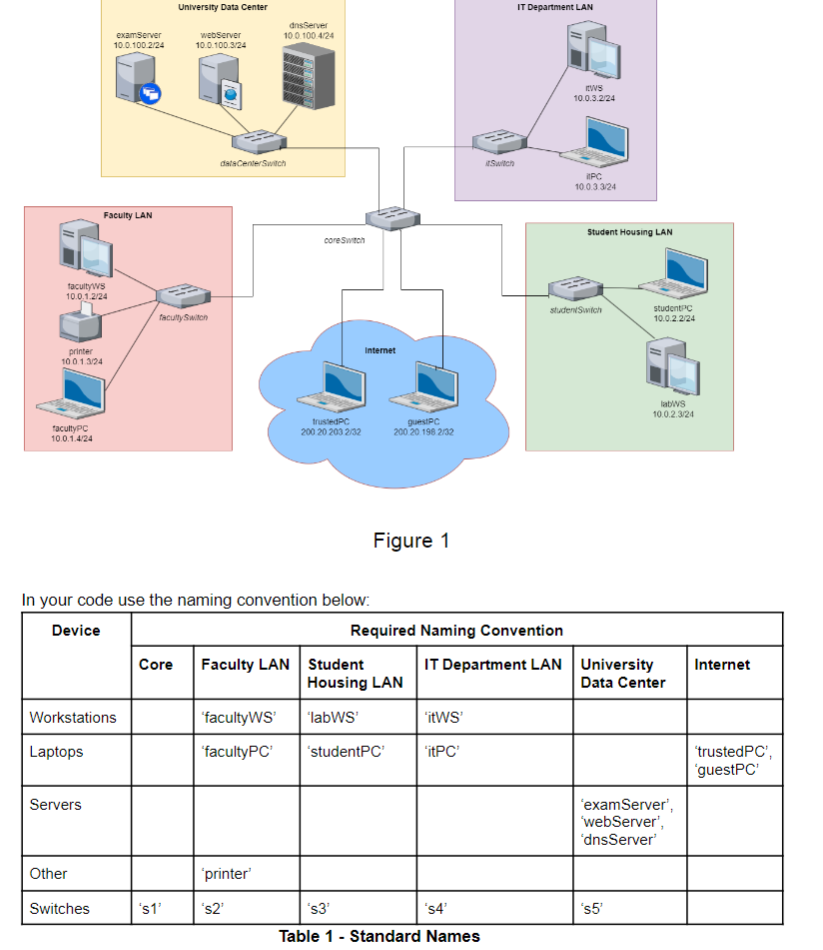
We will use the same topology as Lab which is shown in Figure Note the departments are
now organized into subnets. You will need to do the following:
Finish the topology file by adding all the hosts be sure to manually specify the MAC
address, IP address and subnet for each host switches and links
Implement the router based on Rule Rule Rule and Rule In your code use the naming convention below:
Table Standard Names
Step by Step Solution
There are 3 Steps involved in it
1 Expert Approved Answer
Step: 1 Unlock

Question Has Been Solved by an Expert!
Get step-by-step solutions from verified subject matter experts
Step: 2 Unlock
Step: 3 Unlock
 Study Help