







Question: function [h,n] = bpw(wl, wu, len, win); % [h] = bpw(wl, wu, len, win); % % Creates a causal FIR bandpass impulse response using the
![function [h,n] = bpw(wl, wu, len, win); % [h] = bpw(wl,](https://dsd5zvtm8ll6.cloudfront.net/si.experts.images/questions/2024/09/66fa6c3245561_72966fa6c319703c.jpg)
function [h,n] = bpw(wl, wu, len, win); % [h] = bpw(wl, wu, len, win); % % Creates a causal FIR bandpass impulse response using the windowing method % % wl Lower Cutoff (Radians): wl = [0,pi] % wu Upper Cutoff (Radians): wh = [0,pi], wh>wl % len Length of h (should be odd) % win 'bart', 'blac', 'hamm' 'hann' or 'rect' % ==> (Bartlett, Blackman, Hamming, Hanning, Rectangular) % % h Created Impulse Response % n Causal time index vector from [0:len-1]; % % % Author: Bradley M. Ratliff, Ph.D. % University of Dayton % 4/22/2016
%If length is even, make it odd. if mod(len,2) == 0 len = len + 1; end
%Create n vector M = len-1; n = [-M/2:M/2]; n2 = n+M/2;
%Create Impulse Response Using Rectangular Window h = (wu/pi)*sinc((wu*n)/pi) - (wl/pi)*sinc((wl*n)/pi);
%Apply Appropriate Window. if win == 'bart' wn = 0.54 - 0.46*cos((2*pi*n2)/M); elseif win == 'blac' wn = 0.42 - 0.5*cos(2*pi*n2/M) + 0.08*cos(4*pi*n2/M); elseif win == 'hamm' wn = 0.54 - 0.46*cos((2*pi*n2)/M); elseif win == 'hann' wn = 0.5 - 0.5*cos((2*pi*n2)/M); elseif win == 'rect' wn = 0*n2+1; else disp('Not a valid window type! ==> Rect Window Used.'); wn = 0*n2+1; end h = h.*wn; n = n2;
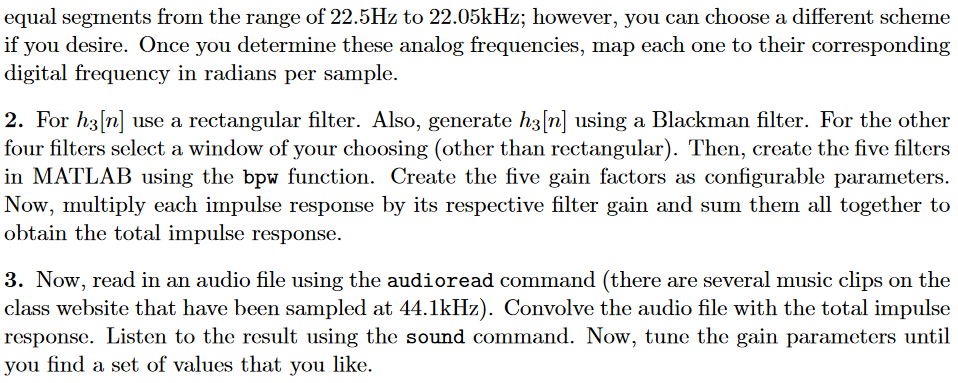
3 Design Tasks: We will assume the input audio files are sampled at a rate of 44.1kHz, which is the rate used on audio CDs. With our sampling rate = 44.1 kHz (T-1/44100 seconds), the effective continuous frequency responses of the five filters should have a combined bandwidth ranging from 0 to 22.5kHz. I suggest you divide the combined bandwidth up into five equal bands on a logarithmic scale. The reason for such a selection is due to the logarithmic way in which humans perceive frequency. I have provided a MATLAB function, bpw, that implements a causal FIR bandpass filter using the windowing method (you can find this function on the class website under the Final Exam folder). To use it, all you need to specify are the lower and upper digital cutoff frequencies (in radians per sample), the length of the filter M, and the type of windowing function to apply (i.e., I've done the hard part) For additional help with the function open the .m file and read the help section at the beginning of the file. Your task is to design and create the 5 bandpass filters, which simply involves determining the cutoff frequency for each filter and choosing a window type. For each filter use a length of M 501. Also, note that hi[n] and hs[n] will be lowpass and highpass filters, respectively. This is casily accounted for by setting a 1 0 for h11n and wu for h572 . Once you have created each filter in MATLAB. you simply need to multiply each filter by its respective gain factor (which are tuning parameters) and sum the scaled impulse responses together. Then, apply the filter via convolution, i.e., using the MATLAB command conv(x, h). Once processed, the reconstruction process is to be done using the sound() command in MATLAB so that you can listen to the results of applying your filter. To design your equalizer perform the following design tasks: 1. Determine the upper and lower analog cutoff frequencies for each bandpass filter in radians per second. I suggest using a logarithmic scale and dividing the frequency axis into five nearly 3 Design Tasks: We will assume the input audio files are sampled at a rate of 44.1kHz, which is the rate used on audio CDs. With our sampling rate = 44.1 kHz (T-1/44100 seconds), the effective continuous frequency responses of the five filters should have a combined bandwidth ranging from 0 to 22.5kHz. I suggest you divide the combined bandwidth up into five equal bands on a logarithmic scale. The reason for such a selection is due to the logarithmic way in which humans perceive frequency. I have provided a MATLAB function, bpw, that implements a causal FIR bandpass filter using the windowing method (you can find this function on the class website under the Final Exam folder). To use it, all you need to specify are the lower and upper digital cutoff frequencies (in radians per sample), the length of the filter M, and the type of windowing function to apply (i.e., I've done the hard part) For additional help with the function open the .m file and read the help section at the beginning of the file. Your task is to design and create the 5 bandpass filters, which simply involves determining the cutoff frequency for each filter and choosing a window type. For each filter use a length of M 501. Also, note that hi[n] and hs[n] will be lowpass and highpass filters, respectively. This is casily accounted for by setting a 1 0 for h11n and wu for h572 . Once you have created each filter in MATLAB. you simply need to multiply each filter by its respective gain factor (which are tuning parameters) and sum the scaled impulse responses together. Then, apply the filter via convolution, i.e., using the MATLAB command conv(x, h). Once processed, the reconstruction process is to be done using the sound() command in MATLAB so that you can listen to the results of applying your filter. To design your equalizer perform the following design tasks: 1. Determine the upper and lower analog cutoff frequencies for each bandpass filter in radians per second. I suggest using a logarithmic scale and dividing the frequency axis into five nearly
Step by Step Solution
There are 3 Steps involved in it

Get step-by-step solutions from verified subject matter experts
 Study Help