







Question: Generating a square wave This function approximates a square wave by summing a series of sinusoidal functions of various frequencies and amplitudes. Xsouane (t) -
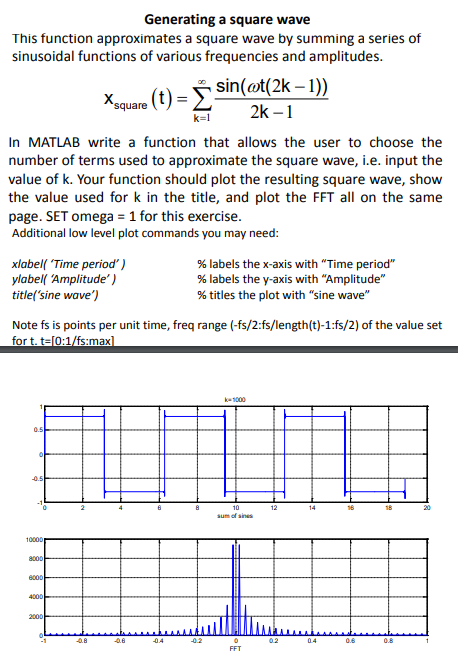
Generating a square wave This function approximates a square wave by summing a series of sinusoidal functions of various frequencies and amplitudes. Xsouane (t) - 5 sin(et(2k-1) n MATLAB write a function that allows the user to choose the number of terms used to approximate the square wave, i.e. input the value of k. Your function should plot the resulting square wave, show the value used for k in the title, and plot the FFT all on the same page. SET omega 1 for this exercise Additional low level plot commands you may need: xlabel( 'Time period') ylabell Amplitude') title('sine wave') % labels the x-axis with "Time period" % labels the y-axis with "Amplitude" % titles the plot with "sine wave" Note fs is points per unit time, freq range (-fs/2:fs/length(t)-1:fs/2) of the value set for t.t-[0:1/fs:max 18 sum of sines 10000 Generating a square wave This function approximates a square wave by summing a series of sinusoidal functions of various frequencies and amplitudes. Xsouane (t) - 5 sin(et(2k-1) n MATLAB write a function that allows the user to choose the number of terms used to approximate the square wave, i.e. input the value of k. Your function should plot the resulting square wave, show the value used for k in the title, and plot the FFT all on the same page. SET omega 1 for this exercise Additional low level plot commands you may need: xlabel( 'Time period') ylabell Amplitude') title('sine wave') % labels the x-axis with "Time period" % labels the y-axis with "Amplitude" % titles the plot with "sine wave" Note fs is points per unit time, freq range (-fs/2:fs/length(t)-1:fs/2) of the value set for t.t-[0:1/fs:max 18 sum of sines 10000
Step by Step Solution
There are 3 Steps involved in it

Get step-by-step solutions from verified subject matter experts
 Study Help