







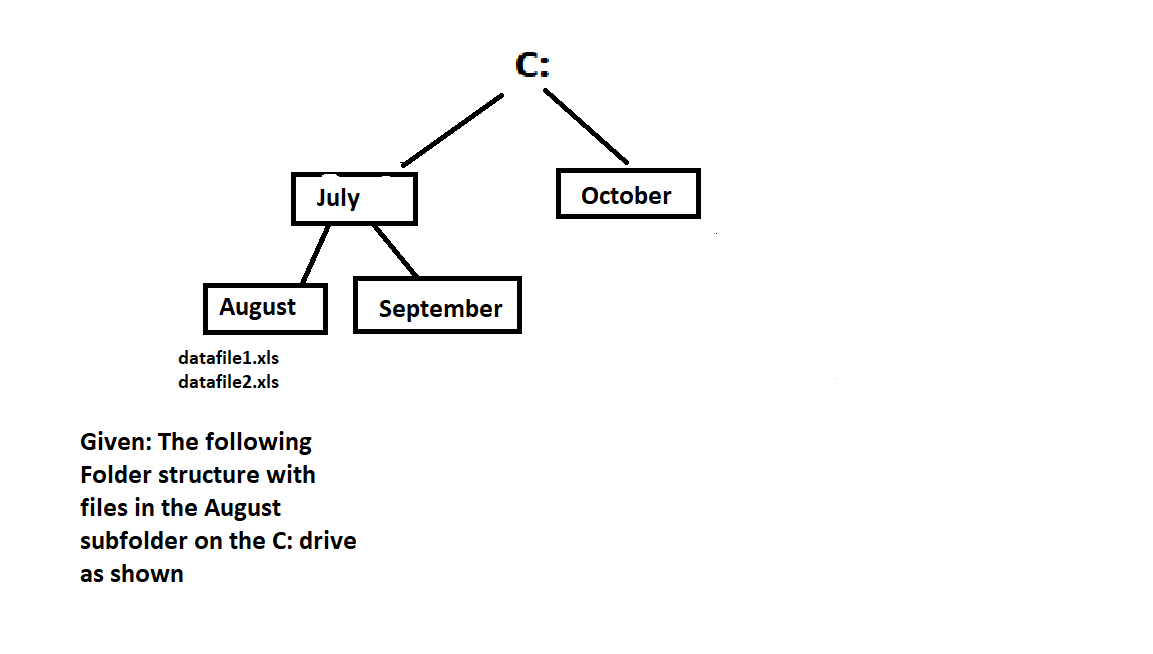
Question: Given: The following Folder structure with files in the August subfolder on the C: drive as shown Open up the Command Prompt and create the
Given: The following
Folder structure with
files in the August
subfolder on the C: drive
as shown
Open up the Command Prompt and create the following structure on your C: drive. Paste a screen snip showing your work using Explorer. It must show all the folders and files for credit.
Question
Question
Points
When you have created the directory structure, take a screen snip with the tree command; save it as a png file, jpeg or bitmap file and attach it with this question. Your snip must also display the files in the directory as well
Question
Answer the following questions based on exactly what you would type in to execute the required action. In all cases but question you will be required to use a command prompt command and one or more absolute paths. Test your answers in the command prompt application to make sure you answered the questions exactly. You must base all your answers on working from the C: drive
Question
Question
Points
Assume your present working directory is somewhere on the D: drive. What exactly would you type in at the command prompt to change to the E: drive using the fewest keystrokes possible and without using a switch? Blank
Blank
Question
Question
Points
Without using command switches or quotes, use a command that has letters and the absolute path to change your present working directory to the August directory Blank
Blank
Question
Question
Points
Without using command switches or quotes, use a command that has letters and the absolute path to change your present working directory to the October directory. Blank
Blank
Question
Question
Points
Without using command switches or quotes, use a command that has letters and the absolute path to change your present working directory to the July directory Blank
Blank
Question
Question
Points
Use a letter command in the command prompt without switches and quotes; type the command and the absolute path to the source and the relative path not the absolute path to the destination filename to rename datafilexls as Quarterxls in the same directorythe relative path does not include the drive and subdirectories in its path
Blank
Blank
Question
Question
Points
Use a letter command without switches or quotes ; type the command which will require a source absolute path and a destination absolute path to copy the datafilexls to the October folder as Quarterxls at the destination. So at the destination the filename will be quarterxlsnote: there should be only space between the source and destination pathBlank
Blank
Question
Question
Points
Use a letter command without switches or quotes in the command prompt; and enter the command, the absolute path and a wildcard character, a period and another wildcard character to delete all the files in the August directoryBlank
Blank
Question
Question
Points
Use a letter command without switches and quotes; type in the command and the absolute path to create a folder named
November that is a subfolder of the October folder create the November folder in the October folder. Blank
Blank
Step by Step Solution
There are 3 Steps involved in it
1 Expert Approved Answer
Step: 1 Unlock

Question Has Been Solved by an Expert!
Get step-by-step solutions from verified subject matter experts
Step: 2 Unlock
Step: 3 Unlock
 Study Help