







Question: Given the input listed above, the output below displays a list of the PIDs and CMDs (with all its arguments) of the processes which have
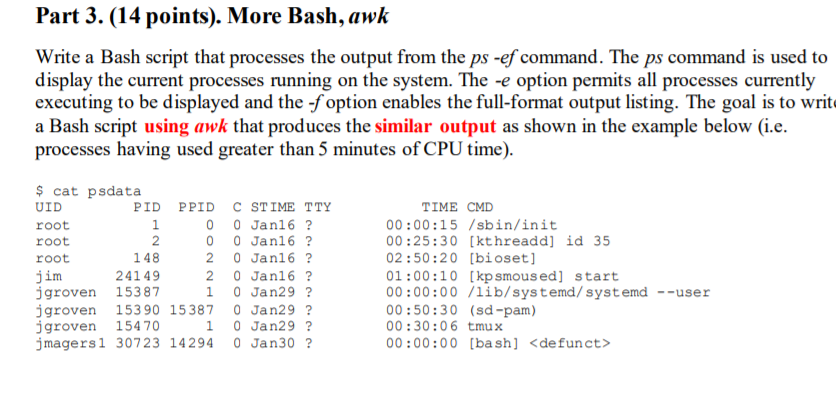
Given the input listed above, the output below displays a list of the PIDs and CMDs (with all its arguments) of the processes which have used at least 5 minutes of cumulative CPU time.
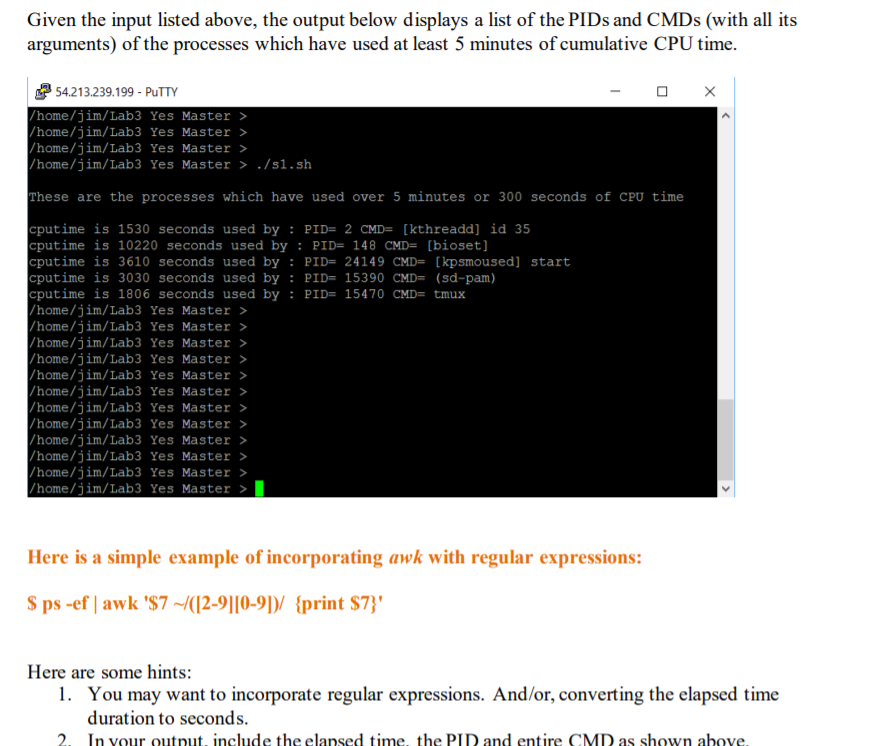
Part 3. (14 points). More Bash, awk Write a Bash script that processes the output from the ps -ef command. The ps command is used to display the current processes running on the system. The -e option permits all processes currently executing to be displayed and the -f option enables the full-format output listing. The goal is to write a Bash script using awk that produces the similar output as shown in the example below (i.e. processes having used greater than 5 minutes of CPU time). $ cat psdata UID PID PPID C STIME TTY root 0 0 Jan16 ? root 0 0 Jan16 ? root 148 20 Jan16 ? jim 24149 2 0 Jan16 ? jgroven 15387 1 0 Jan29 ? jgroven 153 90 15387 0 Jan29 ? jgroven 15470 1 0 Jan 29 ? jmagersl 30723 14294 0 Jan 30 ? TIME CMD 00:00:15 /sbin/init 00:25:30 [kthreadd] id 35 02:50:20 [bioset] 01:00:10 [kp smous ed] start 00:00:00 /lib/systemd/ systemd --user 00:50:30 (sd-pam) 00:30:06 tmux 00:00:00 [bash]
Step by Step Solution
There are 3 Steps involved in it

Get step-by-step solutions from verified subject matter experts
 Study Help