







Question: Given the VB.net code below, please help solve an issue. The problem is that when I want to send a string to another device, the
Given the VB.net code below, please help solve an issue. The problem is that when I want to send a string to another device, the string is not delivered until I close the program that is running. The string should be delivered without having to close the program. Note that the code is mostly copied from the following website: http://www.dreamincode.net/forums/topic/21431-p2p-connections/
A few changes were made. For example, I hard-coded the string that is going to be sent. I also allow the user to input the IP address in a textbox once the program is running.
If you would like the context of this code, I am sending commands to electronic devices (i.e. Agilent Signal Analyzers & Generators). The problem is that the command is not sent (or received) until I close the running program. Interestingly, if I enter the local host IP address 127.0.0.1 instead of the IP addresses of the agilent devices, I receive the string without having to close my program. It could be an issue with the Agilent devices, but I am not sure about that because my colleague was able to interact with the devices using C/C++ code. It is interesting to note that when I comment out the code for the timer, I cannot send anything to myself (local host), but the functionality is still the same when I send the command to the other device (it accepts it after I close the program). That is how far I have narrowed down the issue.
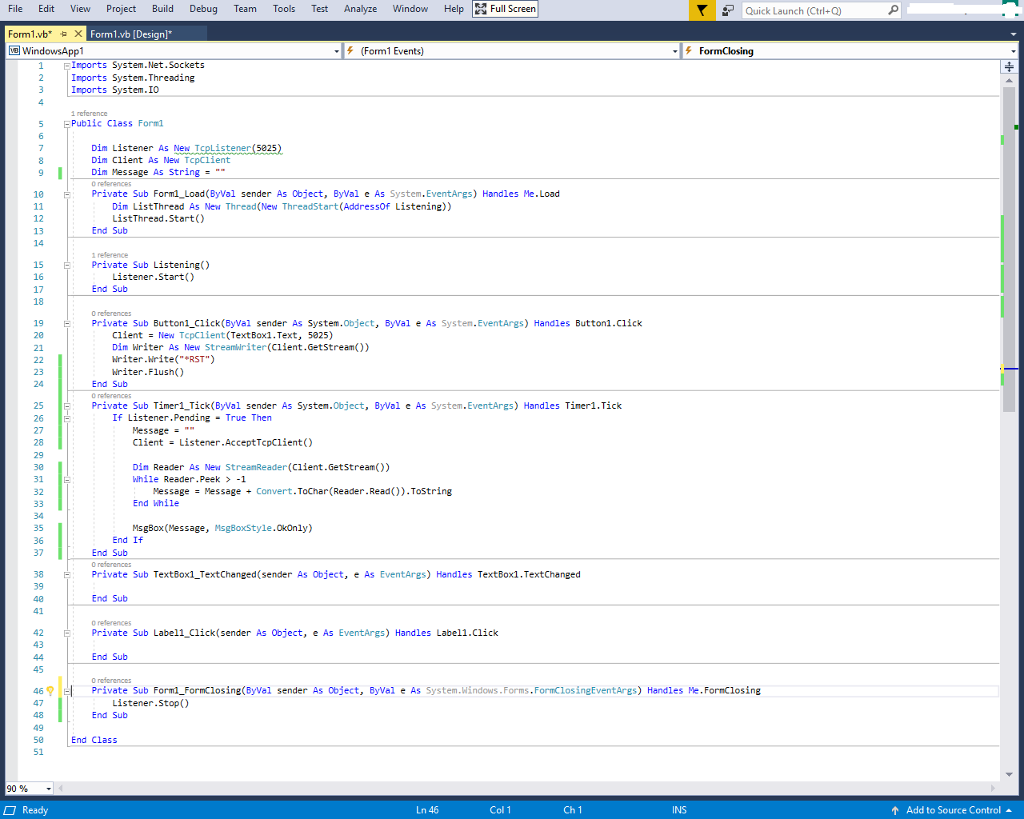
File Edit View Project Build Debug Team Tools Test Analyze Window Help Full Screen Quick Launch (Ctrl+Q) Form1.vb" Form1.vb [Designl WindowsAppl f (Form1 Events) FormClosing EIrports System.Net.Sockets Irports System.Threading 3 Irports System.IO 1 reference Public Class Formi Dim Listener As New TcpListener (5825 Dim Client As New TcpClient Dim Message As String- Private Sub Forml Load (ByWal sender As Object, ByVal e As System.EventArgs) Handles Me.Load Dim ListThreed As New Thread(New ThreadStart(Addressof Listening)) ListThread.Start() 12 13 End Sub 1 reference Private Sub Listening) 16 Listener.Start) End Sub O references Private Sub Button1 Click(ByVal sender As System.Object, ByVal e As Systen.EventArgs) Handles Button1.Click 19 Client New TcpClient (TextBox1.Text, 5825) Dim Writer As New Streamuriter(Client.GetstreamO) Nriter.Write(" RST") riter.Flush() End Sub 0 referenes Private Sub Timer1 Tick(ByWal sender As Systen.Object, ByVal e As System.EventAres) Handles Tiner1.Tick 25 If Listener.Pending True Then Message-* Client Listener.AcceptTcpClient) Din Reader As New StreanReader (C1ient.Getstream()) While Reader.Peek 1 End While MsgBox (Message, MsgBoxStyle.Okonly) 31 E 32 Message Message Convert . ToChar(Reader. Read().ToString 35 36 End If End Sub 0 refarences Private Sub TextBox1_TextChanged(sender As Object, e As EventAres) Handles Textbox1.TextChanged 38 39 End Sub o references Private Sub Label1 Click(sender As Object, e As EventArgs) Handles Label1.Click 43 End Sub 0 references 46? Private Sub Forml-FormClosing(ByVal sender As Object, Byval e As System.Windows.Forms , FormClosingEventArgs) Handles Me. FormClosing Listener.Stop() End Sub End Class 51 90% Ready Ln 46 Col 1 Ch 1 Add to Source Control File Edit View Project Build Debug Team Tools Test Analyze Window Help Full Screen Quick Launch (Ctrl+Q) Form1.vb" Form1.vb [Designl WindowsAppl f (Form1 Events) FormClosing EIrports System.Net.Sockets Irports System.Threading 3 Irports System.IO 1 reference Public Class Formi Dim Listener As New TcpListener (5825 Dim Client As New TcpClient Dim Message As String- Private Sub Forml Load (ByWal sender As Object, ByVal e As System.EventArgs) Handles Me.Load Dim ListThreed As New Thread(New ThreadStart(Addressof Listening)) ListThread.Start() 12 13 End Sub 1 reference Private Sub Listening) 16 Listener.Start) End Sub O references Private Sub Button1 Click(ByVal sender As System.Object, ByVal e As Systen.EventArgs) Handles Button1.Click 19 Client New TcpClient (TextBox1.Text, 5825) Dim Writer As New Streamuriter(Client.GetstreamO) Nriter.Write(" RST") riter.Flush() End Sub 0 referenes Private Sub Timer1 Tick(ByWal sender As Systen.Object, ByVal e As System.EventAres) Handles Tiner1.Tick 25 If Listener.Pending True Then Message-* Client Listener.AcceptTcpClient) Din Reader As New StreanReader (C1ient.Getstream()) While Reader.Peek 1 End While MsgBox (Message, MsgBoxStyle.Okonly) 31 E 32 Message Message Convert . ToChar(Reader. Read().ToString 35 36 End If End Sub 0 refarences Private Sub TextBox1_TextChanged(sender As Object, e As EventAres) Handles Textbox1.TextChanged 38 39 End Sub o references Private Sub Label1 Click(sender As Object, e As EventArgs) Handles Label1.Click 43 End Sub 0 references 46? Private Sub Forml-FormClosing(ByVal sender As Object, Byval e As System.Windows.Forms , FormClosingEventArgs) Handles Me. FormClosing Listener.Stop() End Sub End Class 51 90% Ready Ln 46 Col 1 Ch 1 Add to Source Control
Step by Step Solution
There are 3 Steps involved in it

Get step-by-step solutions from verified subject matter experts
 Study Help