







Question: Given this topology how can I add a default route to ISP matching all IPs with next hop being ISP's s2/0 IP. And what command
Given this topology how can I add a default route to ISP matching all IPs with next hop being ISP's s2/0 IP. And what command would add this route into ospf 1 which already exists as seen on topology.
area 0 is connected to SW1 and contains the 3 routers Edge which is boarder router and Branch and HQ which are internal back bone routers.
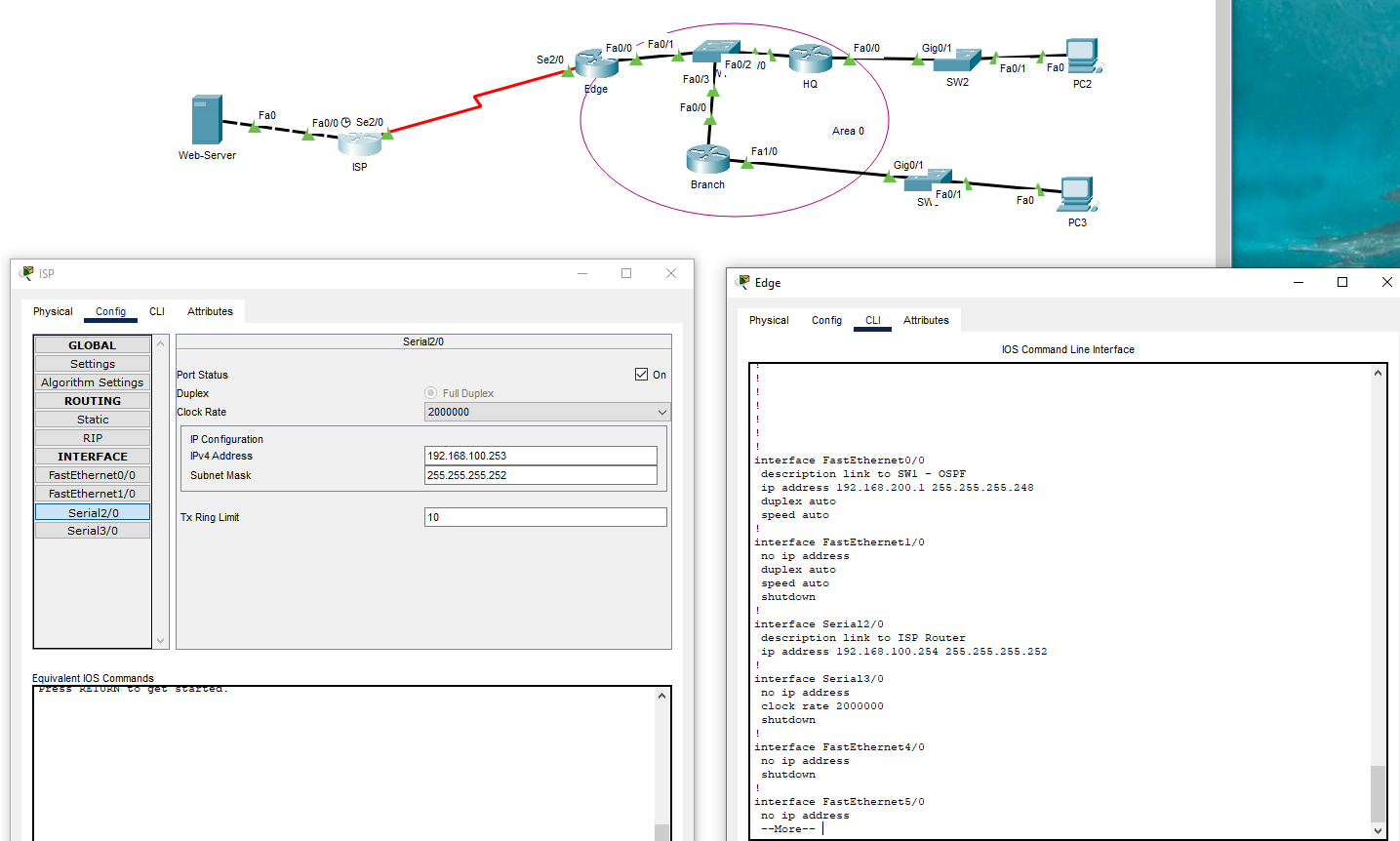

ISP Physical Config CLI GLOBAL Settings Web-Server Fa0 Fa0/0 Se2/0 ISP Attributes Serial2/0 Fa0/0 Fa0/1 Se2/0 Fa0/2/0 Fa0/3 Edge HQ Fa0/0 On Full Duplex Algorithm Settings ROUTING Static RIP INTERFACE FastEthernet0/0 FastEthernet1/0 Port Status Duplex Clock Rate IP Configuration IPv4 Address Subnet Mask 2000000 192.168.100.253 255.255.255.252 Serial2/0 Serial3/0 Tx Ring Limit Equivalent IOS Commands Press RETURN to get started. 10 Branch Fa0/0 Gig0/1 Fa0/1 Fa0 SW2 PC2 Area 0 Fa1/0 Gig0/1 Fa0/1 SW. Fa0 PC3 Edge Physical Config CLI Attributes IOS Command Line Interface interface FastEthernet0/0 description link to SW1 - OSPF ip address 192.168.200.1 255.255.255.248 duplex auto speed auto interface FastEthernet1/0 no ip address duplex auto speed auto shutdown interface Serial2/0 ! description link to ISP Router ip address 192.168.100.254 255.255.255.252 interface Serial3/0 no ip address clock rate 2000000 shutdown interface FastEthernet4/0 ! no ip address shutdown interface FastEthernet5/0 no ip address --More--|
Step by Step Solution
There are 3 Steps involved in it

Get step-by-step solutions from verified subject matter experts
 Study Help