







Question: Go to SQL Developer. Create a top-level query using SELECT * FROM GUEST.Add your query in step 12 as a subquery with the alias TOTAL_FEE.
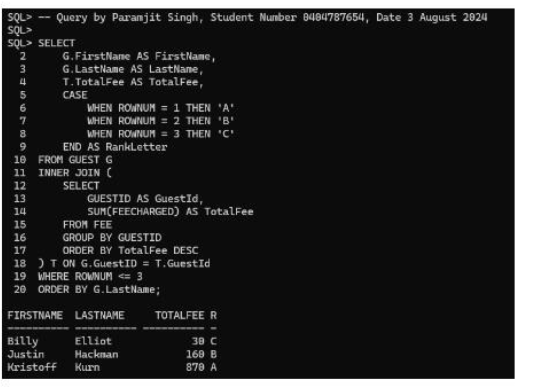
Go to SQL Developer. Create a top-level query using SELECT * FROM GUEST.Add your query in step 12 as a subquery with the alias TOTAL_FEE. INNER JOIN your subquery to GUEST using that subquery's alias. Sort by last name.Replace the * with the correct column names. The complete query should return the following results sorted by LastName.FIRSTNAME LASTNAME TOTALFEE RANKLETTERBilly Elliot 30 CJustin Hackman 160 BKristoff Kurn 870 AIn your SELECT, make table names UPPER_CASE and column names ProperCase. Add a comment before the query that includes your name, student number, and today's date.In SQLPLUS run CST2355_A1_FORMAT.SQL using the @ command. Clear your screen. Copy and paste into SQLPLUS to run your script.Provide a screenshot from SQLPLUS of your comment, SELECT statement, and its formatted output results.
Step by Step Solution
There are 3 Steps involved in it

Get step-by-step solutions from verified subject matter experts
 Study Help