







Question: gotogoal.py --> #! /usr/bin/env python import rospy from math import pow,atan2,sqrt from geometry_msgs.msg import Twist from turtlesim.msg import Pose class TurtleBot: def __init__(self): rospy.init_node('turtlebotgoal',anonymous=True) self.velocity_publisher=rospy.Publisher('turtle1/cmd_vel',Twist,queue_size=10)
gotogoal.py -->
#! /usr/bin/env python import rospy from math import pow,atan2,sqrt from geometry_msgs.msg import Twist from turtlesim.msg import Pose
class TurtleBot: def __init__(self): rospy.init_node('turtlebotgoal',anonymous=True) self.velocity_publisher=rospy.Publisher('turtle1/cmd_vel',Twist,queue_size=10) self.pose_subscriber=rospy.Subscriber('turtle1/pose',Pose,self.update_pose) self.pose=Pose() self.rate=rospy.Rate(10) def update_pose(self,data): self.pose=data def euclidean_distance(self,goal_pose): return sqrt(pow((goal_pose.x-self.pose.x),2)+pow((goal_pose.y-self.pose.y),2)) def linear_vel(self,goal_pose,constant=1.5): return constant*self.euclidean_distance(goal_pose) def steering_angle(self,goal_pose): return atan2(goal_pose.y-self.pose.y,goal_pose.x-self.pose.x) def angular_vel(self,goal_pose,constant=6): return constant*(self.steering_angle(goal_pose)-self.pose.theta)
def move2goal(self): goal_pose=Pose() goal_pose.x=input("Set x :") goal_pose.y=input("Set y :") distance_tolarance=input("Set tolarance :") vel_msg=Twist() while self.euclidean_distance(goal_pose)>=distance_tolarance: vel_msg.linear.x=self.linear_vel(goal_pose) vel_msg.linear.y=0.0 vel_msg.linear.z=0.0 vel_msg.angular.x=0.0 vel_msg.angular.y=0.0 vel_msg.angular.z=self.angular_vel(goal_pose) self.velocity_publisher.publish(vel_msg) self.rate.sleep() vel_msg.linear.x=0 vel_msg.linear.x=0 self.velocity_publisher.publish(vel_msg) if __name__ == '__main__': try: x=TurtleBot() x.move2goal()
except rospy.ROSInterruptException: pass
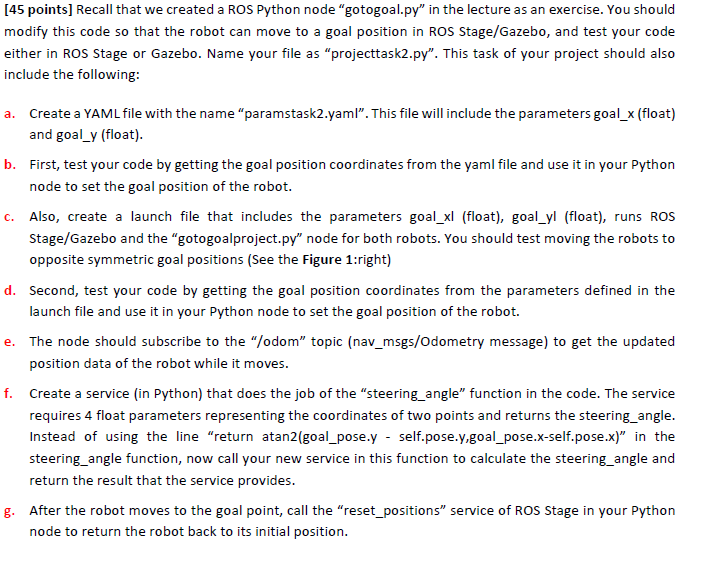
[45 points] Recall that we created a ROS Python node "gotogoal.py" in the lecture as an exercise. You should modify this code so that the robot can move to a goal position in ROS Stage/Gazebo, and test your code either in ROS Stage or Gazebo. Name your file as projecttask2.py". This task of your project should also include the following: a. Create a YAML file with the name "paramstask2.yaml. This file will include the parameters goal_x (float) and goal_y (float). b. First, test your code by getting the goal position coordinates from the yaml file and use it in your Python node to set the goal position of the robot. C. Also, create a launch file that includes the parameters goal_xl (float), goal_yl (float), runs ROS Stage/Gazebo and the "gotogoalproject.py" node for both robots. You should test moving the robots to opposite symmetric goal positions (See the Figure 1:right) d. Second, test your code by getting the goal position coordinates from the parameters defined in the launch file and use it in your Python node to set the goal position of the robot. e. The node should subscribe to the "odom topic (nav_msgs/Odometry message) to get the updated position data of the robot while it moves. f. Create a service in Python) that does the job of the "steering angle function in the code. The service requires 4 float parameters representing the coordinates of two points and returns the steering_angle. Instead of using the line "return atan2(goal_pose.y - self.pose.y.goal_pose.x-self.pose.x)" in the steering_angle function, now call your new service in this function to calculate the steering angle and return the result that the service provides. g. After the robot moves to the goal point, call the "reset_positions" service of ROS Stage in your Python node to return the robot back to its initial position. e
Step by Step Solution
There are 3 Steps involved in it

Get step-by-step solutions from verified subject matter experts
 Study Help