







Question: Question First run the rxMulticast.py code and check what is the output? Now run sendMulticast.py and check what is the output? Why TTL is important

Question
First run the rxMulticast.py code and check what is the output?
Now run sendMulticast.py and check what is the output?
Why TTL is important in message transmission?
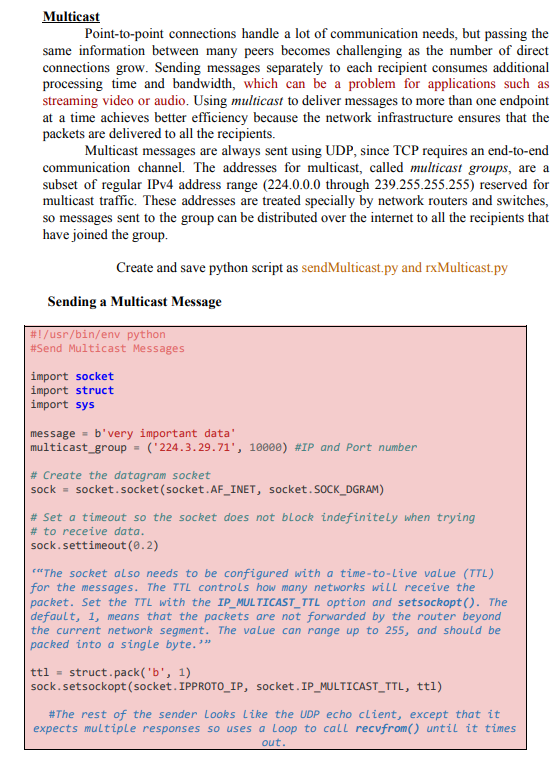
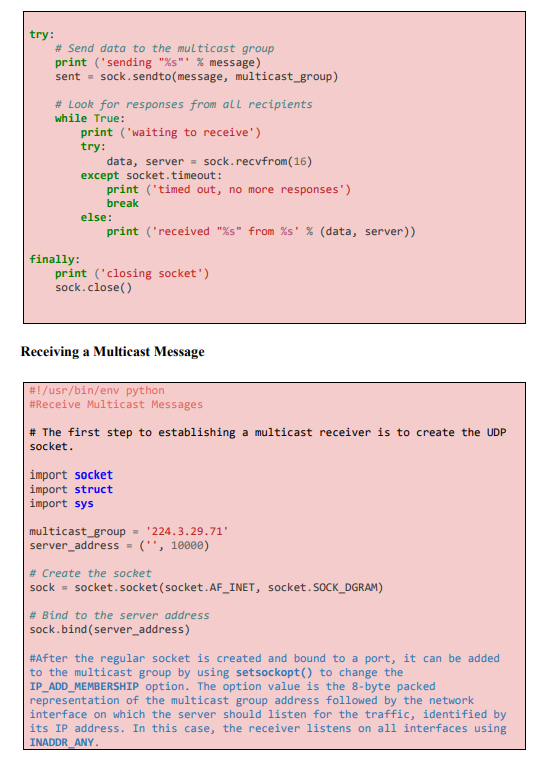
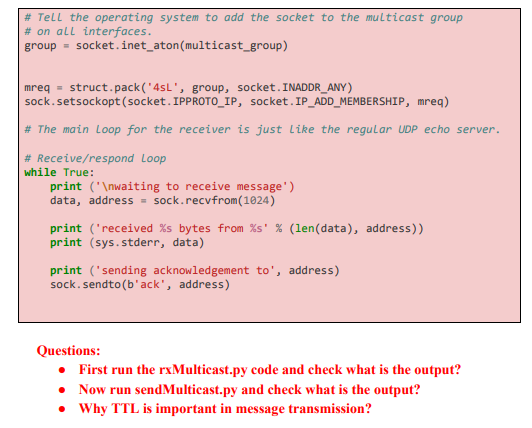
Exercise-3.4: Sending and Receiving a Multicast Message Multicast Point-to-point connections handle a lot of communication needs, but passing the same information between many peers becomes challenging as the number of direct connections grow. Sending messages separately to each recipient consumes additional processing time and bandwidth, which can be a problem for applications such as streaming video or audio. Using multicast to deliver messages to more than one endpoint at a time achieves better efficiency because the network infrastructure ensures that the packets are delivered to all the recipients. Multicast messages are always sent using UDP, since TCP requires an end-to-end communication channel. The addresses for multicast, called multicast groups, are a subset of regular IPv4 address range (224.0.0.0 through 239.255.255.255) reserved for multicast traffic. These addresses are treated specially by network routers and switches, so messages sent to the group can be distributed over the internet to all the recipients that have joined the group Create and save python script as sendMulticast.py and rxMulticast.py Sending a Multicast Message #!/usr/bin/env python #Send Multicast Messages import socket import struct import sys message - b'very important data' multicast_group = ('224.3.29.71', 10000) #IP and Port number # Create the datagram socket sock = socket.socket (socket.AF_INET, socket. SOCK_DGRAM) # Set a timeout so the socket does not block indefinitely when trying # to receive data. sock.settimeout(0.2) ***The socket also needs to be configured with a time-to-Live value (TTL) for the messages. The TTL controls how many networks will receive the packet. Set the TTL with the IP_MULTICAST_TTL option and setsockopt(). The default, 1, means that the packets are not forwarded by the router beyond the current network segment. The value can range up to 255, and should be packed into a single byte." ttl = struct.pack('b', 1) sock.setsockopt(socket. IPPROTO_IP, socket.IP_MULTICAST_TTL, ttl) #The rest of the sender Looks Like the UDP echo client, except that it expects multiple responses so uses a Loop to call recvfrom() until it times out. try: # Send data to the multicast group print ('sending "%s"'%message) sent = sock.sendto(message, multicast_group) # Look for responses from all recipients while True: print ('waiting to receive') try: data, server = sock.recvfrom(16) except socket. timeout: print ('timed out, no more responses") break else: print ('received "%s" from %s' % (data, server)) finally: print ('closing socket") sock.close() Receiving a Multicast Message #!/usr/bin/env python #Receive Multicast Messages # The first step to establishing a multicast receiver is to create the UDP socket. import socket import struct import sys multicast_group- '224.3.29.71' server_address = ('', 10000) # Create the socket sock = socket.socket (socket.AF_INET, socket. SOCK_DGRAM) # Bind to the server address sock.bind(server_address) #After the regular socket is created and bound to a port, it can be added to the multicast group by using setsockopt() to change the IP_ADD_MEMBERSHIP option. The option value is the 8-byte packed representation of the multicast group address followed by the network interface on which the server should listen for the traffic, identified by its IP address. In this case, the receiver listens on all interfaces using INADDR_ANY # Tell the operating system to add the socket to the multicast group # on all interfaces. group = socket.inet_aton (multicast_group) mreq = struct.pack('4sL', group, socket. INADDR_ANY) sock.setsockopt(socket. IPPROTO_IP, socket. IP_ADD_MEMBERSHIP, mreq) # The main Loop for the receiver is just like the regular UDP echo server. # Receive/respond Loop while True: print (' waiting to receive message') data, address = sock.recvfrom(1024) print ('received %s bytes from %s' % (len(data), address)) print (sys.stderr, data) print ('sending acknowledgement to', address) sock. sendto(b'ack', address) Questions: First run the rxMulticast.py code and check what is the output? Now run sendMulticast.py and check what is the output? Why TTL is important in message transmission
Step by Step Solution
There are 3 Steps involved in it

Get step-by-step solutions from verified subject matter experts
 Study Help