







Question: Grader - Instructions Accounting 2019 Project Miller-Nobles (7e/13e) - Using Excel ChF7/ChF8 Project Description: Miller-Nobles (7/13) - Using Excel ChF7/ChF8 v1 Steps to Perform: Step
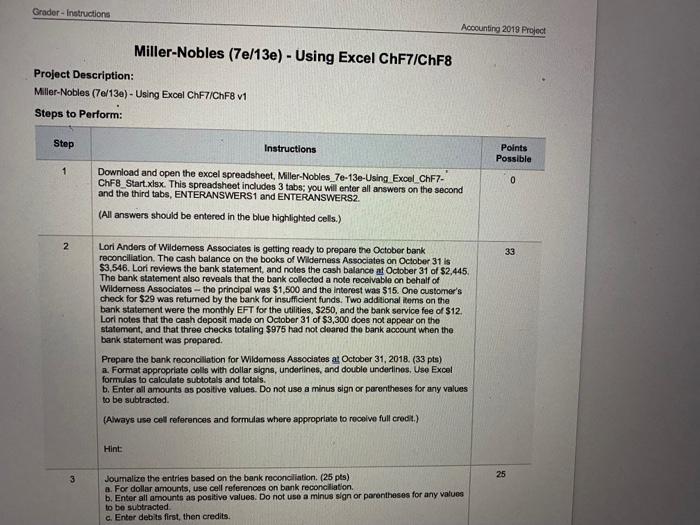
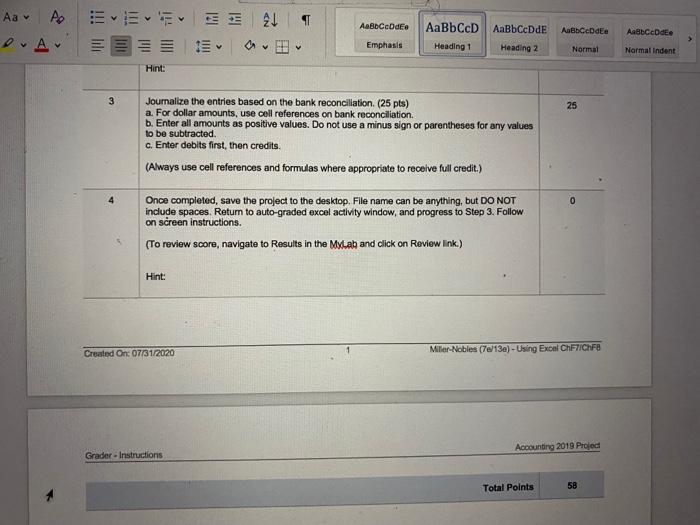
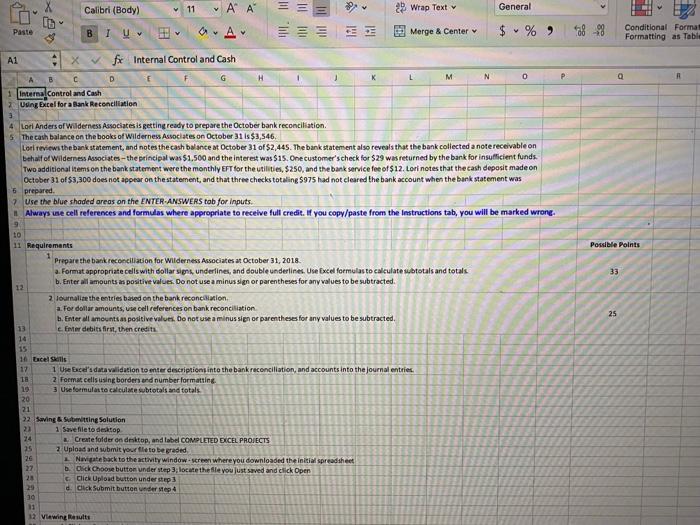
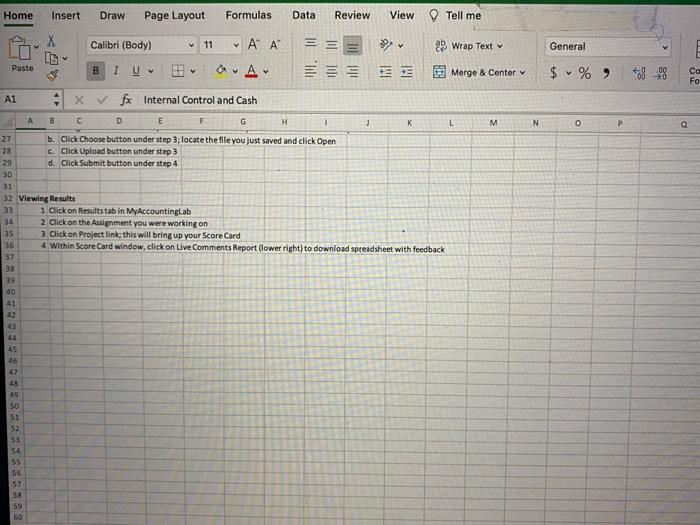
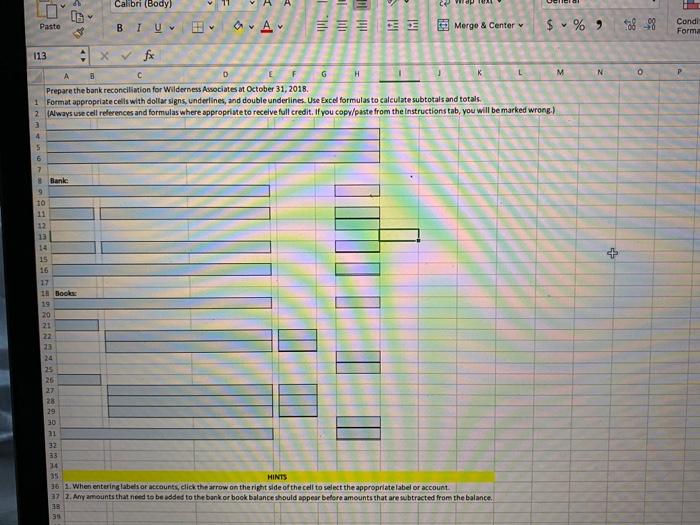
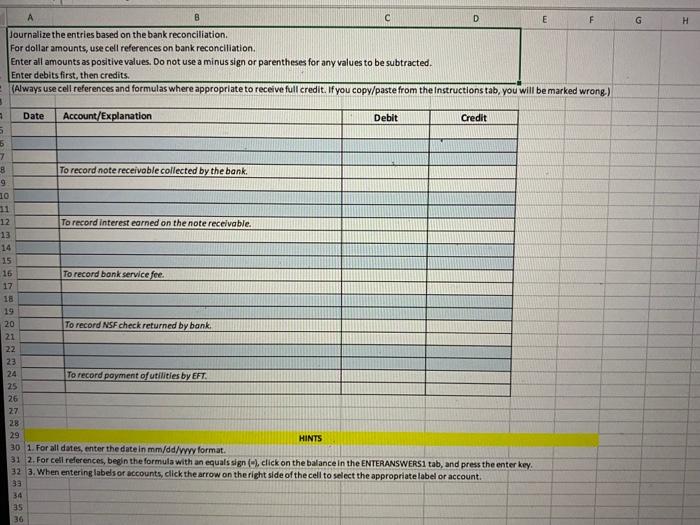
Grader - Instructions Accounting 2019 Project Miller-Nobles (7e/13e) - Using Excel ChF7/ChF8 Project Description: Miller-Nobles (7/13) - Using Excel ChF7/ChF8 v1 Steps to Perform: Step Instructions Points Possible 1 0 Download and open the excel spreadsheet, Miller-Nobles_7e-13e-Using Excel CHF7- ChF8_Start.xlsx. This spreadsheet includes 3 tabs; you will enter all answers on the second and the third tabs, ENTERANSWERS1 and ENTERANSWERS (All answers should be entered in the blue highlighted cells.) 2 33 Lori Anders of Wildemess Associates is getting ready to prepare the October bank reconciliation. The cash balance on the books of Wilderness Associates on October 31 is $3,546. Lori reviews the bank statement, and notes the cash balance at October 31 of $2,445. The bank statement also reveals that the bank collected a note receivable on behalf of Wilderness Associates the principal was $1,500 and the interest was $15. One customer's check for $29 was returned by the bank for insufficient funds. Two additional items on the bank statement were the monthly EFT for the utilities. $250, and the bank service fee of $12. Lori notes that the cash deposit made on October 31 of $3,300 does not appear on the statement, and that three checks totaling $975 had not cleared the bank account when the bank statement was prepared. Prepare the bank reconciliation for Wildemess Associates at October 31, 2018. (33 pts) a. Format appropriate cells with dollar signs, underlines, and double underlines, Uso Excel formulas to calculate subtotals and totals. b. Enter all amounts as positive values. Do not use a minus sign or parentheses for any values to be subtracted (Always use cel references and formulas where appropriate to receive full credit) Hint 25 3 Joumalize the entries based on the bank reconciliation (25 pts) a. For dollar amounts, use cell references on bank reconciliation b. Enter all amounts as positive values. Do not use a minus sign or parentheses for any values to be subtracted c. Enter debits first, then credits Aa - po 21 AaBbce de AaBb CcD AaBbCcDdE Abbcode ABCDE v Emphasis Heading 1 Heading 2 Normal Normal Indent Hint: 3 25 Joumalize the entries based on the bank reconciliation. (25 pts) a. For dollar amounts, use cell references on bank reconciliation b. Enter all amounts as positive values. Do not use a minus sign or parentheses for any values to be subtracted c. Enter debits first, then credits (Always use cell references and formulas where appropriate to receive full credit.) 4 Once completed, save the project to the desktop, File name can be anything, but DO NOT include spaces. Return to auto-graded excel activity window, and progress to Step 3. Follow on screen instructions. (To review score, navigate to Results in the MyLab and click on Review link.) Hint: Created On: 07/31/2020 Mlier-Nobles (7/13e) - Using Excel ChF7ACHFB Accounting 2019 Project Gradur - Instructions Total Points 58 Wrap Text General . A MI Merge & Center $ % ) 38 - Conditional Format Formatting as Table Calibri (Body) 11 ' ' ID Paste B TV a A1 1 x fx Internal Control and Cash C D G H 1 Internal control and Cash Using Excel for a Bank Reconciliation K L M N 0 P Possible Points 33 25 4 Lori Anders of Wilderness Associates is getting ready to prepare the October bank reconciliation 5 The cash balance on the books of Wilderness Associates on October 31 is $3,546 Lor reviews the bank statement, and notes the cash balance at October 31 of $2,445. The bank statement also reveals that the bank collected a note receivable on behalf of Wilderness Associates - the principal was $1.500 and the interest was $15. One customer's check for $29 was returned by the bank for insufficient funds. Two additional items on the bank statement were the monthly EFT for the utilities, $250, and the bank service fee of $12. Lori notes that the cash deposit made on October 31 of $3,300 does not appear on the statement, and that three checks totaling $975 had not cleared the bank account when the bank statement was 6 prepared 7. Use the blue shaded areas on the ENTER ANSWERS tob for inputs. Always une cell references and formulas where appropriate to receive full credit. If you copy/paste from the Instructions tab, you will be marked wrong 9 10 11 Requirements Prepare the bank reconciliation for Wilderness Associates at October 31, 2018 a. Format appropriate cells with dollar signs, underlines, and double underlines. Use Excel formulas to calculate subtotals and totals b. Enter all amounts as positive values. Do not use a minus sign or parentheses for any values to be subtracted 12 2 Journalize the entries based on the bank reconciliation a. Fer dollar amounts, use cell references on bank reconciliation b. Enteral amounts positive values. Do not use a minus sien or parentheses for any values to be subtracted. 13 c. Enter debits first, then credits 14 15 10 Dace Statis 17 1 Use Exce's data validation to enter descriptions into the bank reconciliation, and accounts into the journal entries. 18 2 Format cells using borders and number formatting 10 3 Use formulate calculme subtotals and totals. 20 21 22 Saving & Submitting Solution 23 1 Savenie to desktop 24 Create folder on desktop, and label COMPLETED EXCEL PROJECTS 25 2 Upload and submit your leto begraded 26 Navigate back to the activity window screen where you downloaded the initial spreadsheet 27 .. Osck Choose button under step 3; locate the file you just saved and click Open Click Upload button under step 3 29 d. Click Submit button andere 30 11 12 Viewing Results Home Insert Draw Page Layout Formulas Data Review View Tell me Calibri (Body) 11 [G v 22 Wrap Text General OA Paste BIU v IM Morge & Center $ % ) 58 Fo L M N o P a A1 X V fx Internal Control and Cash 8 D E F G H 3 K b. Click Choose button under step 3; locate the file you just saved and click Open 28 Click Upload button under step 3 29 d. Click Submit button under step 4 30 31 32 Viewing Results 33 1 Click on Results tab in My Accountinglab 34 2 Click on the Assignment you were working on 35 3. Click on Project links this will bring up your Score Card 36 4 Within Score Card window, click on Live Comments Report (lower right) to download spreadsheet with feedback 37 28 39 40 41 42 44 45 46 42 48 49 50 51 52 53 54 55 56 57 58 59 Calibri (Body) A A LOD Pasto BIU A Merge & Center $ % 3828 Condi Forma N 0 113 * fx A B D 6 H M Prepare the bank reconciliation for Wilderness Associates at October 31, 2018. 1 Format appropriate cells with dollar signs underlines, and double underlines. Use Excel formulas to calculate subtotals and totalt 2 Always use cell references and formulas where appropriate to receive full credit. If you copy/paste from the Instructionstab, you will be marked wrong.) 3 4 5 6 7 * Bank 9 10 11 12 + 13 14 15 16 17 18 Books 19 20 -21 22 23 24 25 26 28 29 20 21 32 33 14 HINTS 36 1. When entering labels or accounts, click the arrow on the right side of the cell to select the appropriate label or account az 2. Any amounts that need to be added to the bank or book balance should appear before amounts that are subtracted from the balance 23 35 G A B F Journalize the entries based on the bank reconciliation. For dollar amounts, use cell references on bank reconciliation. Enter all amounts as positive values. Do not use a minus sign or parentheses for any values to be subtracted. Enter debits first, then credits (Always use cell references and formulas where appropriate to receive full credit. If you copy/paste from the Instructions tab, you will be marked wrong) 3 Date Account/Explanation Debit Credit 6 7 8 9 10 To record note receivable collected by the bank. 12 To record interest earned on the note receivable. 13 14 15 16 To record bank service fee. 17 18 19 20 To record NSF check returned by bank 21 22 23 24 To record payment of utilities by EFT. 25 26 27 28 29 HINTS 30 1. For all dates, enter the date in mm/dd/yyy format. 31 2. For cell references, begin the formula with an equals sign (-).click on the balance in the ENTERANSWERS1 tab, and press the enter key, 32 3. When entering labels or accounts, click the arrow on the right side of the cell to select the appropriate label or account. 33 34 35 36 Grader - Instructions Accounting 2019 Project Miller-Nobles (7e/13e) - Using Excel ChF7/ChF8 Project Description: Miller-Nobles (7/13) - Using Excel ChF7/ChF8 v1 Steps to Perform: Step Instructions Points Possible 1 0 Download and open the excel spreadsheet, Miller-Nobles_7e-13e-Using Excel CHF7- ChF8_Start.xlsx. This spreadsheet includes 3 tabs; you will enter all answers on the second and the third tabs, ENTERANSWERS1 and ENTERANSWERS (All answers should be entered in the blue highlighted cells.) 2 33 Lori Anders of Wildemess Associates is getting ready to prepare the October bank reconciliation. The cash balance on the books of Wilderness Associates on October 31 is $3,546. Lori reviews the bank statement, and notes the cash balance at October 31 of $2,445. The bank statement also reveals that the bank collected a note receivable on behalf of Wilderness Associates the principal was $1,500 and the interest was $15. One customer's check for $29 was returned by the bank for insufficient funds. Two additional items on the bank statement were the monthly EFT for the utilities. $250, and the bank service fee of $12. Lori notes that the cash deposit made on October 31 of $3,300 does not appear on the statement, and that three checks totaling $975 had not cleared the bank account when the bank statement was prepared. Prepare the bank reconciliation for Wildemess Associates at October 31, 2018. (33 pts) a. Format appropriate cells with dollar signs, underlines, and double underlines, Uso Excel formulas to calculate subtotals and totals. b. Enter all amounts as positive values. Do not use a minus sign or parentheses for any values to be subtracted (Always use cel references and formulas where appropriate to receive full credit) Hint 25 3 Joumalize the entries based on the bank reconciliation (25 pts) a. For dollar amounts, use cell references on bank reconciliation b. Enter all amounts as positive values. Do not use a minus sign or parentheses for any values to be subtracted c. Enter debits first, then credits Aa - po 21 AaBbce de AaBb CcD AaBbCcDdE Abbcode ABCDE v Emphasis Heading 1 Heading 2 Normal Normal Indent Hint: 3 25 Joumalize the entries based on the bank reconciliation. (25 pts) a. For dollar amounts, use cell references on bank reconciliation b. Enter all amounts as positive values. Do not use a minus sign or parentheses for any values to be subtracted c. Enter debits first, then credits (Always use cell references and formulas where appropriate to receive full credit.) 4 Once completed, save the project to the desktop, File name can be anything, but DO NOT include spaces. Return to auto-graded excel activity window, and progress to Step 3. Follow on screen instructions. (To review score, navigate to Results in the MyLab and click on Review link.) Hint: Created On: 07/31/2020 Mlier-Nobles (7/13e) - Using Excel ChF7ACHFB Accounting 2019 Project Gradur - Instructions Total Points 58 Wrap Text General . A MI Merge & Center $ % ) 38 - Conditional Format Formatting as Table Calibri (Body) 11 ' ' ID Paste B TV a A1 1 x fx Internal Control and Cash C D G H 1 Internal control and Cash Using Excel for a Bank Reconciliation K L M N 0 P Possible Points 33 25 4 Lori Anders of Wilderness Associates is getting ready to prepare the October bank reconciliation 5 The cash balance on the books of Wilderness Associates on October 31 is $3,546 Lor reviews the bank statement, and notes the cash balance at October 31 of $2,445. The bank statement also reveals that the bank collected a note receivable on behalf of Wilderness Associates - the principal was $1.500 and the interest was $15. One customer's check for $29 was returned by the bank for insufficient funds. Two additional items on the bank statement were the monthly EFT for the utilities, $250, and the bank service fee of $12. Lori notes that the cash deposit made on October 31 of $3,300 does not appear on the statement, and that three checks totaling $975 had not cleared the bank account when the bank statement was 6 prepared 7. Use the blue shaded areas on the ENTER ANSWERS tob for inputs. Always une cell references and formulas where appropriate to receive full credit. If you copy/paste from the Instructions tab, you will be marked wrong 9 10 11 Requirements Prepare the bank reconciliation for Wilderness Associates at October 31, 2018 a. Format appropriate cells with dollar signs, underlines, and double underlines. Use Excel formulas to calculate subtotals and totals b. Enter all amounts as positive values. Do not use a minus sign or parentheses for any values to be subtracted 12 2 Journalize the entries based on the bank reconciliation a. Fer dollar amounts, use cell references on bank reconciliation b. Enteral amounts positive values. Do not use a minus sien or parentheses for any values to be subtracted. 13 c. Enter debits first, then credits 14 15 10 Dace Statis 17 1 Use Exce's data validation to enter descriptions into the bank reconciliation, and accounts into the journal entries. 18 2 Format cells using borders and number formatting 10 3 Use formulate calculme subtotals and totals. 20 21 22 Saving & Submitting Solution 23 1 Savenie to desktop 24 Create folder on desktop, and label COMPLETED EXCEL PROJECTS 25 2 Upload and submit your leto begraded 26 Navigate back to the activity window screen where you downloaded the initial spreadsheet 27 .. Osck Choose button under step 3; locate the file you just saved and click Open Click Upload button under step 3 29 d. Click Submit button andere 30 11 12 Viewing Results Home Insert Draw Page Layout Formulas Data Review View Tell me Calibri (Body) 11 [G v 22 Wrap Text General OA Paste BIU v IM Morge & Center $ % ) 58 Fo L M N o P a A1 X V fx Internal Control and Cash 8 D E F G H 3 K b. Click Choose button under step 3; locate the file you just saved and click Open 28 Click Upload button under step 3 29 d. Click Submit button under step 4 30 31 32 Viewing Results 33 1 Click on Results tab in My Accountinglab 34 2 Click on the Assignment you were working on 35 3. Click on Project links this will bring up your Score Card 36 4 Within Score Card window, click on Live Comments Report (lower right) to download spreadsheet with feedback 37 28 39 40 41 42 44 45 46 42 48 49 50 51 52 53 54 55 56 57 58 59 Calibri (Body) A A LOD Pasto BIU A Merge & Center $ % 3828 Condi Forma N 0 113 * fx A B D 6 H M Prepare the bank reconciliation for Wilderness Associates at October 31, 2018. 1 Format appropriate cells with dollar signs underlines, and double underlines. Use Excel formulas to calculate subtotals and totalt 2 Always use cell references and formulas where appropriate to receive full credit. If you copy/paste from the Instructionstab, you will be marked wrong.) 3 4 5 6 7 * Bank 9 10 11 12 + 13 14 15 16 17 18 Books 19 20 -21 22 23 24 25 26 28 29 20 21 32 33 14 HINTS 36 1. When entering labels or accounts, click the arrow on the right side of the cell to select the appropriate label or account az 2. Any amounts that need to be added to the bank or book balance should appear before amounts that are subtracted from the balance 23 35 G A B F Journalize the entries based on the bank reconciliation. For dollar amounts, use cell references on bank reconciliation. Enter all amounts as positive values. Do not use a minus sign or parentheses for any values to be subtracted. Enter debits first, then credits (Always use cell references and formulas where appropriate to receive full credit. If you copy/paste from the Instructions tab, you will be marked wrong) 3 Date Account/Explanation Debit Credit 6 7 8 9 10 To record note receivable collected by the bank. 12 To record interest earned on the note receivable. 13 14 15 16 To record bank service fee. 17 18 19 20 To record NSF check returned by bank 21 22 23 24 To record payment of utilities by EFT. 25 26 27 28 29 HINTS 30 1. For all dates, enter the date in mm/dd/yyy format. 31 2. For cell references, begin the formula with an equals sign (-).click on the balance in the ENTERANSWERS1 tab, and press the enter key, 32 3. When entering labels or accounts, click the arrow on the right side of the cell to select the appropriate label or account. 33 34 35 36
Step by Step Solution
There are 3 Steps involved in it

Get step-by-step solutions from verified subject matter experts
 Study Help