







Question: Graph Pathfinding We have been asked to create a tool to help Pacman solve mazes. More generally, we must create a tool that can find
Graph Pathfinding
We have been asked to create a tool to help Pacman solve mazes. More generally, we must create a tool that can find the shortest path from one location to another in any enclosed field of obstacles. We are given the field as input, represented as a simple text file. The starting point and ending point are indicated in this text file, as well as the layout of the field (the location of walls). We must produce a similar text file, but with the shortest path from the starting point to the ending point added to the field. If there is no path at all, the path indicators will simply not exist in the output.
To solve this problem, you must represent the maze as a graph and perform a breadth-first search from Pacman's starting point. See the slides from Lecture 17 for a suggestion on implementing a graph for this assignment using a 2D array of nodes.
Requirements
PathFinder class:
Create a class PathFinder in package assignment08, with the following method:
public static void solveMaze(String inputFile, String outputFile)
This method will read a maze from a file with the name inputFile, and output the solved maze to a file with the name outputFile. You must use the filenames exactly as is (i.e., do not change the directory or path). The full path to files for reading/writing in grading tests will be provided. See required specifications below. This method must use a graph and graph pathfinding to solve the problem.
Your program may contain any other methods or classes necessary for your solution. It is recommended you create separate Graph and Node classes. Additionally, you will need a queue for breadth-first search. Implement one using your Assignment 6 SinglyLinkedList class or use Java's LinkedList (Links to an external site.)Links to an external site. class, which implements the Queue (Links to an external site.)Links to an external site. interface. Make sure you submit all files necessary to run your program.
Input
The input files are in the following form:
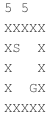
The first line contains two numbers, separated by a space. The first number is the height of the field, and the second is the width. The rest of the lines contain the layout of the field. The characters have the following meaning:
X - A single wall segment. Pacman cannot travel on to or through walls.
S - The starting point of the path that we are trying to find (where Pacman starts). This is an open space (no wall).
G - The ending point (goal) of the path we are trying to find (where Pacman wants to be). This is an open space (no wall).
(space) - An open space on the field. Pacman is free to travel in any open space, assuming he can get there.
Pacman is free to move from his current location to any adjacent open space. This includes the space directly above, below, left and right of where he is. It does not include diagonally adjacent spaces. If any of the adjacent spaces are a wall, Pacman can not travel in that direction. The path that your maze solver finds must be a connected path (i.e., it cannot skip spaces or have Pacman "jumping" over walls or empty spaces).
You can assume that all input mazes will be rectangular. All of the border positions around the perimeter of the field will be walls (i.e., the field is fully enclosed).
The following is an example of reading numbers (height and width) from a file that assumes you are using a BufferedReader named input to read the file:
String[] dimensions = input.readLine().split(" "); height = Integer.parseInt(dimensions[0]); width = Integer.parseInt(dimensions[1]); Output
The output of your program should be a file formatted in a way similar to the input file:
Output the height and width at the top of the file, just like in the input file.
The output file should have the same layout of walls, and the same start and end points as the input file.
The output file should replace some of the open space characters (" ") with dot characters ('.'). The spaces that you replace with dots are the spaces on the shortest path from the starting point to the ending point (goal).
For example, given the input file example above, the following output may be produced:
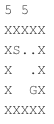
Notice that some of the open spaces from the example input file are now replaced with dots, connecting a path from 'S' to 'G'. NOTE: There is a single newline character after the last 'X' in the output.
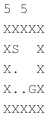
There are multiple shortest path solutions for the example above. Any connected path from 'S' to 'G' with length 4 is a correct solution. Another acceptable solution to the example above is:
If there is no path from 'S' to 'G', simply do not place any dots in the output file; print the original maze.
A zipped file of mazes and their solutions is provided to assist in developing your solution.
Below is an example of creating a file and writing to it using a Java try-with-resources statement. Note that outputFile is a String. If outputFile is the name of a file that does not exist, the file will be created. Remember to use the exact string passed to your solveMaze method (i.e., do not modify the path of the file).
try(PrintWriter output = new PrintWriter(new FileWriter(outputFile))) { output.println(height + " " + width); // write more data here } Rules
The path cannot go through or on top of walls.
The path must be connected (i.e., no skips or jumps).
Diagonally-adjacent spaces are not connected. Paths may only up, left, down, or right.
If no path exists, the output file will have no dots.
If multiple shortest paths exist, any are considered valid.
Your program must produce output in exact format specified above, for grading purposes.
Your program must run in 10 seconds or less on all mazes provided for grading tests. This includes file input, graph construction, pathfinding, and file output. The biggest test maze is 100x100 (see randomMaze in the zipped file of mazes). There will be other test mazes of similar size.
Program guidelines
Other than the required PathFinder class with method solveMaze (see above), the design of your program is completely up to you. Download TestPathFinder.java as an example of running your program. Read the comments in the source code.
Pacman tool
The pacman tool is not necessary for the successful completion of this assignment. However, it will help you visualize your mazes and verify that your solutions are correct. And, it is fun! Download pacman.zip to help you visualize your text-form mazes. You can also use this tool to play Pacman using the arrow keys.
NOTE: You must have python installed to run this Pacman tool. Python is already installed on the CADE machines. Most personal computers come with this pre-installed, as well.
Unzip the compressed "pacman" folder. From the command line, change directories to that folder. To run pacman, type the following command:
python pacman.py -l
In these commands
python pacman.py -l demoMaze.txt
where "demoMaze.txt" is a file that contains a maze layout (such as the one above). This assumes that "demoMaze.txt" is in your pacman directory (it is included in the zip file). To test your own maze solutions, we recomend putting the solution maze file in the pacman directory. If your maze files are instead all in a different directory, you can provide the full path to the file.
Auto pacman
The command above displays the maze and the path (if there is one), but does not move pacman. This is designed so that you can examine the path without pacman eating it. You can control pacman with the arrow keys if you wish. If you want to see pacman follow the path automatically, add some additional command-line arguments:
python pacman.py -l demoMazeSol.txt -p auto
The -p automatically tells pacman to follow the path laid out in the maze.
Zoom
If your maze is too small or too large, you can change the size of the pacman window with the -z command. For example:
python pacman.py -l demoMazeSol.txt -p auto -z 0.5
python pacman.py -l demoMazeSol.txt -p auto -z 2
You can use any number after -z as a scale factor to increase or decrease the size of the window.
Commenting
Since you have been given no starting source code, it is expected that you will more thorough in commenting your classes and methods' purposes than with previous assignments.
Testing
The provided mazes do not guarantee that your solution is correct. Develop your own test mazes and/or move the start and goal points in the provided mazes to convince yourself that your algorithm can find any path.
Finishing up
When preliminary coding is complete and your program compiles without error or warning, test the program thoroughly and systematically.
Your code should be well-commented (Javadoc comments are required) and formatted such that it is clear and easy to read. Be sure to put the names of both programming partners in the header comment of each file please make sure these names match what we have in Canvas. You must have at least: comments for every method you write, describing what the method does, what the arguments are (and what they mean), and what the return value is, as well as any special cases that the method handles or can run in to. You should also have comments on any line or block of code that is not self-explanatory.
Zip your source code files no .class files, source code only. Be sure to include all files necessary for running your code. Please submit just one solution per pair (i.e., one partner should upload the zip file and an analysis doc, the other should only upload an analysis doc).
Also, include an assignment.properties file, and if you are submitting the code, make sure the submitted field is true. Otherwise, it is extremely important that the submitted field is false. Do not zip the assignment.properties file with your Java code.
Complete your analysis document on your own.
Analysis Document
When you are satisfied that your program is correct, write a brief analysis document. The analysis document is 10% of your assignment 8 grade. Ensure that your analysis document addresses the following.
Who is your programming partner? Which of you submitted the source code of your program?
Evaluate your programming partner.
Does the straight-line distance (the absolute distance, ignoring any walls) from the start point to the goal point affect the running time of your algorithm?
Explain the difference between the straight-line distance and the actual solution path length. Give an example of a situation in which they differ greatly. How do each of them affect the running time of your algorithm? Which one is a more accurate indicator of run-time?
Assuming that the input maze is square (height and width are the same), consider the problem size N to be the length of one side of the maze. What is the worst-case performance of your algorithm in Big-O notation? Your analysis should take in to account the density of the maze (how many wall segments there are in the field). For example, a completely open field with no walls other than the perimeter is not dense at all, as opposed to the example maze given "bigMaze.txt", which is very dense. There is no one correct answer to this since solutions may vary, but you must provide an analysis that shows you are thinking about the problem in a meaningful way related to your solution.
How many hours did you spend on this assignment?
Each partner must write and submit his/her own answers to these questions. Upload your solution in .pdf format only.
Graph Pathfinding
We have been asked to create a tool to help Pacman solve mazes. More generally, we must create a tool that can find the shortest path from one location to another in any enclosed field of obstacles. We are given the field as input, represented as a simple text file. The starting point and ending point are indicated in this text file, as well as the layout of the field (the location of walls). We must produce a similar text file, but with the shortest path from the starting point to the ending point added to the field. If there is no path at all, the path indicators will simply not exist in the output.
To solve this problem, you must represent the maze as a graph and perform a breadth-first search from Pacman's starting point. See the slides from Lecture 17 for a suggestion on implementing a graph for this assignment using a 2D array of nodes.
Requirements
PathFinder class:
Create a class PathFinder in package assignment08, with the following method:
public static void solveMaze(String inputFile, String outputFile)
This method will read a maze from a file with the name inputFile, and output the solved maze to a file with the name outputFile. You must use the filenames exactly as is (i.e., do not change the directory or path). The full path to files for reading/writing in grading tests will be provided. See required specifications below. This method must use a graph and graph pathfinding to solve the problem.
Your program may contain any other methods or classes necessary for your solution. It is recommended you create separate Graph and Node classes. Additionally, you will need a queue for breadth-first search. Implement one using your Assignment 6 SinglyLinkedList class or use Java's LinkedList (Links to an external site.)Links to an external site. class, which implements the Queue (Links to an external site.)Links to an external site. interface. Make sure you submit all files necessary to run your program.
Input
The input files are in the following form:
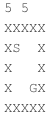
The first line contains two numbers, separated by a space. The first number is the height of the field, and the second is the width. The rest of the lines contain the layout of the field. The characters have the following meaning:
X - A single wall segment. Pacman cannot travel on to or through walls.
S - The starting point of the path that we are trying to find (where Pacman starts). This is an open space (no wall).
G - The ending point (goal) of the path we are trying to find (where Pacman wants to be). This is an open space (no wall).
(space) - An open space on the field. Pacman is free to travel in any open space, assuming he can get there.
Pacman is free to move from his current location to any adjacent open space. This includes the space directly above, below, left and right of where he is. It does not include diagonally adjacent spaces. If any of the adjacent spaces are a wall, Pacman can not travel in that direction. The path that your maze solver finds must be a connected path (i.e., it cannot skip spaces or have Pacman "jumping" over walls or empty spaces).
You can assume that all input mazes will be rectangular. All of the border positions around the perimeter of the field will be walls (i.e., the field is fully enclosed).
The following is an example of reading numbers (height and width) from a file that assumes you are using a BufferedReader named input to read the file:
String[] dimensions = input.readLine().split(" "); height = Integer.parseInt(dimensions[0]); width = Integer.parseInt(dimensions[1]); Output
The output of your program should be a file formatted in a way similar to the input file:
Output the height and width at the top of the file, just like in the input file.
The output file should have the same layout of walls, and the same start and end points as the input file.
The output file should replace some of the open space characters (" ") with dot characters ('.'). The spaces that you replace with dots are the spaces on the shortest path from the starting point to the ending point (goal).
For example, given the input file example above, the following output may be produced:
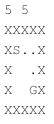
Notice that some of the open spaces from the example input file are now replaced with dots, connecting a path from 'S' to 'G'. NOTE: There is a single newline character after the last 'X' in the output.
There are multiple shortest path solutions for the example above. Any connected path from 'S' to 'G' with length 4 is a correct solution. Another acceptable solution to the example above is:
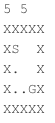
If there is no path from 'S' to 'G', simply do not place any dots in the output file; print the original maze.
A zipped file of mazes and their solutions is provided to assist in developing your solution.
Below is an example of creating a file and writing to it using a Java try-with-resources statement. Note that outputFile is a String. If outputFile is the name of a file that does not exist, the file will be created. Remember to use the exact string passed to your solveMaze method (i.e., do not modify the path of the file).
try(PrintWriter output = new PrintWriter(new FileWriter(outputFile))) { output.println(height + " " + width); // write more data here } Rules
The path cannot go through or on top of walls.
The path must be connected (i.e., no skips or jumps).
Diagonally-adjacent spaces are not connected. Paths may only up, left, down, or right.
If no path exists, the output file will have no dots.
If multiple shortest paths exist, any are considered valid.
Your program must produce output in exact format specified above, for grading purposes.
Your program must run in 10 seconds or less on all mazes provided for grading tests. This includes file input, graph construction, pathfinding, and file output. The biggest test maze is 100x100 (see randomMaze in the zipped file of mazes). There will be other test mazes of similar size.
Program guidelines
Other than the required PathFinder class with method solveMaze (see above), the design of your program is completely up to you. Download TestPathFinder.java as an example of running your program. Read the comments in the source code.
Pacman tool
The pacman tool is not necessary for the successful completion of this assignment. However, it will help you visualize your mazes and verify that your solutions are correct. And, it is fun! Download pacman.zip to help you visualize your text-form mazes. You can also use this tool to play Pacman using the arrow keys.
NOTE: You must have python installed to run this Pacman tool. Python is already installed on the CADE machines. Most personal computers come with this pre-installed, as well.
Unzip the compressed "pacman" folder. From the command line, change directories to that folder. To run pacman, type the following command:
python pacman.py -l
In these commands
python pacman.py -l demoMaze.txt
where "demoMaze.txt" is a file that contains a maze layout (such as the one above). This assumes that "demoMaze.txt" is in your pacman directory (it is included in the zip file). To test your own maze solutions, we recomend putting the solution maze file in the pacman directory. If your maze files are instead all in a different directory, you can provide the full path to the file.
Auto pacman
The command above displays the maze and the path (if there is one), but does not move pacman. This is designed so that you can examine the path without pacman eating it. You can control pacman with the arrow keys if you wish. If you want to see pacman follow the path automatically, add some additional command-line arguments:
python pacman.py -l demoMazeSol.txt -p auto
The -p automatically tells pacman to follow the path laid out in the maze.
Zoom
If your maze is too small or too large, you can change the size of the pacman window with the -z command. For example:
python pacman.py -l demoMazeSol.txt -p auto -z 0.5
python pacman.py -l demoMazeSol.txt -p auto -z 2
You can use any number after -z as a scale factor to increase or decrease the size of the window.
Commenting
Since you have been given no starting source code, it is expected that you will more thorough in commenting your classes and methods' purposes than with previous assignments.
Testing
The provided mazes do not guarantee that your solution is correct. Develop your own test mazes and/or move the start and goal points in the provided mazes to convince yourself that your algorithm can find any path.
Finishing up
When preliminary coding is complete and your program compiles without error or warning, test the program thoroughly and systematically.
Your code should be well-commented (Javadoc comments are required) and formatted such that it is clear and easy to read. Be sure to put the names of both programming partners in the header comment of each file please make sure these names match what we have in Canvas. You must have at least: comments for every method you write, describing what the method does, what the arguments are (and what they mean), and what the return value is, as well as any special cases that the method handles or can run in to. You should also have comments on any line or block of code that is not self-explanatory.
Zip your source code files no .class files, source code only. Be sure to include all files necessary for running your code. Please submit just one solution per pair (i.e., one partner should upload the zip file and an analysis doc, the other should only upload an analysis doc).
Also, include an assignment.properties file, and if you are submitting the code, make sure the submitted field is true. Otherwise, it is extremely important that the submitted field is false. Do not zip the assignment.properties file with your Java code.
Complete your analysis document on your own.
Analysis Document
When you are satisfied that your program is correct, write a brief analysis document. The analysis document is 10% of your assignment 8 grade. Ensure that your analysis document addresses the following.
Who is your programming partner? Which of you submitted the source code of your program?
Evaluate your programming partner.
Does the straight-line distance (the absolute distance, ignoring any walls) from the start point to the goal point affect the running time of your algorithm?
Explain the difference between the straight-line distance and the actual solution path length. Give an example of a situation in which they differ greatly. How do each of them affect the running time of your algorithm? Which one is a more accurate indicator of run-time?
Assuming that the input maze is square (height and width are the same), consider the problem size N to be the length of one side of the maze. What is the worst-case performance of your algorithm in Big-O notation? Your analysis should take in to account the density of the maze (how many wall segments there are in the field). For example, a completely open field with no walls other than the perimeter is not dense at all, as opposed to the example maze given "bigMaze.txt", which is very dense. There is no one correct answer to this since solutions may vary, but you must provide an analysis that shows you are thinking about the problem in a meaningful way related to your solution.
How many hours did you spend on this assignment?
Each partner must write and submit his/her own answers to these questions. Upload your solution in .pdf format only.
XS X XS X
Step by Step Solution
There are 3 Steps involved in it

Get step-by-step solutions from verified subject matter experts
 Study Help