







Question: Grid Rowselect push sub data to Grid two. The bolded part of code is where selection that is sent from grid 1 to grid 2
Grid Rowselect push sub data to Grid two. The bolded part of code is where selection that is sent from grid 1 to grid 2 happens. So basically, there is a relationship between the two source data with matching "EmployeeID", this will trigger the rowselect to send the data to Grid 2, but for some reason the given logic doesn't seem to work. You can refer to the jqwidgets website to find the jqxgrid api as reference for this.
Below is the code:
HTML:
Javascript
$(document).ready(function () {
// prepare the data
var source = {
localdata: [
{ "firstname": "VINET", "EmployeeID": 5, },
{ "firstname": "Andrew", "EmployeeID": 6, }
],
datatype: "array",
id: 'EmployeeID',
datafields:
[
{ name: 'firstname', type: 'string' },
{ name: 'lastname', type: 'string' },
{ name: 'productname', type: 'string' },
{ name: 'quantity', type: 'number' },
{ name: 'price', type: 'number' }
]
};
var dataAdapter = new $.jqx.dataAdapter(source);
// initialize jqxGrid
$("#jqxgrid").jqxGrid(
{
width: 850,
source: dataAdapter,
pageable: true,
autoheight: true,
selectionmode: 'checkbox',
filterable: true,
showfilterrow: true,
columns: [
{ text: 'First Name', datafield: 'firstname', width: 200 },
{ text: 'Last Name', datafield: 'lastname', width: 200 },
{ text: 'Product', datafield: 'productname', width: 190 },
{ text: 'Quantity', datafield: 'quantity', width: 90, cellsalign: 'right' },
{ text: 'Price', datafield: 'price', width: 90, cellsalign: 'right', cellsformat: 'c2' }
]
});
var source2 = {
localdata: [
{ "firstname": "Tanner", "EmployeeID": 5 },
{ "firstname": "Sam", "EmployeeID": 5 },
{ "firstname": "James", "EmployeeID": 6 },
],
id: 'EmployeeID',
root: 'EmployeeID',
datatype: "array",
datafields:
[
{ name: 'firstname', type: 'string' },
{ name: 'lastname', type: 'string' },
{ name: 'productname', type: 'string' },
{ name: 'quantity', type: 'number' },
{ name: 'price', type: 'number' }
]
};
var dataAdapter2 = new $.jqx.dataAdapter(source2);
dataAdapter2.dataBind();
$("#jqxgrid2").jqxGrid({
width: 850,
source: dataAdapter2,
pageable: true,
autoheight: true,
selectionmode: 'checkbox',
filterable: true,
showfilterrow: true,
columns: [
{ text: 'First Name', datafield: 'firstname', width: 200 },
{ text: 'Last Name', datafield: 'lastname', width: 200 },
{ text: 'Product', datafield: 'productname', width: 190 },
{ text: 'Quantity', datafield: 'quantity', width: 90, cellsalign: 'right' },
{ text: 'Price', datafield: 'price', width: 90, cellsalign: 'right', cellsformat: 'c2' }
]
});
var records = new Array();
//var records = dataAdapter2.records;
function getRows(records, customerID) {
var array = [];
var length = dataAdapter2.records.length;
for (var i = 0; i
var rec = dataAdapter2.records[i];
if (rec.EmployeeID == customerID) {
records[records.length] = rec;
array.push(rec);
}
/*
if (indexes.indexOf(rec.boundindex) != -1) {
array.push(rec);
}
*/
}
return array;
};
function changeSelection() {
var rowindexes = $('#jqxgrid').jqxGrid('getselectedrowindexes');
if (rowindexes.length > 0){
var selectedRowData = $('#jqxgrid').jqxGrid('getrowdata', rowindexes);
var customerID = selectedRowData.EmployeeID;
var selectedRows = getRows(records, customerID);
source2.localdata = selectedRows;
$("#jqxgrid2").jqxGrid('updatebounddata');
}
};
$("#jqxgrid").on('rowunselect', function (event) {
changeSelection();
});
$("#jqxgrid").on('rowselect', function (event) {
changeSelection();
});
});
Output should be: Selected row from grid 1 and it will push its sub data to grid 2
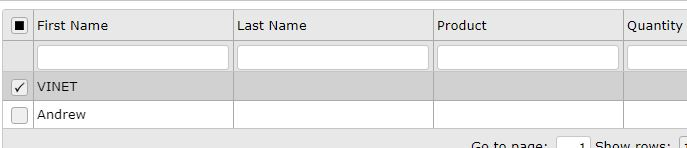

First Name Last Name Product Quantity VINET Andrew 1 Show rows First Name Last Name Product Quantity VINET Andrew 1 Show rows
Step by Step Solution
There are 3 Steps involved in it

Get step-by-step solutions from verified subject matter experts
 Study Help