







Question: GUI Development Details Rename all controls using standard naming conven ons for your environment. Form Load event 1 . Label control cleared. 2 . The
GUI Development Details
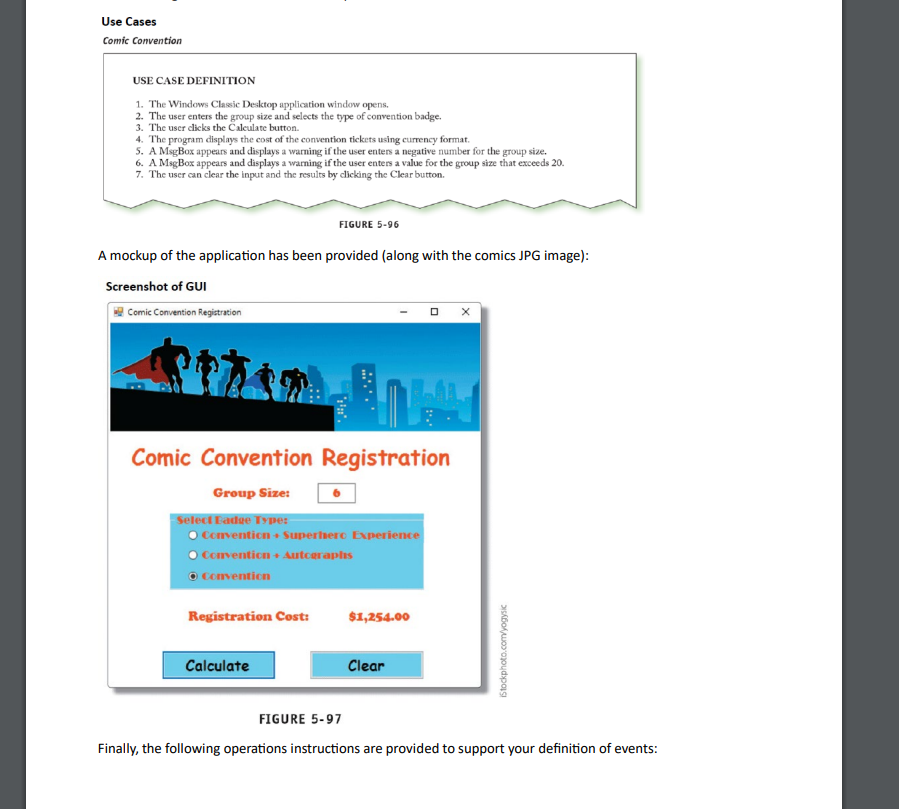
Rename all controls using standard naming convenons for your environment.
Form Load event
Label control cleared.
The textbox is cleared and has focus.
One of the radio buton opons is preselected.
btnClear click event:
Label control is cleared.
The textbox is cleared and has focus.
First radio buton opon is preselected as at Form Load
btnCalculate click event:
Declare then variables and inialize the three cost levels.
Use if statements to determine if
a group number entered is numeric
b group number entered is between and
c which cost level is selected
Calculate the total cost amount and display the results on the form by converng the total cost amount to
String, formated as currency
If the group size is not between and display an error message box
If the group size is not numeric, display an error message box
Main Deliverable: Create a working GUI that performs the computaons as laid out in the requirements
document and details above, and updates the form from events accordingly.
Documentation Deliverable: Create a README Markdown file for Assignment P including Project name and
student name, development tools used, and any issues you encountered in development none is a possible
answer
Step by Step Solution
There are 3 Steps involved in it
1 Expert Approved Answer
Step: 1 Unlock

Question Has Been Solved by an Expert!
Get step-by-step solutions from verified subject matter experts
Step: 2 Unlock
Step: 3 Unlock
 Study Help