







Question: have to make the functions quadtrees in python Quadtrees! First the gratuitous backstory! You've been hired as a summer intern at SASA (the Shmorbodian Air
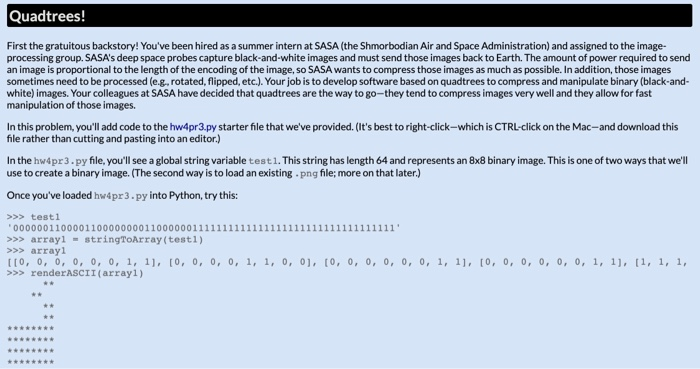
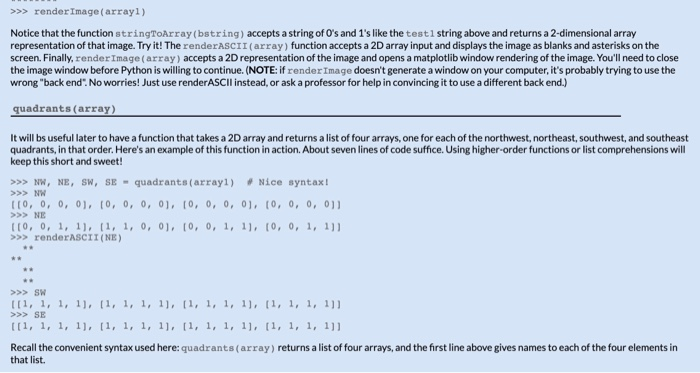
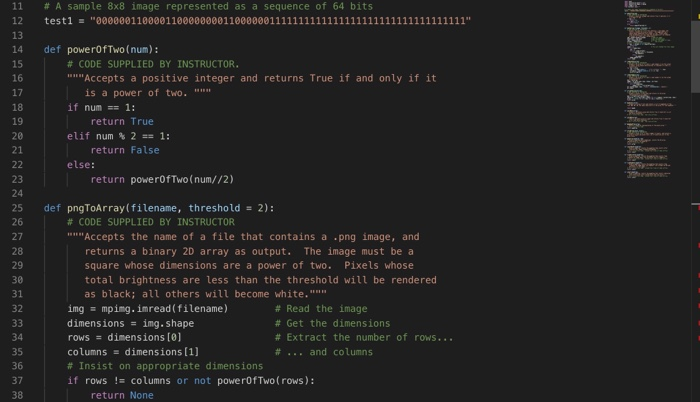
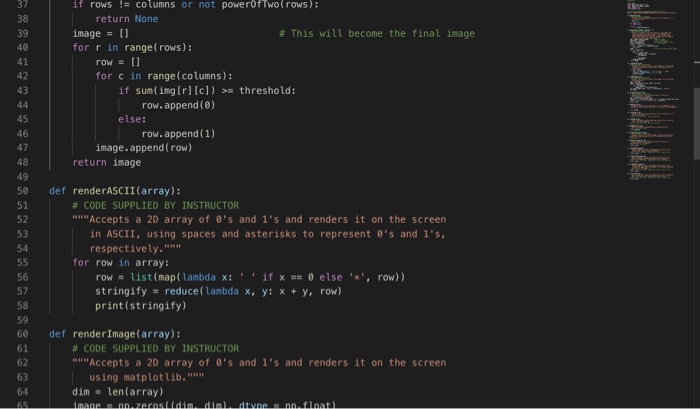
Quadtrees! First the gratuitous backstory! You've been hired as a summer intern at SASA (the Shmorbodian Air and Space Administration) and assigned to the image- processing group. SASA's deep space probes capture black-and-white images and must send those images back to Earth. The amount of power required to send an image is proportional to the length of the encoding of the image, so SASA wants to compress those images as much as possible. In addition, those images sometimes need to be processed (e.g., rotated, flipped, etc.). Your job is to develop software based on quadtrees to compress and manipulate binary (black-and- white) images. Your colleagues at SASA have decided that quadtrees are the way to go-they tend to compress images very well and they allow for fast manipulation of those images. In this problem, you'll add code to the hw4pr3.py starter file that we've provided. (It's best to right-click-which is CTRL-click on the Mac-and download this file rather than cutting and pasting into an editor.) In the hw4pr 3.py file, you'll see a global string variable test 1. This string has length 64 and represents an 8x8 binary image. This is one of two ways that we'll use to create a binary image. The second way is to load an existing.png file; more on that later.) Once you've loaded hw4pr3.py into Python, try this: >>> testi 0000001100001100000000110000001111111111111111111111111111111111' >>> array1 = stringToArray(testi) >>> array1 [[0, 0, 0, 0, 0, 0, 1, 1], [0, 0, 0, 0, 1, 1, 0, 0], [0, 0, 0, 0, 0, 0, 1, 1], [0, 0, 0, 0, 0, 0, 1, 1], [1, 1, 1, >>> renderASCII (array1) >>> render Image(array1) Notice that the function stringToArray (string) accepts a string of O's and 1's like the test string above and returns a 2-dimensional array representation of that image. Try it! The renderASCII(array) function accepts a 2D array input and displays the image as blanks and asterisks on the screen. Finally, render Image (array) accepts a 2D representation of the image and opens a matplotlib window rendering of the image. You'll need to close the image window before Python is willing to continue. (NOTE: if render Image doesn't generate a window on your computer, it's probably trying to use the wrong "back end". No worries! Just use render ASCII instead, or ask a professor for help in convincing it to use a different back end.) quadrants (array) It will bs useful later to have a function that takes a 2D array and returns a list of four arrays, one for each of the northwest, northeast, southwest, and southeast quadrants, in that order. Here's an example of this function in action. About seven lines of code suffice. Using higher-order functions or list comprehensions will keep this short and sweet! >>> NW, NE, SW, SE - quadrants (array1) Nice syntax! >>> NW 110, 0, 0, 0], [0, 0, 0, 0, 0, 0, 0, 0], [0, 0, 0, 0] >>> NE 110, 0, 1, 1), 11, 1, 0, 0], [0, 0, 1, 11, 10, 0, 1, 11] >>> renderASCII (NE) >>> SW 111, 1, 1, 1), 11, 1, 1, 1], [1, 1, 1, 1), (1, 1, 1, 1]] >>> SE [[1, 1, 1, 1), 11, 1, 1, 1], [1, 1, 1, 1], [1, 1, 1, 1]] Recall the convenient syntax used here: quadrants(array) returns a list of four arrays, and the first line above gives names to each of the four elements in that list. Quadtrees! First the gratuitous backstory! You've been hired as a summer intern at SASA (the Shmorbodian Air and Space Administration) and assigned to the image- processing group. SASA's deep space probes capture black-and-white images and must send those images back to Earth. The amount of power required to send an image is proportional to the length of the encoding of the image, so SASA wants to compress those images as much as possible. In addition, those images sometimes need to be processed (e.g., rotated, flipped, etc.). Your job is to develop software based on quadtrees to compress and manipulate binary (black-and- white) images. Your colleagues at SASA have decided that quadtrees are the way to go-they tend to compress images very well and they allow for fast manipulation of those images. In this problem, you'll add code to the hw4pr3.py starter file that we've provided. (It's best to right-click-which is CTRL-click on the Mac-and download this file rather than cutting and pasting into an editor.) In the hw4pr 3.py file, you'll see a global string variable test 1. This string has length 64 and represents an 8x8 binary image. This is one of two ways that we'll use to create a binary image. The second way is to load an existing.png file; more on that later.) Once you've loaded hw4pr3.py into Python, try this: >>> testi 0000001100001100000000110000001111111111111111111111111111111111' >>> array1 = stringToArray(testi) >>> array1 [[0, 0, 0, 0, 0, 0, 1, 1], [0, 0, 0, 0, 1, 1, 0, 0], [0, 0, 0, 0, 0, 0, 1, 1], [0, 0, 0, 0, 0, 0, 1, 1], [1, 1, 1, >>> renderASCII (array1) >>> render Image(array1) Notice that the function stringToArray (string) accepts a string of O's and 1's like the test string above and returns a 2-dimensional array representation of that image. Try it! The renderASCII(array) function accepts a 2D array input and displays the image as blanks and asterisks on the screen. Finally, render Image (array) accepts a 2D representation of the image and opens a matplotlib window rendering of the image. You'll need to close the image window before Python is willing to continue. (NOTE: if render Image doesn't generate a window on your computer, it's probably trying to use the wrong "back end". No worries! Just use render ASCII instead, or ask a professor for help in convincing it to use a different back end.) quadrants (array) It will bs useful later to have a function that takes a 2D array and returns a list of four arrays, one for each of the northwest, northeast, southwest, and southeast quadrants, in that order. Here's an example of this function in action. About seven lines of code suffice. Using higher-order functions or list comprehensions will keep this short and sweet! >>> NW, NE, SW, SE - quadrants (array1) Nice syntax! >>> NW 110, 0, 0, 0], [0, 0, 0, 0, 0, 0, 0, 0], [0, 0, 0, 0] >>> NE 110, 0, 1, 1), 11, 1, 0, 0], [0, 0, 1, 11, 10, 0, 1, 11] >>> renderASCII (NE) >>> SW 111, 1, 1, 1), 11, 1, 1, 1], [1, 1, 1, 1), (1, 1, 1, 1]] >>> SE [[1, 1, 1, 1), 11, 1, 1, 1], [1, 1, 1, 1], [1, 1, 1, 1]] Recall the convenient syntax used here: quadrants(array) returns a list of four arrays, and the first line above gives names to each of the four elements in that list
Step by Step Solution
There are 3 Steps involved in it

Get step-by-step solutions from verified subject matter experts
 Study Help