







Question: Having trouble with this portion in an Excel workbook. Points Possible Step Instructions 10 Create a new worksheet named Code to the right of the
Having trouble with this portion in an Excel workbook.
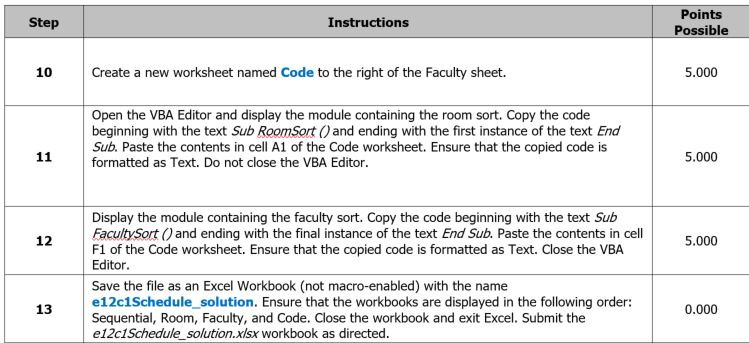
Points Possible Step Instructions 10 Create a new worksheet named Code to the right of the Faculty sheet. 5.000 Open the VBA Editor and display the module containing the room sort. Copy the code beginning with the text Sub RoomSort and ending with the first instance of the text End Sub. Paste the contents in cell A1 of the Code worksheet. Ensure that the copied code is formatted as Text. Do not close the VBA Editor. 5.000 Display the module containing the faculty sort. Copy the code beginning with the text Sub FacultySort and ending with the final nstance of the text End Sub. Paste the contents in cell F1 of the Code worksheet. Ensure that the copied code is formatted as Text. Close the VBA Editor. 12 5.000 Save the file as an Excel Workbook (not macro-enabled) with the name e12c1Schedule_ solution. Ensure that the workbooks are displayed in the following order: Sequential, Room, Faculty, and Code. Close the workbook and exit Excel. Submit the e12c1Schedulesolution xisx workbook as directed. 13 0.000 Points Possible Step Instructions 10 Create a new worksheet named Code to the right of the Faculty sheet. 5.000 Open the VBA Editor and display the module containing the room sort. Copy the code beginning with the text Sub RoomSort and ending with the first instance of the text End Sub. Paste the contents in cell A1 of the Code worksheet. Ensure that the copied code is formatted as Text. Do not close the VBA Editor. 5.000 Display the module containing the faculty sort. Copy the code beginning with the text Sub FacultySort and ending with the final nstance of the text End Sub. Paste the contents in cell F1 of the Code worksheet. Ensure that the copied code is formatted as Text. Close the VBA Editor. 12 5.000 Save the file as an Excel Workbook (not macro-enabled) with the name e12c1Schedule_ solution. Ensure that the workbooks are displayed in the following order: Sequential, Room, Faculty, and Code. Close the workbook and exit Excel. Submit the e12c1Schedulesolution xisx workbook as directed. 13 0.000
Step by Step Solution
There are 3 Steps involved in it

Get step-by-step solutions from verified subject matter experts
 Study Help