







Question: he program must be named TracerouteAnalysis.java, and needs to take the file name of the tcpdump trace as the first argument. For example, the program
he program must be named "TracerouteAnalysis.java", and needs to take the file name of the tcpdump trace as the first argument. For example, the program needs to run as $ javac TracerouteAnalysis.java $ java TracerouteAnalysis Project_1-example_traceroute_TCP_trace.txt and the results of the analysis must be written on standard output (basically, on screen). NOTE: project submissions that do not follow the guidelines will be discarded wihtout consideration (i.e., 0 points). Project Description: In this project, you are required to write a program that takes in input a textual tcpdump trace of traffic generated by Traceroute and computes the time between a TCP packet sent by the client and the related ICMP "Time exceeded in-transit" message. As an example, consider the two packet logs reported below: 1291654312.963163 IP (tos 0x0, ttl 1, id 9067, offset 0, flags [none], proto TCP (6), length 60) 128.192.76.177.47212 > 137.138.144.168.80: S, cksum 0xc4d6 (correct), 1135826272:1135826272(0) win 5840
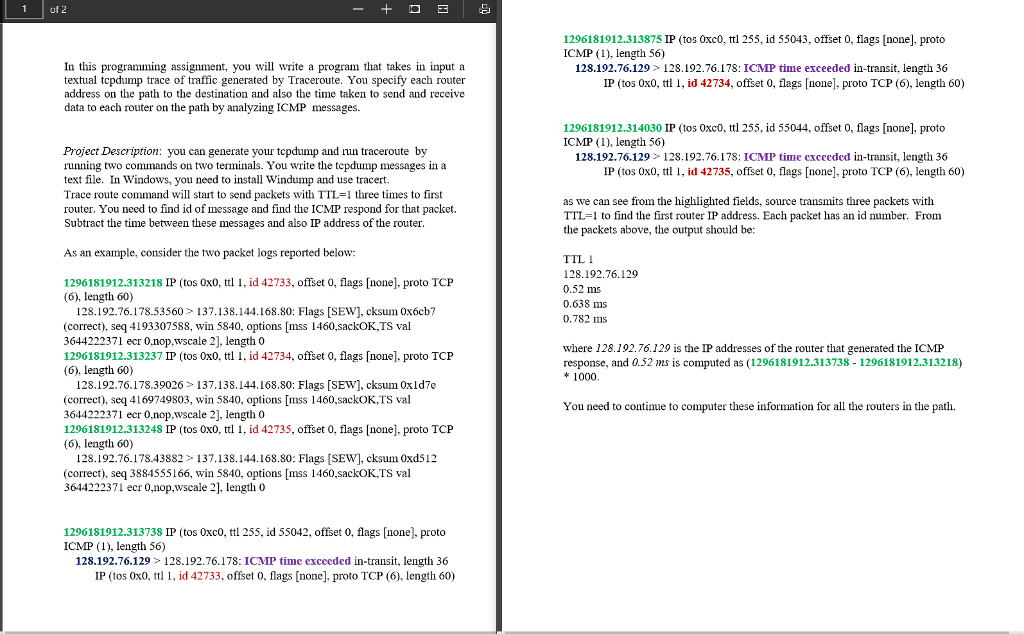
In this programming assignment, you will write a program that takes in input a textual tcpdump trace of traffic generated by Traceroute. You specify each router address on the path to the destination and also the time taken to send and receive data to each router on the path by analyzing ICMP messages. Project Description: you can generate your tcpdump and run traceroute by running two commands on two terminals. You write the tcpdump messages in a text file. In Windows, you need to install Windump and use tracert. Trace route command will start to send packets with TTL=1 three times to first router. You need to find id of message and find the ICMP respond for that packet. Subtract the time between these messages and also IP address of the router. As an example, consider the two packet logs reported below
Step by Step Solution
There are 3 Steps involved in it

Get step-by-step solutions from verified subject matter experts
 Study Help