







Question: Heading Select Paragraph Styles Editing Ednor 1) a) The first data set represents runs scored by 5 baseball players in a national tournament. We want
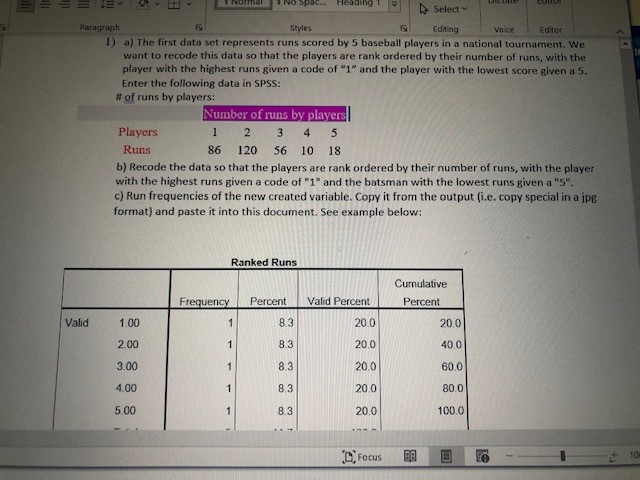
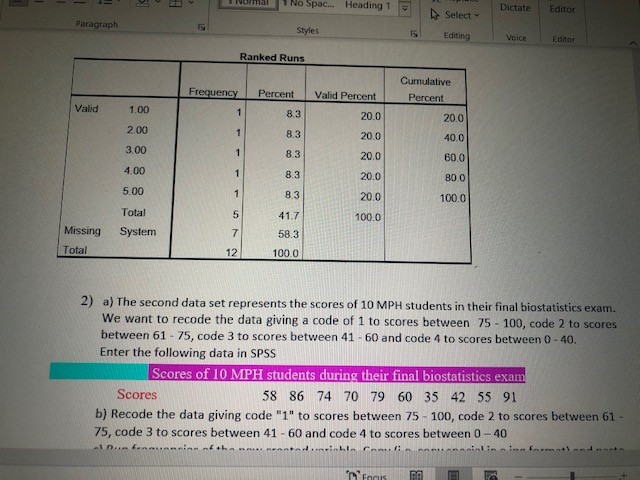
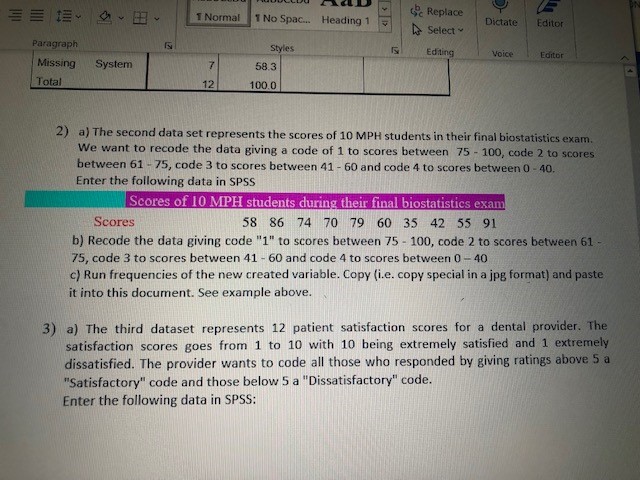
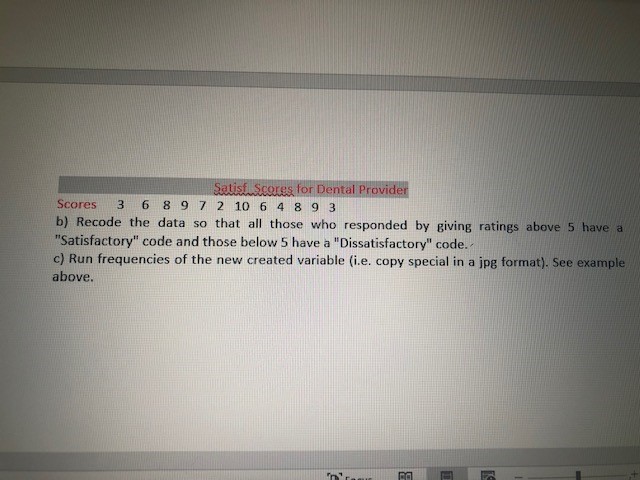
Heading Select Paragraph Styles Editing Ednor 1) a) The first data set represents runs scored by 5 baseball players in a national tournament. We want to recode this data so that the players are rank ordered by their number of runs, with the player with the highest runs given a code of "1" and the player with the lowest score given a 5. Enter the following data in SPSS: # of runs by players: Number of runs by players Players 1 2 3 4 5 Runs 86 120 56 10 18 b) Recode the data so that the players are rank ordered by their number of runs, with the player with the highest runs given a code of "1" and the batsman with the lowest runs given a "5". c) Run frequencies of the new created variable. Copy it from the output (i.e. copy special in a jpg format) and paste it into this document. See example below: Ranked Runs Cumulative Frequency Percent Valid Percent Percent Valid 1.00 83 20 0 20.0 2.00 8.3 20.0 40.0 3.00 8.3 20.0 60.0 4.00 8.3 20.0 80.0 5.00 8.3 20.0 100.0 10 Focus E # 101 No Spac... Heading 1 Dictate Editor Select Paragraph Styles Editing Voice Editor Ranked Runs Cumulative Frequency Percent Valid Percent Percent Valid 1.00 8,3 20.0 20.0 2.00 8.3 20.0 40.0 3.00 8.3 20.0 60.0 4,00 8,3 20.0 80 0 5.00 83 20.0 100.0 Total 5 41.7 100.0 Missing System 7 58.3 Total 12 100 0 2) a) The second data set represents the scores of 10 MPH students in their final biostatistics exam. We want to recode the data giving a code of 1 to scores between 75 - 100, code 2 to scores between 61 - 75, code 3 to scores between 41 - 60 and code 4 to scores between 0 - 40, Enter the following data in SPSS Scores of 10 MPH students during their final biostatistics exam Scores 58 86 74 70 79 60 35 42 55 91 b) Recode the data giving code "1" to scores between 75 - 100, code 2 to scores between 61 - 75, code 3 to scores between 41 - 60 and code 4 to scores between 0 - 40 ali a ins farmati and marks42 Replace 1 Normal 1 No Space.. Heading 1 Dictate Editor D Select ~ Paragraph Styles Editing Voice Editor Missing System 58.3 Total 12 100.0 2) a) The second data set represents the scores of 10 MPH students in their final biostatistics exam. We want to recode the data giving a code of 1 to scores between 75 - 100, code 2 to scores between 61 - 75, code 3 to scores between 41 - 60 and code 4 to scores between 0 - 40, Enter the following data in SPSS Scores of 10 MPH students during their final biostatistics exam Scores 58 86 74 70 79 60 35 42 55 91 b) Recode the data giving code "1" to scores between 75 - 100, code 2 to scores between 61 75, code 3 to scores between 41 - 60 and code 4 to scores between 0 - 40 c) Run frequencies of the new created variable. Copy (i.e. copy special in a jpg format) and paste it into this document. See example above. 3) a) The third dataset represents 12 patient satisfaction scores for a dental provider. The satisfaction scores goes from 1 to 10 with 10 being extremely satisfied and 1 extremely dissatisfied. The provider wants to code all those who responded by giving ratings above 5 a "Satisfactory" code and those below 5 a "Dissatisfactory" code. Enter the following data in SPSS:Satisficores for Dental Provider Scores 3 6 8 9 7 2 10 6 4 8 9 3 b) Recode the data so that all those who responded by giving ratings above 5 have a "Satisfactory" code and those below 5 have a "Dissatisfactory" code. - c) Run frequencies of the new created variable (i.e. copy special in a jpg format). See example above
Step by Step Solution
There are 3 Steps involved in it

Get step-by-step solutions from verified subject matter experts
 Study Help