







Question: Hello could anyone help with this question? I can provide the ex11_07 file on request. 11.7 (Querying an Array of Invoice Objects) Use the class
Hello could anyone help with this question? I can provide the ex11_07 file on request.
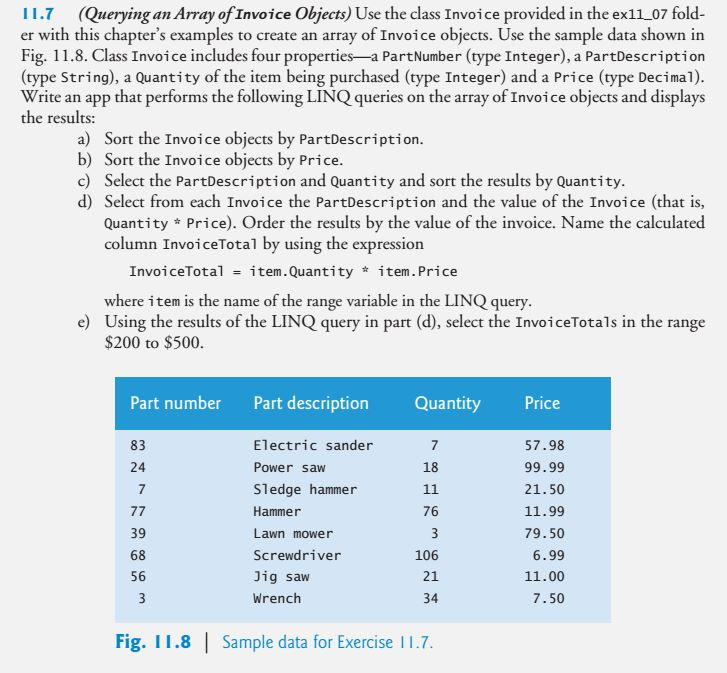
11.7 (Querying an Array of Invoice Objects) Use the class Invoice provided in the ex11 07 fold er with this chapter's examples to create an array of Invoice objects. Use the sample data shown in Fig. 11.8. Class Invoice includes four properties-a PartNumber (type Integer), a PartDescription (type String), a Quantity of the item being purchased (type Integer) and a Price (type Decimal) Write an app that performs the following LINQ queries on the array of Invoice objects and displays the results a) Sort the Invoice objects by PartDescription b) Sort the Invoice objects by Price c) Select the PartDescription and Quantity and sort the results by Quantity d) Select from each Invoice the PartDescription and the value of the Invoice (that is, Quantity Price). Order the results by the value of the invoice. Name the calculated column InvoiceTotal by using the expression InvoiceTotal # item . Quantity * item. Price where item is the name of the range variable in the LINQ query Using the results of the LINQ query in part (d), select the InvoiceTotals in the range $200 to $500 e) Part number Part description QuantityPrice 83 Electric sander Power saw Sledge hammer Hammer Lawn mower Screwdriver Jig saw Wrench 57.98 99.99 21.50 11.99 79.50 6.99 11.00 7.50 24 18 76 39 68 56 106 21 34 Fig. 11.8Sample data for Exercise 11.7
Step by Step Solution
There are 3 Steps involved in it

Get step-by-step solutions from verified subject matter experts
 Study Help