







Question: Hello could you solve this practice program for my python class? P.S: Make sure you follow all the requirements anduse all the resources that I
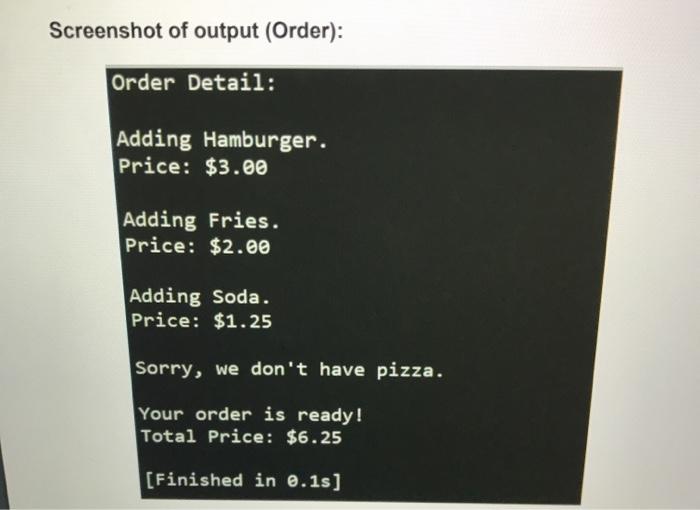
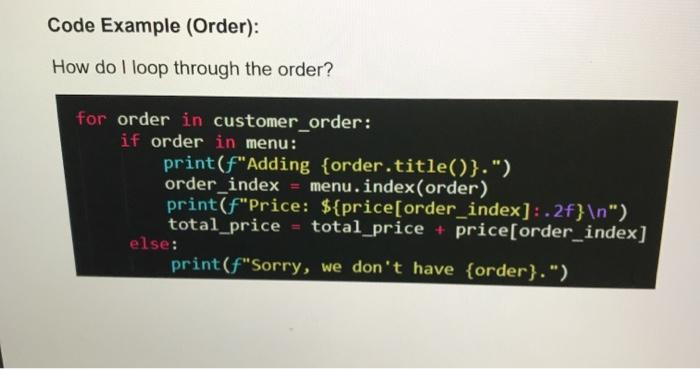
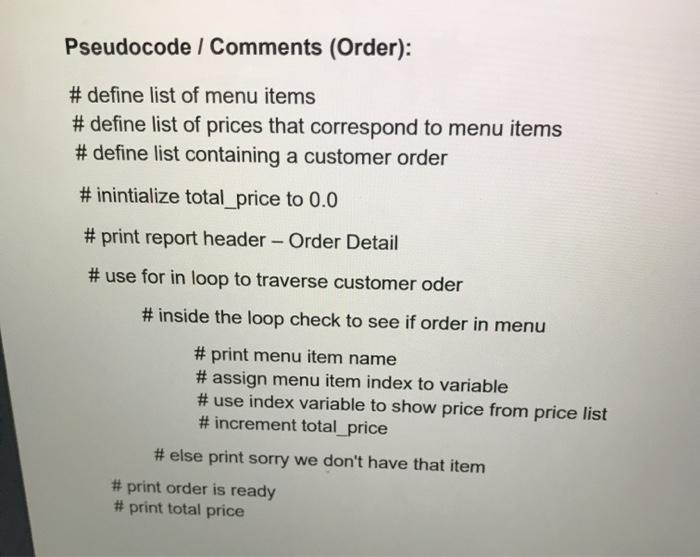
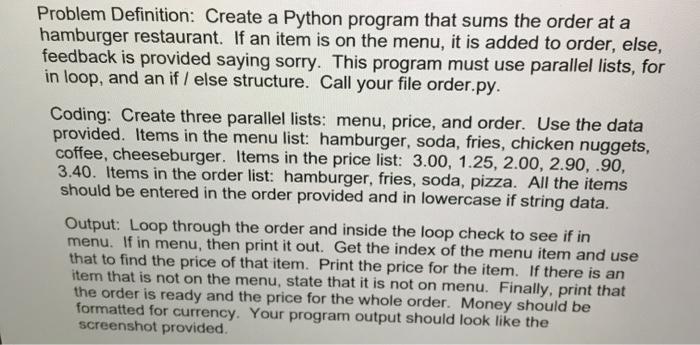
Screenshot of output (Order): Order Detail: Adding Hamburger. Price: $3.00 Adding Fries. Price: $2.00 Adding Soda Price: $1.25 Sorry, we don't have pizza. Your order is ready! Total Price: $6.25 [Finished in 0.1s) Code Example (Order): How do I loop through the order? for order in customer_order: if order in menu: print(F"Adding {order.title()}.") order_index menu.index(order) print(f"Price: ${price[order_index]: .2f} ") total_price total_price + price[order_index] else: print(F"Sorry, we don't have {order}.") Pseudocode / Comments (Order): #define list of menu items #define list of prices that correspond to menu items #define list containing a customer order #inintialize total_price to 0.0 # print report header - Order Detail # use for in loop to traverse customer oder # inside the loop check to see if order in menu # print menu item name # assign menu item index to variable # use index variable to show price from price list #increment total_price #else print sorry we don't have that item # print order is ready # print total price Problem Definition: Create a Python program that sums the order at a hamburger restaurant. If an item is on the menu, it is added to order, else, feedback is provided saying sorry. This program must use parallel lists, for in loop, and an if I else structure. Call your file order.py. Coding: Create three parallel lists: menu, price, and order. Use the data provided. Items in the menu list: hamburger, soda, fries, chicken nuggets, coffee, cheeseburger. Items in the price list: 3.00, 1.25, 2.00, 2.90.90, 3.40. Items in the order list: hamburger, fries, soda, pizza. All the items should be entered in the order provided and in lowercase if string data. Output: Loop through the order and inside the loop check to see if in menu. If in menu, then print it out. Get the index of the menu item and use that to find the price of that item. Print the price for the item. If there is an item that is not on the menu, state that it is not on menu. Finally, print that the order is ready and the price for the whole order. Money should be formatted for currency. Your program output should look like the screenshot provided
Step by Step Solution
There are 3 Steps involved in it

Get step-by-step solutions from verified subject matter experts
 Study Help