







Question: Hello Everyone, I need help with my Java assignment. I could be happy if someone could help me with this. Thank you in advance. Inputs
Hello Everyone,
I need help with my Java assignment. I could be happy if someone could help me with this. Thank you in advance.
Inputs and outputs are here in the links.
https://drive.google.com/drive/folders/16pzzdmMtuz6YquPbCfSUg8XNsHW_dvXz?usp=sharing
 Hello Everyone,
I need help with my Java assignment. I could be happy if someone could help me with this. Thank you in advance.
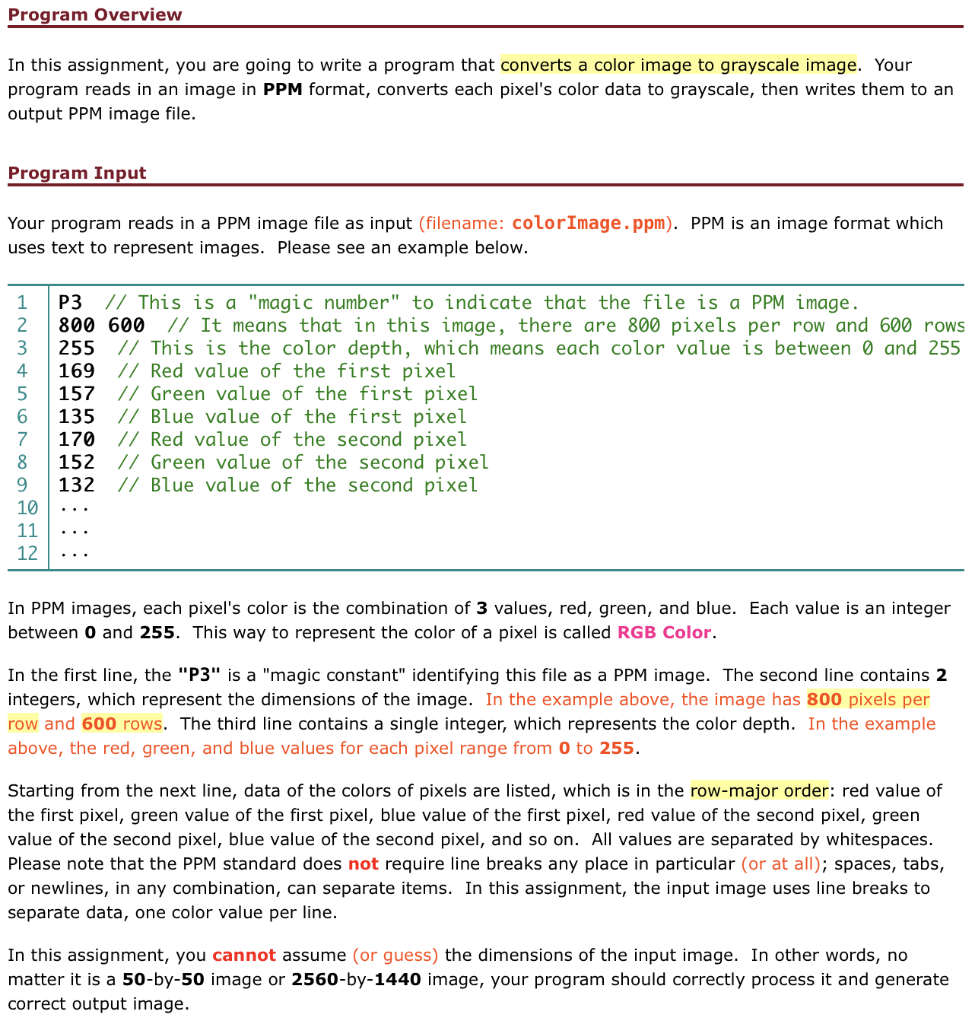
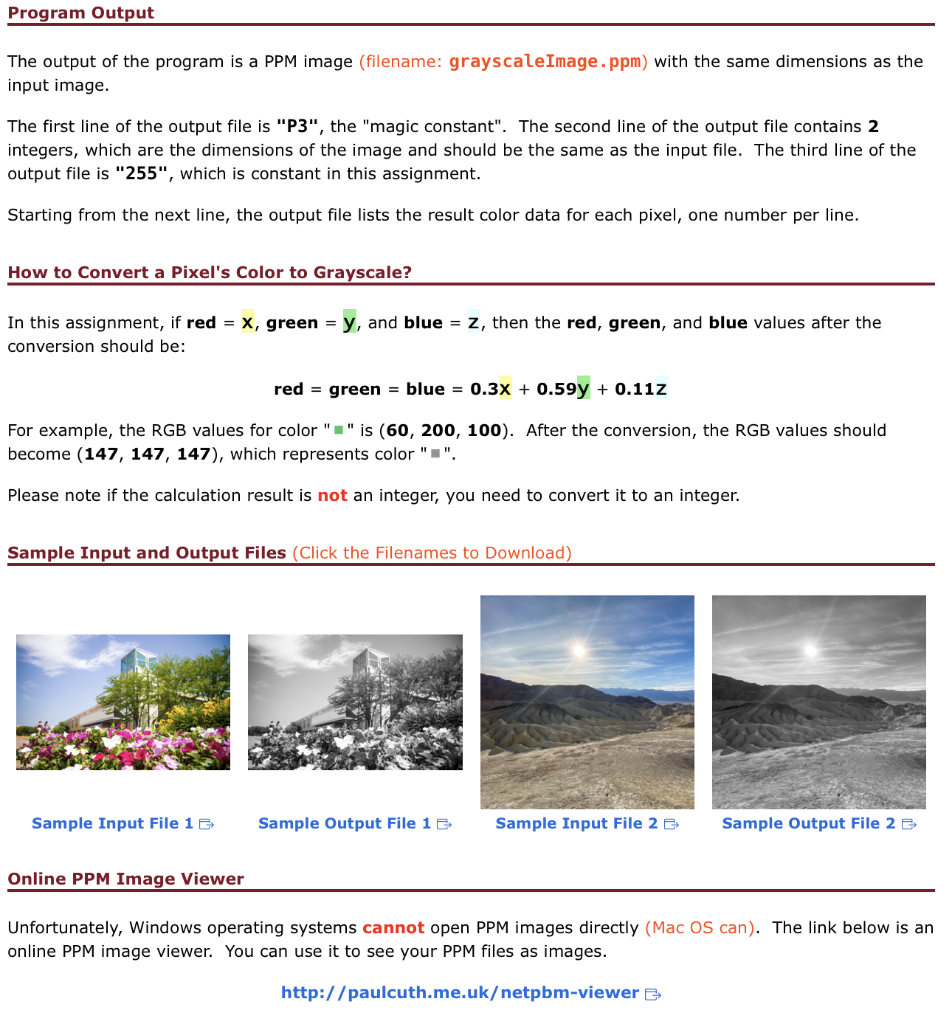
The output of the program is a PPM image (filename: grayscaleImage.ppm) with the same dimensions as the input image. The first line of the output file is "P3", the "magic constant". The second line of the output file contains 2 integers, which are the dimensions of the image and should be the same as the input file. The third line of the output file is "255", which is constant in this assignment. Starting from the next line, the output file lists the result color data for each pixel, one number per line. How to Convert a Pixel's Color to Grayscale? In this assignment, if red =x, green =y, and blue=z, then the red, green, and blue values after the conversion should be: red=green=blue=0.3x+0.59y+0.11z For example, the RGB values for color " =" is (60,200,100). After the conversion, the RGB values should become (147,147,147), which represents color " =". Please note if the calculation result is not an integer, you need to convert it to an integer. Sample Input and Output Files (Click the Filenames to Download) Sample Input File 1 Sample Output File 1 Sample Input File 2 Sample Output File 2 Online PPM Image Viewer Unfortunately, Windows operating systems cannot open PPM images directly (Mac OS can). The link below is an online PPM image viewer. You can use it to see your PPM files as images. In this assignment, you are going to write a program that converts a color image to grayscale image. Your program reads in an image in PPM format, converts each pixel's color data to grayscale, then writes them to an output PPM image file. Program Input Your program reads in a PPM image file as input (filename: colorImage. ppm). PPM is an image format which uses text to represent images. Please see an example below. In PPM images, each pixel's color is the combination of 3 values, red, green, and blue. Each value is an integer between 0 and 255. This way to represent the color of a pixel is called RGB Color. In the first line, the "P3" is a "magic constant" identifying this file as a PPM image. The second line contains 2 integers, which represent the dimensions of the image. In the example above, the image has 800 pixels per row and 600 rows. The third line contains a single integer, which represents the color depth. In the example above, the red, green, and blue values for each pixel range from 0 to 255 . Starting from the next line, data of the colors of pixels are listed, which is in the row-major order: red value of the first pixel, green value of the first pixel, blue value of the first pixel, red value of the second pixel, green value of the second pixel, blue value of the second pixel, and so on. All values are separated by whitespaces. Please note that the PPM standard does not require line breaks any place in particular (or at all); spaces, tabs, or newlines, in any combination, can separate items. In this assignment, the input image uses line breaks to separate data, one color value per line. In this assignment, you cannot assume (or guess) the dimensions of the input image. In other words, no matter it is a 50-by-50 image or 2560-by-1440 image, your program should correctly process it and generate correct output image
Step by Step Solution
There are 3 Steps involved in it

Get step-by-step solutions from verified subject matter experts
 Study Help