







Question: Hello Everyone, I need help with my Linux Project. I only need commands for each step. I would be happy if someone could help me
Hello Everyone,
I need help with my Linux Project. I only need commands for each step. I would be happy if someone could help me with this. Thanks in advance.
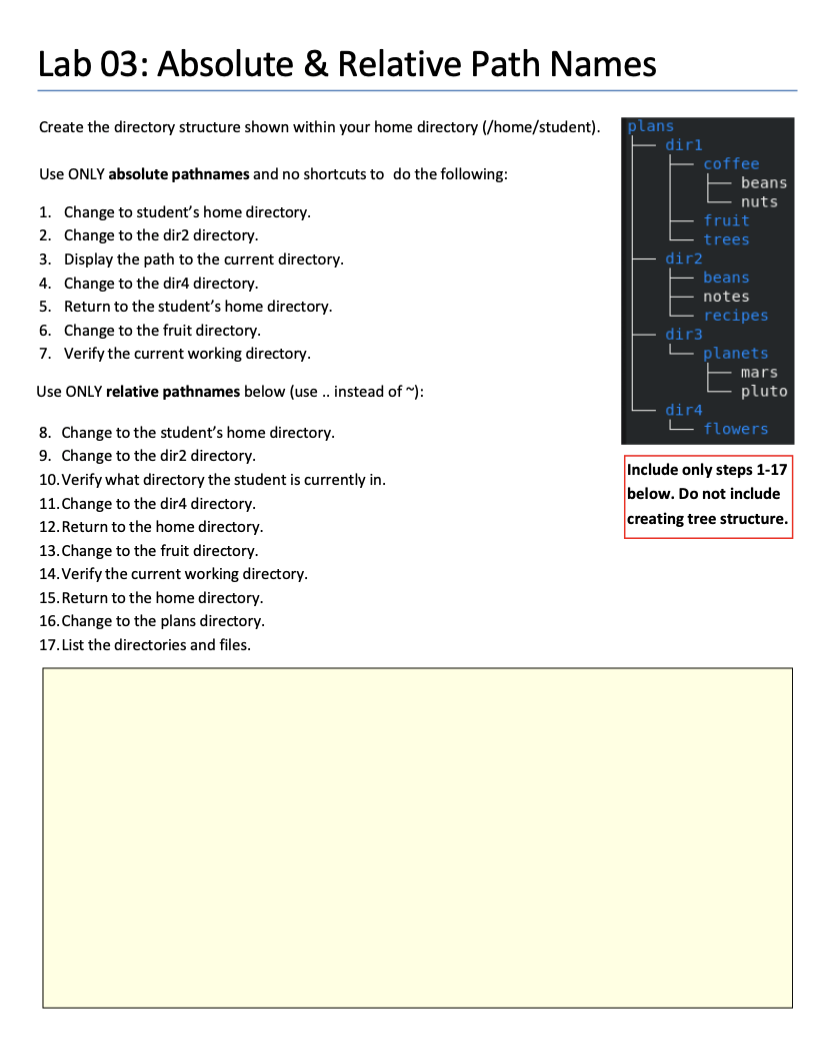
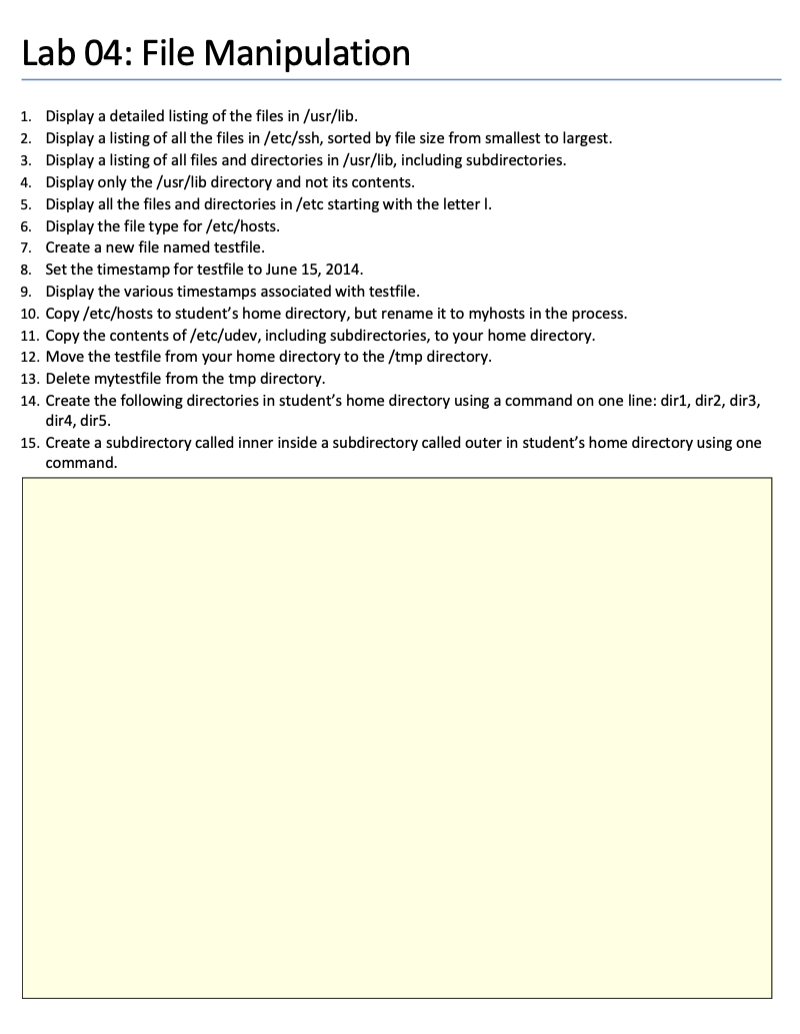
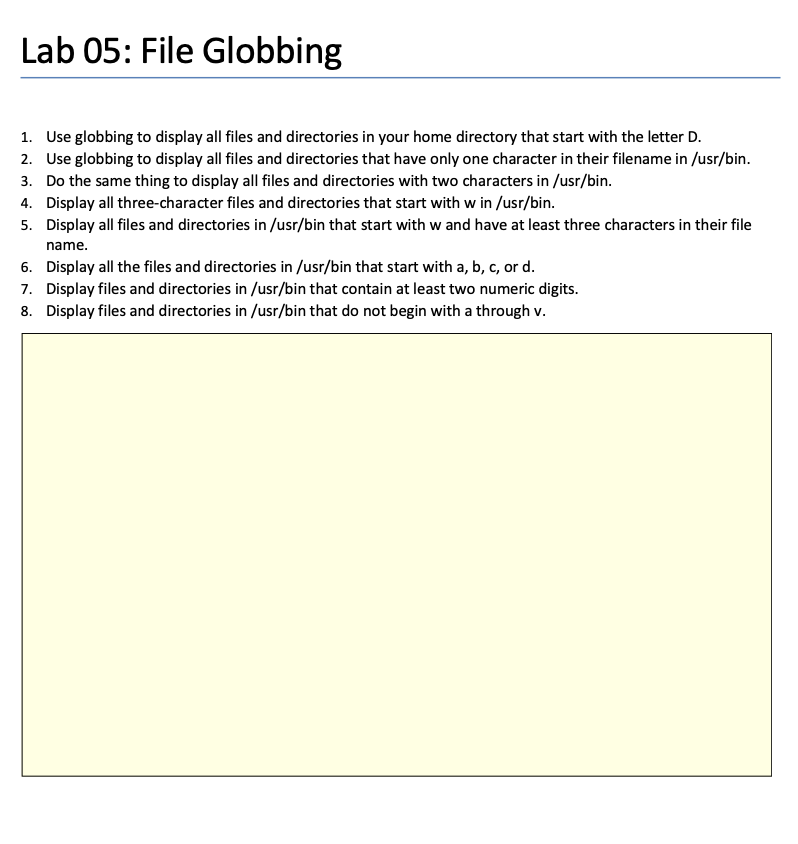
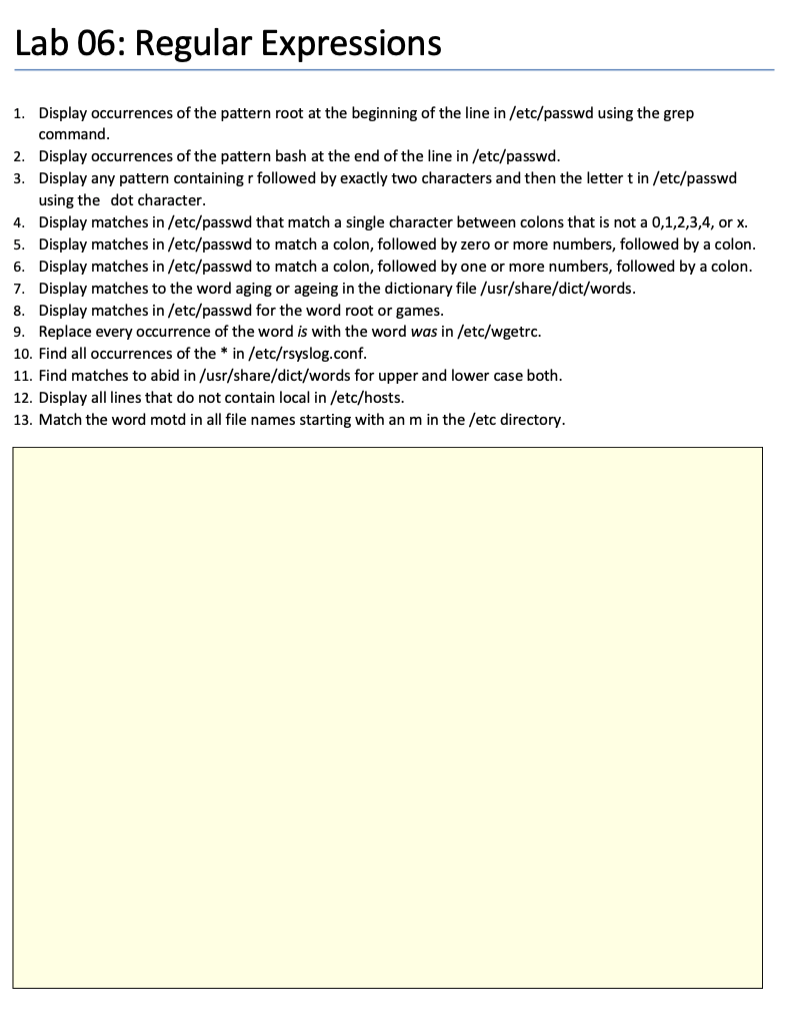
Create the directory structure shown within your home directory (/home/s Use ONLY absolute pathnames and no shortcuts to do the following: 1. Change to student's home directory. 2. Change to the dir2 directory. 3. Display the path to the current directory. 4. Change to the dir4 directory. 5. Return to the student's home directory. 6. Change to the fruit directory. 7. Verify the current working directory. Use ONLY relative pathnames below (use .. instead of ): 8. Change to the student's home directory. 9. Change to the dir2 directory. 10. Verify what directory the student is currently in. 11. Change to the dir4 directory. 12. Return to the home directory. 13. Change to the fruit directory. 14. Verify the current working directory. 15. Return to the home directory. 16. Change to the plans directory. 17. List the directories and files. 1. Display a detailed listing of the files in /usr/lib. 2. Display a listing of all the files in /etc/ssh, sorted by file size from smallest to largest. 3. Display a listing of all files and directories in /usr/lib, including subdirectories. 4. Display only the /usr/lib directory and not its contents. 5. Display all the files and directories in /etc starting with the letter I. 6. Display the file type for /etc/hosts. 7. Create a new file named testfile. 8. Set the timestamp for testfile to June 15,2014. 9. Display the various timestamps associated with testfile. 10. Copy /etc/hosts to student's home directory, but rename it to myhosts in the process. 11. Copy the contents of /etc/udev, including subdirectories, to your home directory. 12. Move the testfile from your home directory to the /tmp directory. 13. Delete mytestfile from the tmp directory. 14. Create the following directories in student's home directory using a command on one line: dir1, dir2, dir3, dir4, dir5. 15. Create a subdirectory called inner inside a subdirectory called outer in student's home directory using one command. 1. Use globbing to display all files and directories in your home directory that start with the letter D. 2. Use globbing to display all files and directories that have only one character in their filename in /usr/bin. 3. Do the same thing to display all files and directories with two characters in /usr/bin. 4. Display all three-character files and directories that start with w in /usr/bin. 5. Display all files and directories in /usr/bin that start with w and have at least three characters in their file name. 6. Display all the files and directories in /usr/bin that start with a, b, c, or d. 7. Display files and directories in /usr/bin that contain at least two numeric digits. 8. Display files and directories in /usr/bin that do not begin with a through v. 1. Display occurrences of the pattern root at the beginning of the line in /etc/passwd using the grep command. 2. Display occurrences of the pattern bash at the end of the line in /etc/passwd. 3. Display any pattern containing r followed by exactly two characters and then the letter t in /etc/passwd using the dot character. 4. Display matches in /etc/passwd that match a single character between colons that is not a 0,1,2,3,4, or x. 5. Display matches in /etc/passwd to match a colon, followed by zero or more numbers, followed by a colon. 6. Display matches in /etc/passwd to match a colon, followed by one or more numbers, followed by a colon. 7. Display matches to the word aging or ageing in the dictionary file /usr/share/dict/words. 8. Display matches in /etc/passwd for the word root or games. 9. Replace every occurrence of the word is with the word was in /etc/wgetrc. 10. Find all occurrences of the in /etc/rsyslog.conf. 11. Find matches to abid in /usr/share/dict/words for upper and lower case both. 12. Display all lines that do not contain local in /etc/hosts. 13. Match the word motd in all file names starting with an m in the /etc directory
Step by Step Solution
There are 3 Steps involved in it

Get step-by-step solutions from verified subject matter experts
 Study Help