





Question: hello hope somebody can help, I do have the correct answers listed on right side, but i do need the formulas/ steps to achieve the
hello hope somebody can help, I do have the correct answers listed on right side, but i do need the formulas/ steps to achieve the colored spaces, thank you for helping
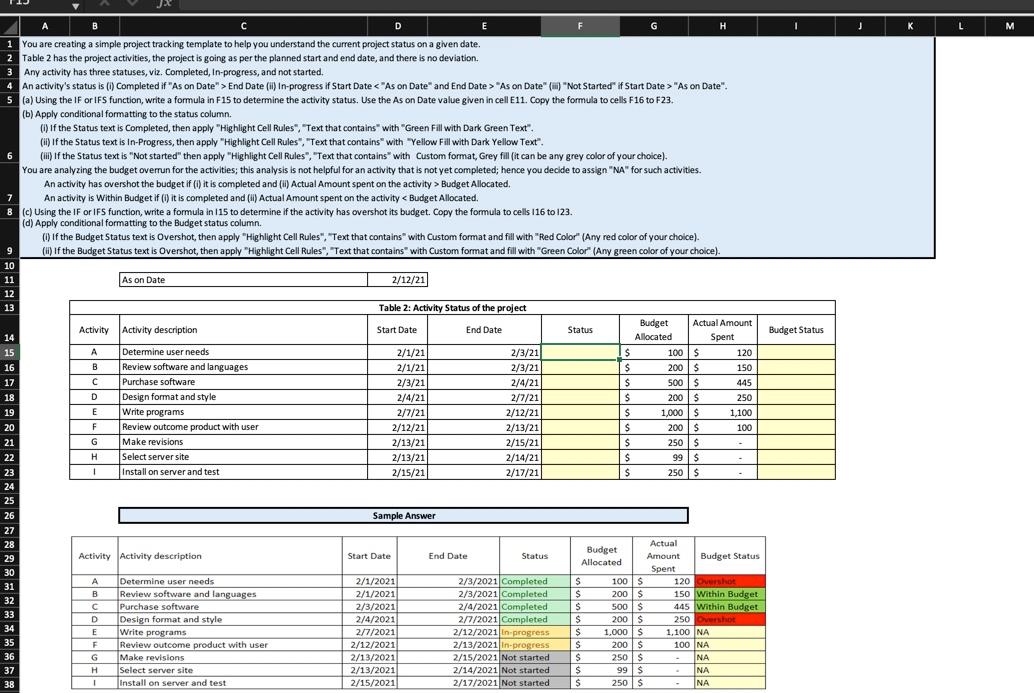
I K L M Budget Status A B B D E G H 1 You are creating a simple project tracking template to help you understand the current project status on a given date. Table 2 has the project activities, the project is going as per the planned start and end date, and there is no deviation Any activity has three statuses, viz. Completed, In-progress, and not started. 4 An activity's status is (1) Completed if "As on Date" > End Date (ii) In-progress if Start Date "As on Date" ("Not Started if Start Date > "As on Date". 5 (a) Using the If or IFS function, write a formula in F15 to determine the activity status. Use the As on Date value given in cell E11. Copy the formula to cells F16 to F23. (b) Apply conditional formatting to the status column. if the Status text is completed, then apply"Highlight Cell Rules", Text that contains with "Green Fill with Dark Green Text". (it) If the Status text is In-Progress, then apply "Highlight Cell Rules", "Text that contains with "Yellow Fill with Dark Yellow Text". 6 (iii) If the Status text is "Not started" then apply"Highlight Cell Rules", "Text that contains with Custom format, Grey fill (it can be any grey color of your choice). You are analyzing the budget overrun for the activities; this analysis is not helpful for an activity that is not yet completed; hence you decide to assign "NA" for such activities. An activity has overshot the budget if (1) it is completed and (6) Actual Amount spent on the activity > Budget Allocated. 7 An activity is within Budget if() it is completed and (ii) Actual Amount spent on the activity

